Computer Networks Interview Questions
• Images marked with ★ are AI-generated.
How are different types of networks categorized?
Network types are classified based on the geographical area they cover or the extent of their distribution.
PAN (Personal Area Network):
LAN (Local Area Network):
MAN (Metropolitan Area Network):
WAN (Wide Area Network):
GAN (Global Area Network):
What is a Local Area Network (LAN), and how does it function?
A Local Area Network (LAN) is extensively used to connect computers, laptops, and consumer electronics to facilitate resource sharing such as printers and fax machines, as well as to exchange information.
Key Characteristics:
Two Forms of LAN:
Wireless LAN (WLAN):
Wired LAN:
Common Uses:
Can you explain what nodes and links are in a network?
Node:
Link:
Types of Links:
Wired Links:
Wireless Links:
Key Point:
What does the term network topology mean?
Network topology refers to the physical or logical arrangement of nodes and the connections (links) between them in a network.
It illustrates how various computers, devices, and cables are interconnected.
Two Types of Topology:
Physical Topology:
Logical Topology:
Why Topology Matters:
Example:
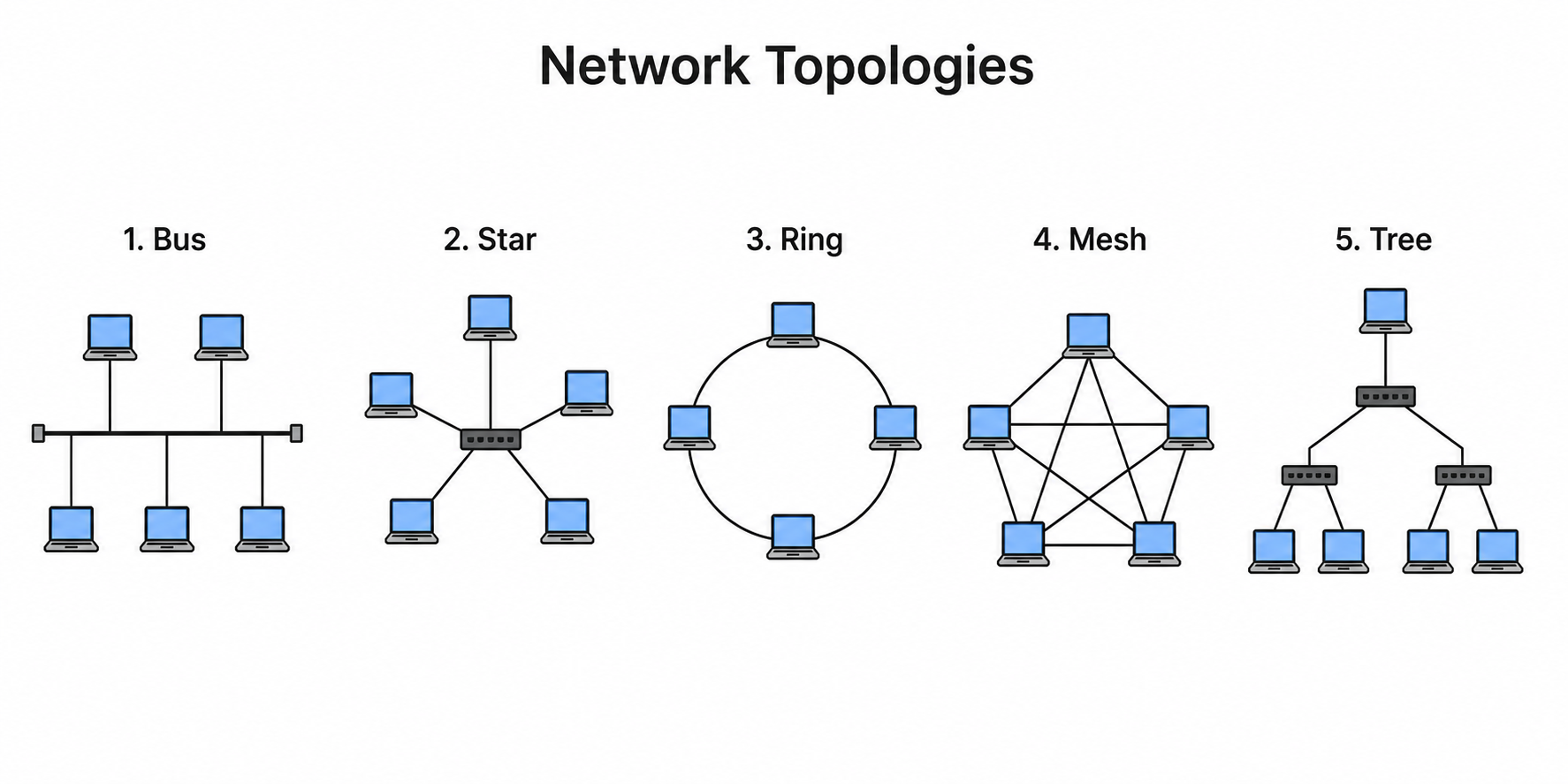
What are the various types of network topologies?
Bus Topology:
Star Topology:
Ring Topology:
Mesh Topology:
Tree Topology:
Hybrid Topology:
What defines an IPv4 address, and what are its different classes?
An IPv4 address is a 32-bit address assigned dynamically or statically to devices on a network. It is composed of four 8-bit segments called octets, with each octet ranging from 0 to 255.
IPv4 addresses are grouped into five classes based on network size and number of hosts:
Class A:
Class B:
Class C:
Class D:
Class E:
What are private IP addresses and special IP addresses?
Private IP Addresses:
Within each IP class, specific ranges are reserved for private use and cannot be routed over the public Internet. Used internally within networks:
Special IP Addresses:
Loopback Address:
Why Private IPs Matter:
What is meant by internetworking?
Internetworking refers to the process of connecting multiple distinct networks or segments together through intermediary devices such as routers or gateways.
This interconnected system functions as a single large network, allowing communication and data exchange across various public, private, commercial, industrial, or governmental networks.
Key Points:
Intermediary Devices Used:
Benefits:
Could you explain what a VPN is?
A Virtual Private Network (VPN) is a technology that establishes a secure and encrypted connection through a less secure network, commonly the Internet.
How it Works:
Key Features:
Encryption:
Tunneling:
Anonymity:
Common Use Cases:
What are the different categories of VPNs?
The different types of VPNs include:
Access VPN (Remote Access VPN):
Site-to-Site VPN:
Intranet VPN:
Extranet VPN:
Key Difference:
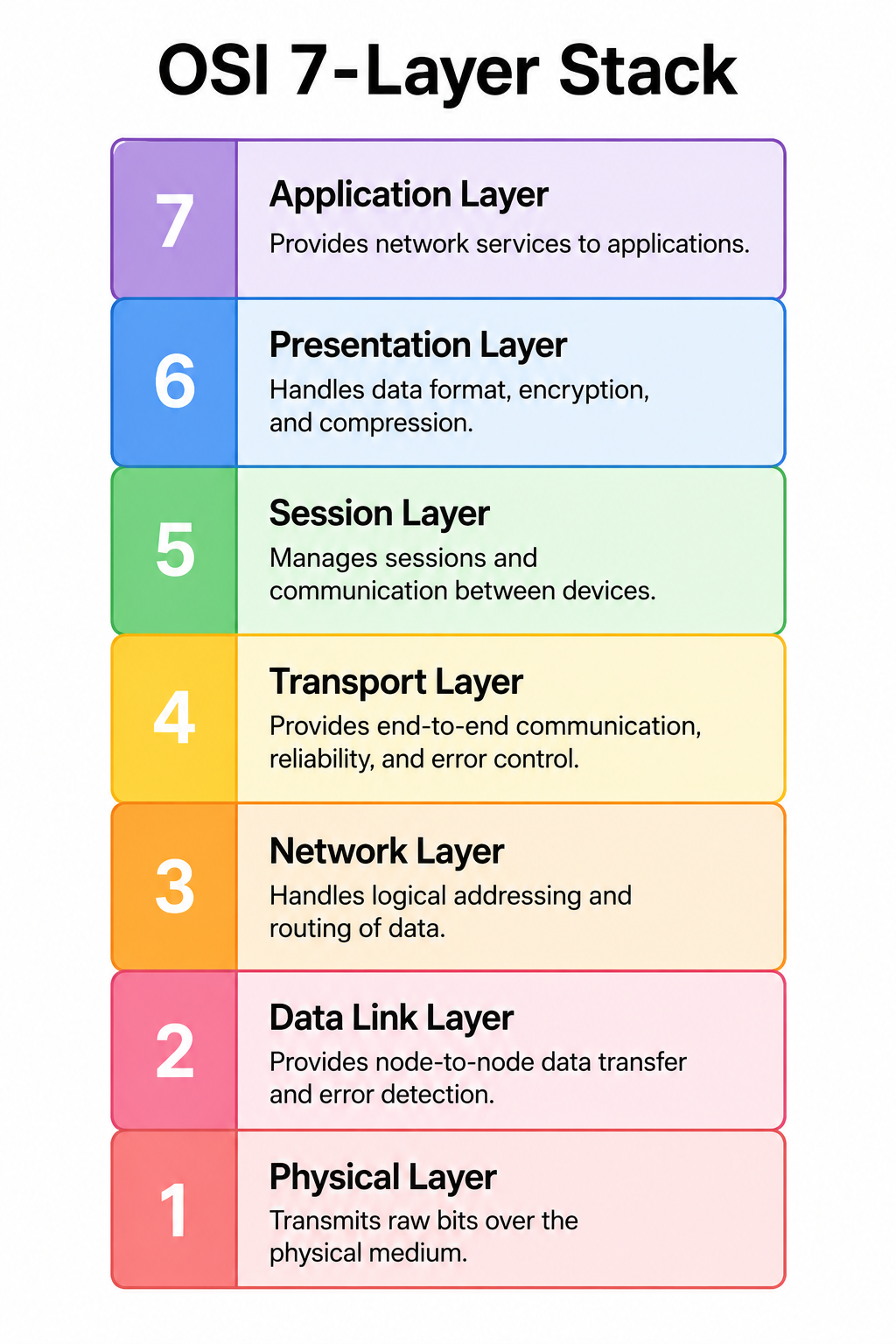
Can you describe the OSI Reference Model?
The OSI (Open Systems Interconnection) model is a conceptual framework developed by ISO to standardize communication functions of telecommunication or computing systems without regard to their underlying internal structure and technology.
Key Purpose:
The 7 Layers (top to bottom):
Benefits:
Which layers in the OSI model are considered software or user support layers?
The layers considered software or user support layers in the OSI model are the upper three layers:
Layer 7 — Application Layer:
Layer 6 — Presentation Layer:
Layer 5 — Session Layer:
Why They Are Called User Support Layers:
Which layers in the OSI model are hardware or network support layers?
The hardware or network support layers in the OSI model are the lower three layers:
Layer 3 — Network Layer:
Layer 2 — Data Link Layer:
Layer 1 — Physical Layer:
Why They Are Called Hardware/Network Support Layers:
At which OSI layer are headers and trailers added to data?
In the OSI model, headers and trailers are added at specific layers as data moves downward through the stack — a process called encapsulation.
Headers are added at:
Layer 6 — Presentation Layer:
Layer 5 — Session Layer:
Layer 4 — Transport Layer:
Layer 3 — Network Layer:
Trailer is added at:
Layer 2 — Data Link Layer:
Key Concept — Encapsulation:
What occurs in the OSI model when data moves from lower to upper layers?
As data packets move from the lower layers to the upper layers in the OSI model, the process of decapsulation occurs.
What Happens:
Layer-by-Layer Process (receiving side):
Summary: Moving upward = removing headers = decapsulation.
What happens in the OSI model as data moves from upper to lower layers?
When data packets move from the upper layers to the lower layers in the OSI model, the process of encapsulation occurs.
What Happens:
Layer-by-Layer Process (sending side):
Summary: Moving downward = adding headers = encapsulation.
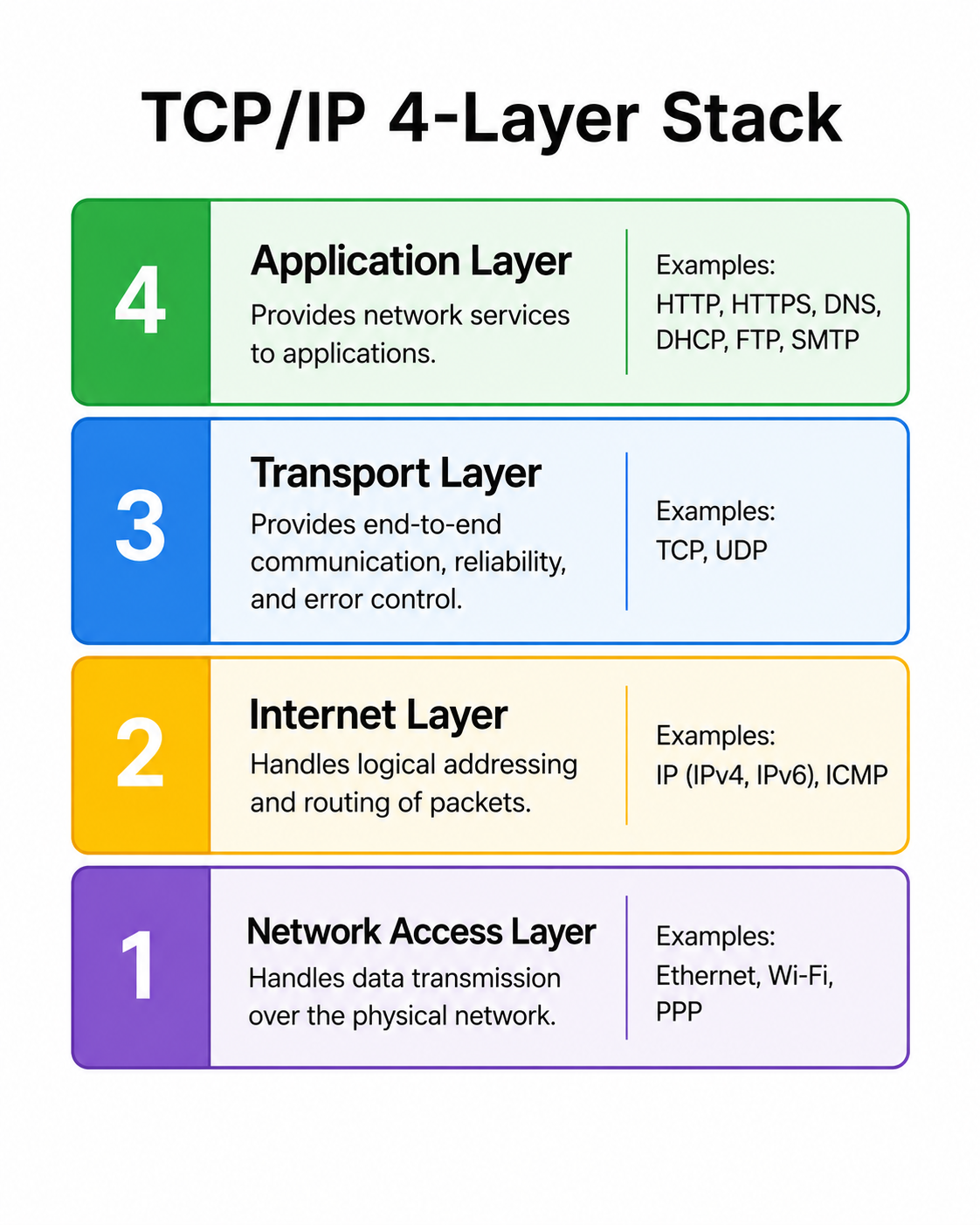
Can you explain the TCP/IP Reference Model?
The TCP/IP Reference Model is a streamlined version of the OSI model, comprising four layers. It was developed by the U.S. Department of Defense in the 1980s.
Named after its two core protocols:
Why It Was Created:
Key Characteristics:
Protocols:
Practical Significance:
What are the four layers of the TCP/IP Reference Model and their functions?
The four layers of the TCP/IP Reference Model are:
1. Link Layer (Network Access Layer):
2. Internet Layer:
3. Transport Layer:
4. Application Layer:
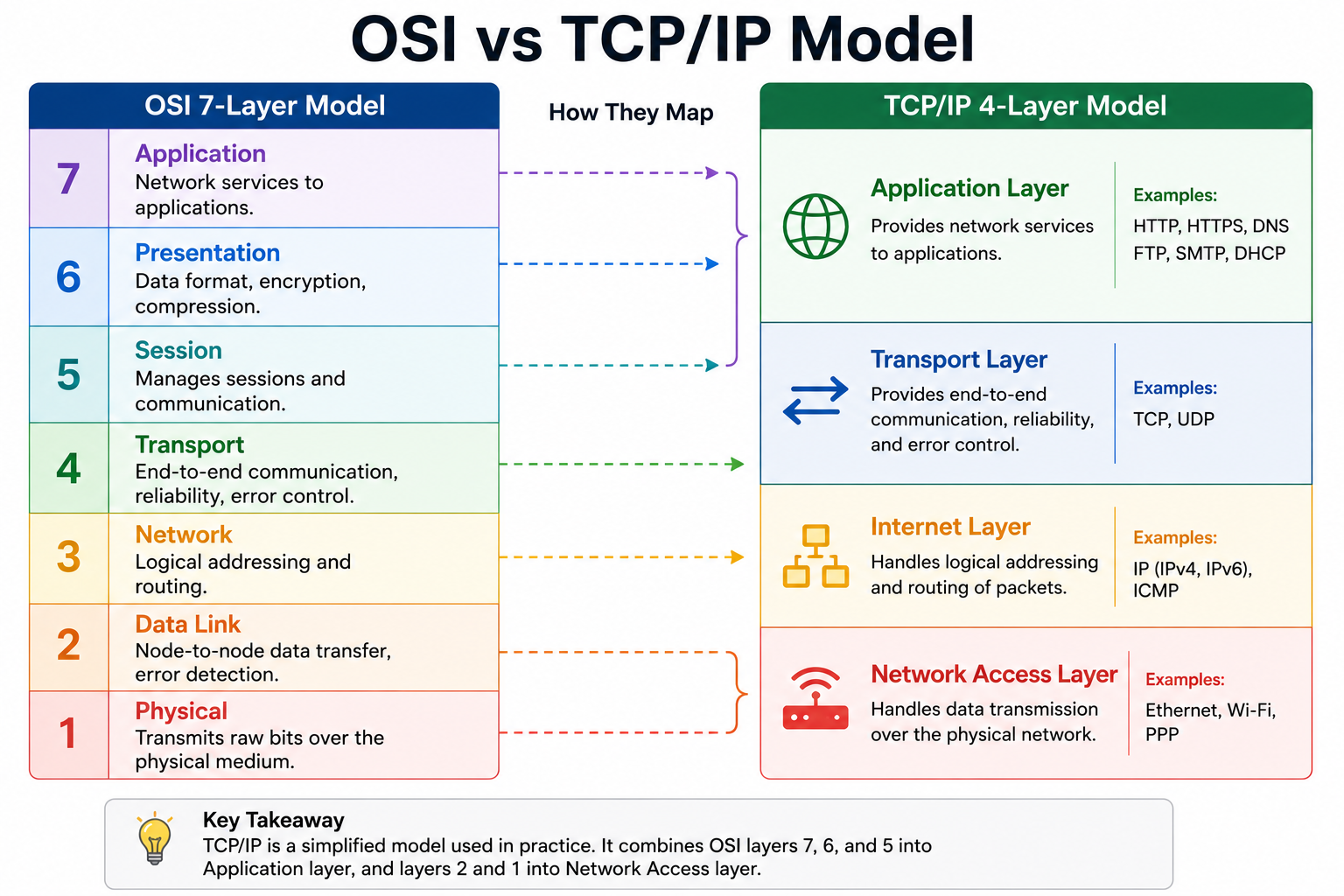
How does the OSI Reference Model differ from the TCP/IP Reference Model?
Key Differences between OSI and TCP/IP:
Number of Layers:
Layer Boundaries:
Reliability:
Approach:
Development:
Usage:
Application Layer:
Where does transmission media fit within the OSI model?
In the OSI model, physical transmission media corresponds to the Physical Layer — Layer 1.
Physical Layer Responsibilities:
Types of Transmission Media at Layer 1:
Guided (Wired) Media:
Unguided (Wireless) Media:
Key Point:
What are the HTTP and HTTPS protocols?
HTTP (HyperText Transfer Protocol):
HTTPS (HTTP Secure):
Key Difference:
How to identify: HTTPS pages show a padlock icon in the browser address bar.
How is the HTTPS protocol defined?
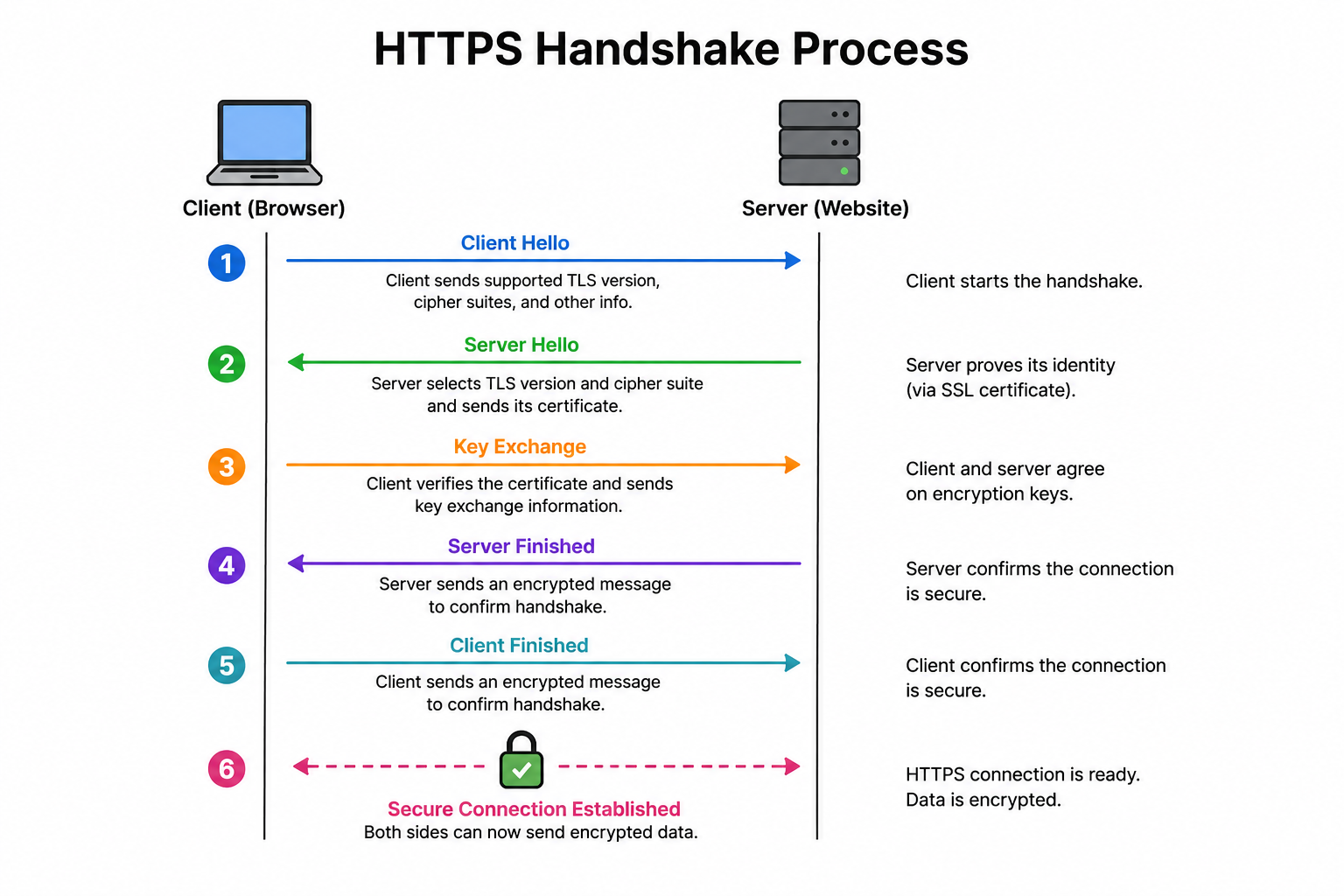
HTTPS (HyperText Transfer Protocol Secure) is an advanced and secure version of HTTP. It is the standard protocol for secure communication on the World Wide Web.
Key Characteristics:
How HTTPS Works:
1. Client requests a secure connection to the server.
2. Server sends its SSL/TLS certificate containing the public key.
3. Client verifies the certificate with a trusted Certificate Authority (CA).
4. A session key is established using asymmetric encryption.
5. All subsequent data is transmitted using symmetric encryption with the session key.
Benefits:
Modern Importance:
What is the SMTP protocol used for?
SMTP (Simple Mail Transfer Protocol) is the standard protocol for sending emails between servers.
Key Characteristics:
How SMTP Works:
1. Email client sends a message to the SMTP server.
2. SMTP server looks up the recipient's mail server using DNS (MX records).
3. The message is forwarded to the recipient's SMTP server.
4. The recipient retrieves the email using POP3 or IMAP.
SMTP vs Other Email Protocols:
Example:
What does DNS stand for, and what does it do?
DNS stands for Domain Name System.
It is a hierarchical and decentralized naming system for devices and services connected to the Internet.
Primary Function:
DNS operates by default on port 53.
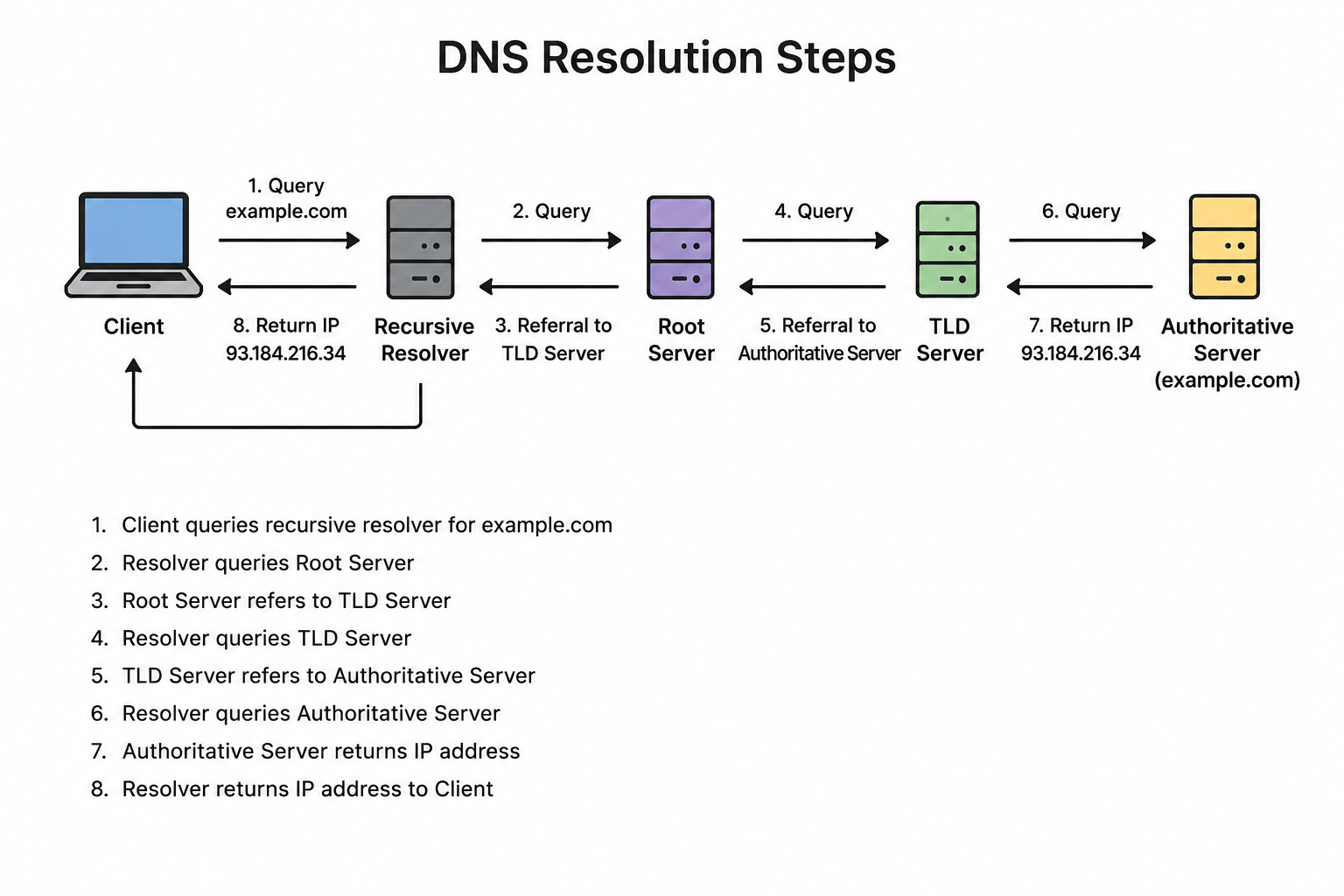
How DNS Resolution Works:
1. User types a domain name in the browser.
2. Browser checks its local cache.
3. If not found, queries the Recursive Resolver (usually ISP).
4. Resolver queries the Root Name Server.
5. Root server directs to the TLD Name Server (.com, .org, etc.).
6. TLD server directs to the Authoritative Name Server.
7. Authoritative server returns the IP address.
8. Browser connects to the server at that IP.
Analogy:
What is the primary function of a DNS server?
The Domain Name Server (DNS) translates domain names and hostnames into IP addresses and vice versa.
Primary Functions:
Name Resolution:
Reverse DNS Lookup:
Load Distribution:
Global Management:
Caching:
Example:
What protocol and port number does DNS use?
DNS uses both TCP and UDP protocols, operating on port 53.
UDP (User Datagram Protocol) — Primary:
TCP (Transmission Control Protocol) — Secondary:
- Zone transfers — when DNS servers replicate their databases.
- Large responses that exceed 512 bytes (the UDP limit for DNS).
- DNSSEC — when DNS responses include security extensions.
Key Points:
Example:
What is the TCP protocol?
TCP (Transmission Control Protocol) is a core protocol of the Internet Protocol Suite that defines how computers establish a connection and transmit data reliably over a network.
Key Characteristics:
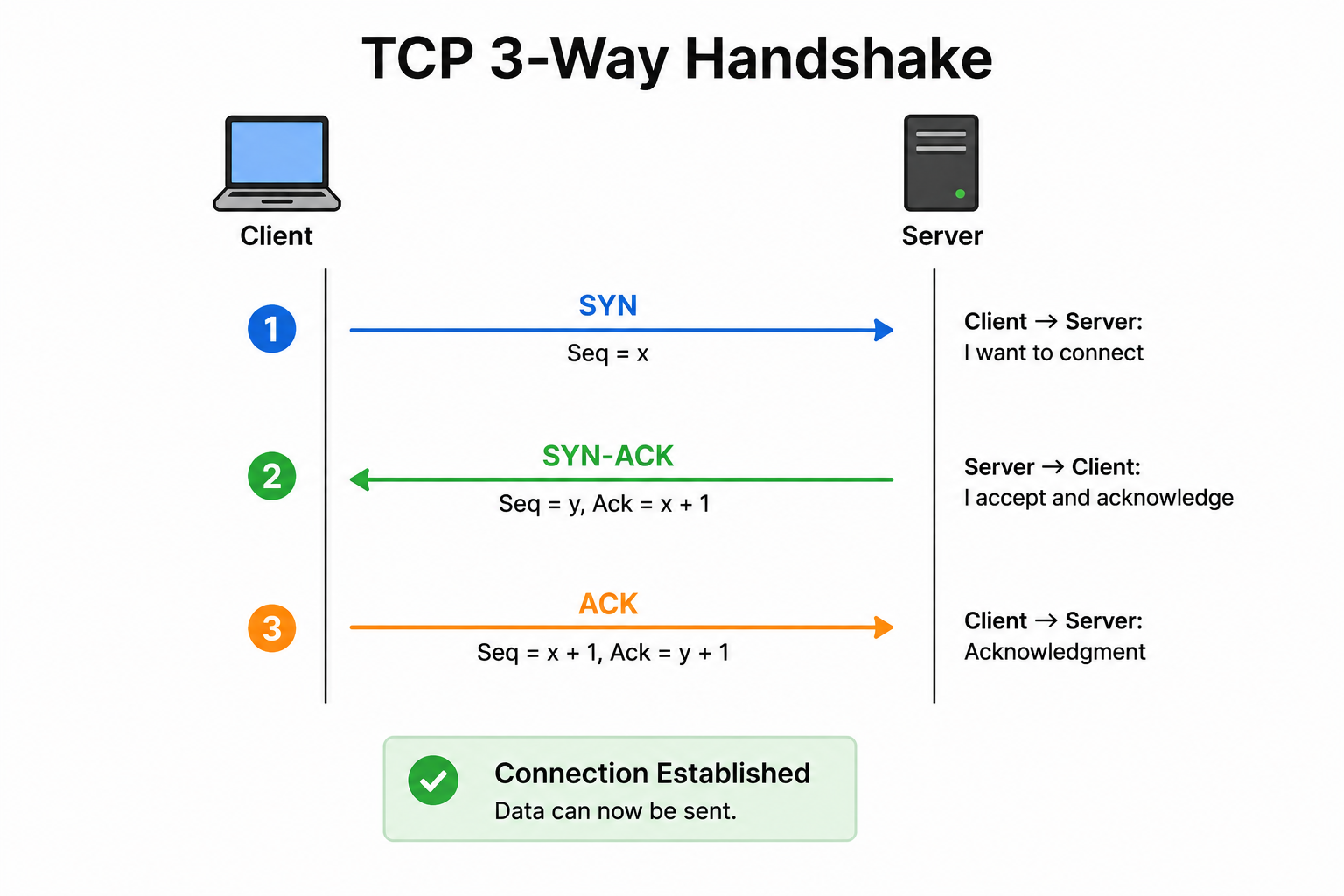
Three-Way Handshake:
TCP establishes connections using a three-way handshake:
1. SYN — Client sends a synchronization request.
2. SYN-ACK — Server acknowledges and responds.
3. ACK — Client acknowledges, connection established.
Common Use Cases:
Trade-off:
What is the UDP protocol?
UDP (User Datagram Protocol) is a connectionless transport protocol that operates using datagrams.
Key Characteristics:
How UDP Works:
Common Use Cases:
Trade-off:
How do TCP and UDP compare?
TCP vs UDP — Key Comparisons:
Connection:
Reliability:
Speed:
Packet Order:
Error Checking:
Packet Size:
Use Cases:
Summary: Use TCP when accuracy matters; use UDP when speed matters.
What is the function of the ICMP protocol?
ICMP (Internet Control Message Protocol) operates at the Network Layer and is used primarily for error reporting and network diagnostics.
Primary Functions:
Error Reporting:
Network Diagnostics:
Key Tools Using ICMP:
Ping:
Traceroute:
Key Characteristics:
Security Note:
What does the DHCP protocol do?
DHCP (Dynamic Host Configuration Protocol) is an Application Layer protocol that automatically assigns IP addresses and other network settings to devices on an IP network.
Primary Function:
- IP Address
- Subnet Mask
- Default Gateway
- DNS Server addresses
DHCP servers usually operate on port 67 (server) and port 68 (client).
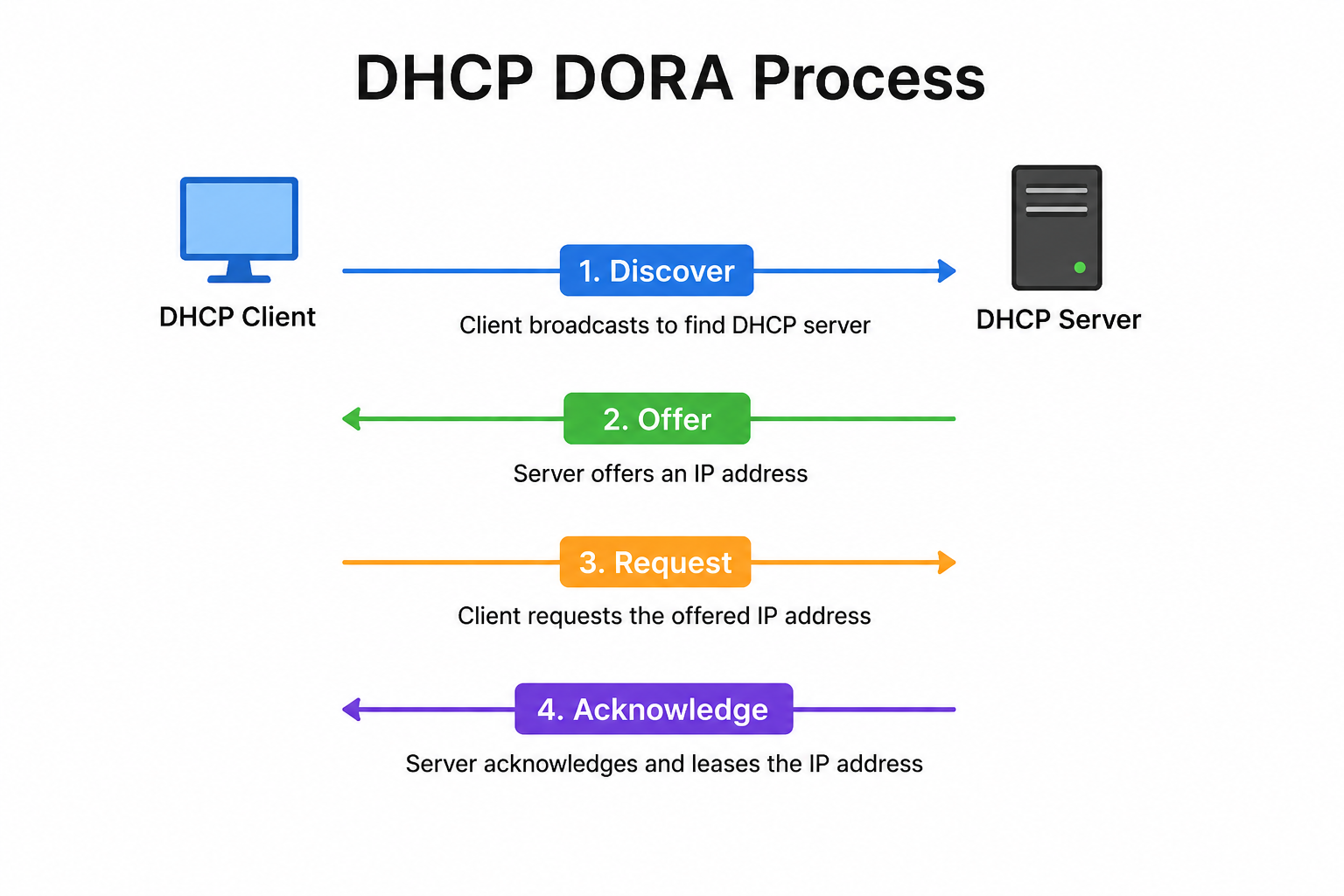
How DHCP Works (DORA Process):
1. Discover — Client broadcasts a request for an IP address.
2. Offer — DHCP server offers an available IP address.
3. Request — Client requests the offered IP address.
4. Acknowledge — Server confirms the assignment.
Key Benefits:
IP Lease:
What is the role of the ARP protocol?
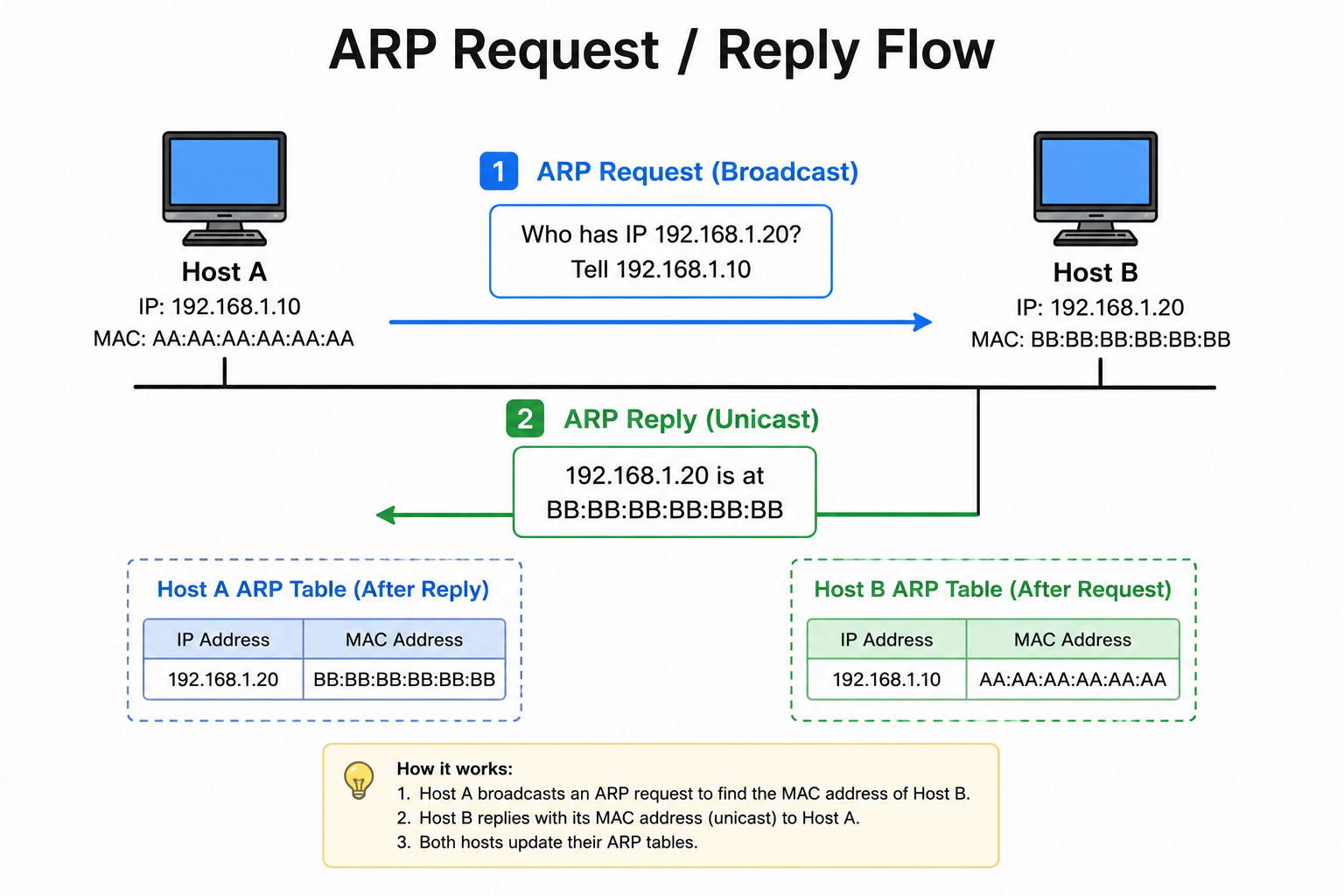
ARP (Address Resolution Protocol) is a network protocol that maps a device's logical IP address to its physical MAC address.
Primary Role:
How ARP Works:
1. Device A wants to communicate with Device B on the same network.
2. Device A knows Device B's IP address but not its MAC address.
3. Device A broadcasts an ARP Request: "Who has IP 192.168.1.5?"
4. Device B responds with an ARP Reply: "I have that IP, my MAC is XX:XX:XX:XX:XX:XX."
5. Device A stores the mapping in its ARP cache for future use.
ARP Cache:
Security Concern:
What is the FTP protocol used for?
FTP (File Transfer Protocol) is an Application Layer protocol enabling reliable and efficient file transfers between hosts over a TCP/IP network.
Primary Use:
Note: The answer document mentions port 27, but the standard FTP control port is port 21.
How FTP Works:
- Control Connection (Port 21): Sends commands and receives responses.
- Data Connection (Port 20): Transfers the actual file data.
Two Modes:
Security:
Common Use Cases:
What services does the Application Layer provide in the Internet model?
The Application Layer in the Internet (TCP/IP) model is the topmost layer that directly interacts with end-user applications and provides a wide range of network services.
Services Provided:
Mail Services:
Directory Services:
File Transfer:
Access Management:
Network Virtual Terminal:
Additional Services:
Why is the POP3 protocol necessary for email?
POP3 (Post Office Protocol version 3) is widely adopted by email clients as a standard method to access mailboxes and download messages.
Primary Necessity:
How POP3 Works:
1. Email client connects to the POP3 server on port 110 (or port 995 for POP3S).
2. User authenticates with username and password.
3. Client downloads all new emails from the server to the local device.
4. By default, emails are deleted from the server after download.
Why POP3 is Necessary:
Offline Access:
Storage Management:
Simplicity:
POP3 vs IMAP:
Modern Usage:
What is a MAC address, and how is it connected to the Network Interface Card (NIC)?
A MAC (Media Access Control) address is a unique 48-bit or 64-bit identifier assigned to devices on a network.
Key Characteristics:
Connection to NIC:
Structure of MAC Address:
Usage:
How does a MAC address differ from an IP address?
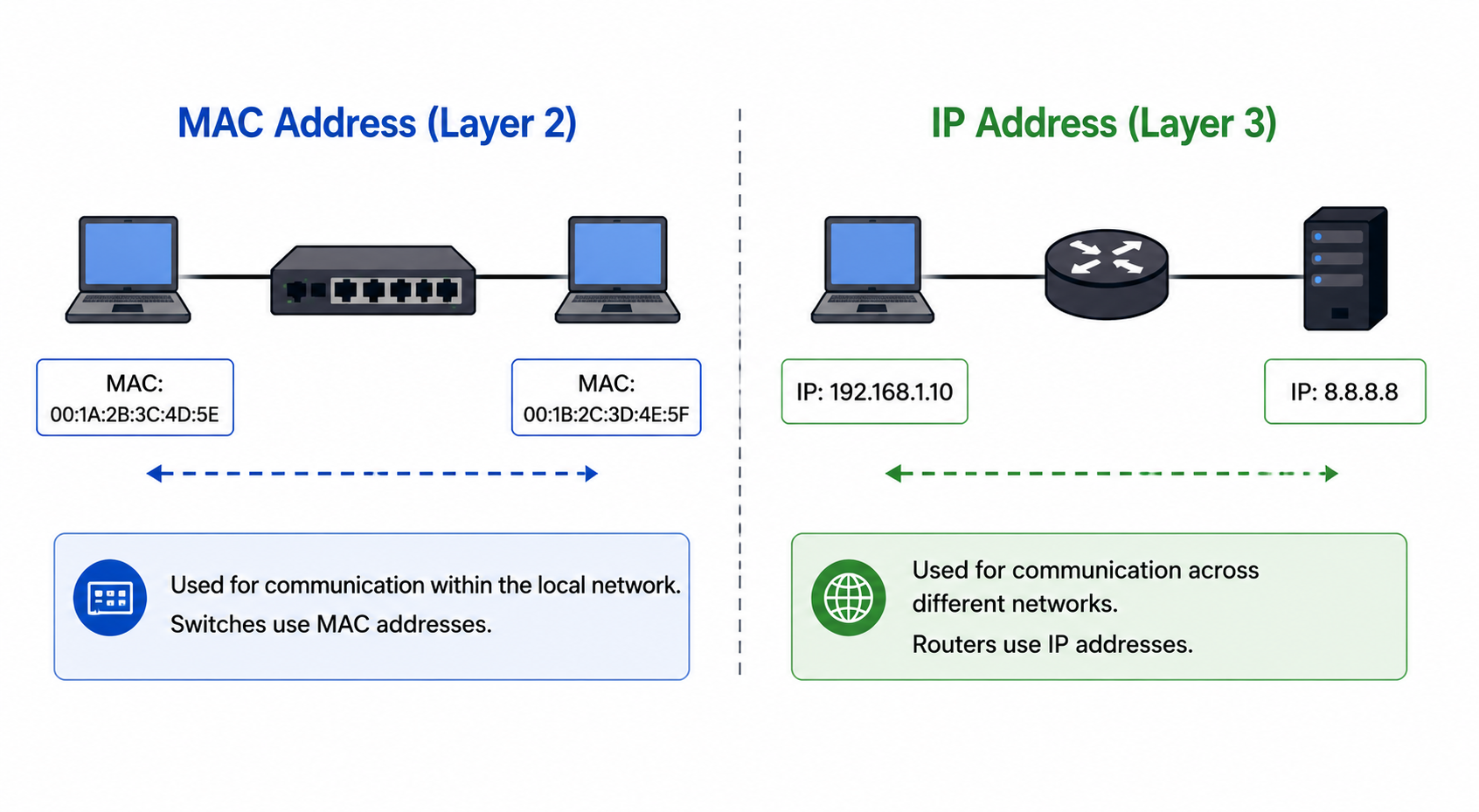
MAC Address vs IP Address — Key Differences:
Full Form:
Size:
Assignment:
Type:
OSI Layer:
Scope:
Changeability:
Format:
What is a subnet?
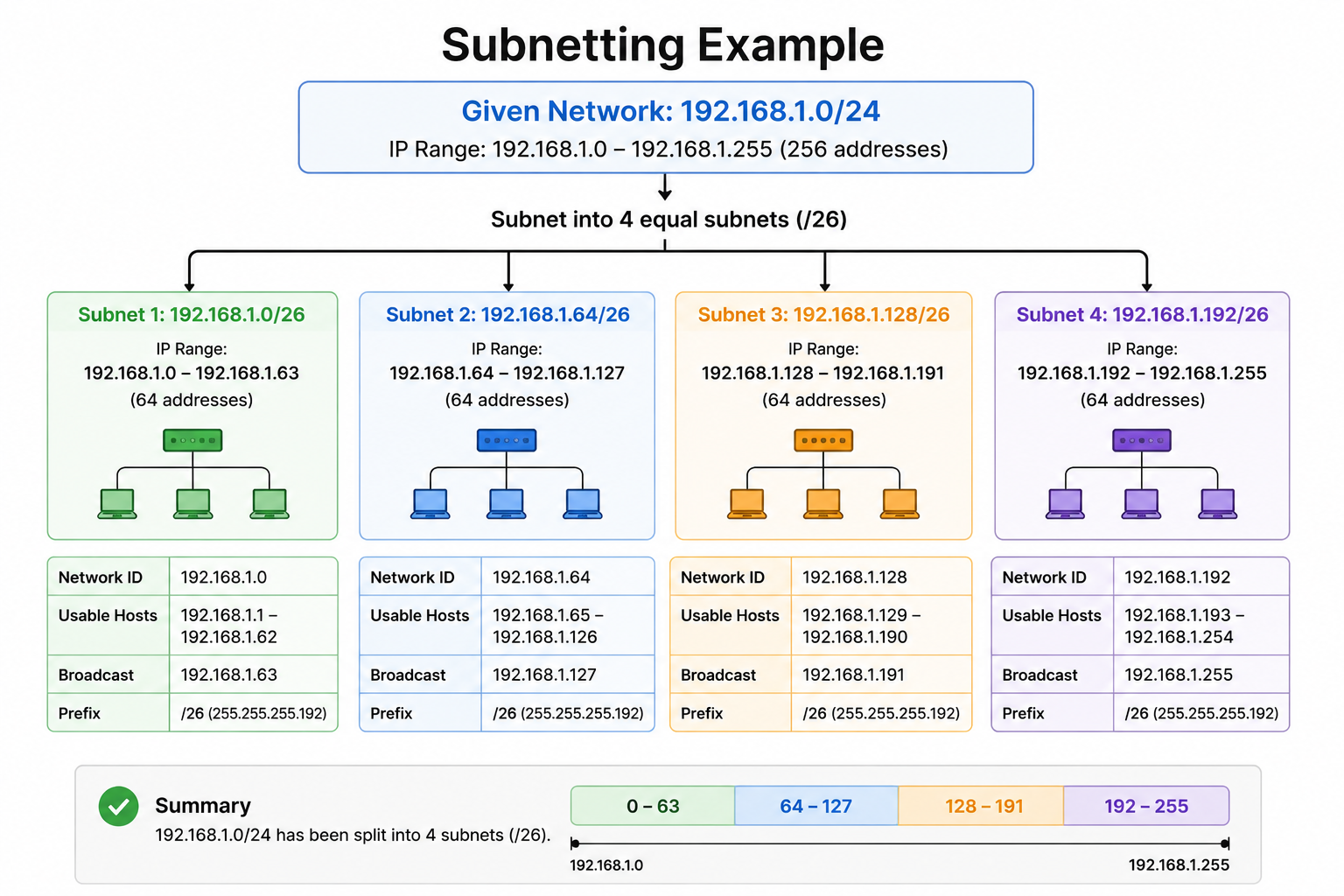
A subnet is a segmented portion of a larger network created through subnetting — the process of dividing a network into smaller sub-networks.
Primary Purpose:
How Subnetting Works:
Example:
- Subnet 1: `192.168.1.0/25` (hosts: .1 to .126)
- Subnet 2: `192.168.1.128/25` (hosts: .129 to .254)
Benefits:
What are the differences between a hub and a switch?
Hub vs Switch — Key Differences:
OSI Layer:
Transmission Mode:
Connectivity:
Intelligence:
Administration:
Speed:
Collision Handling:
Cost:
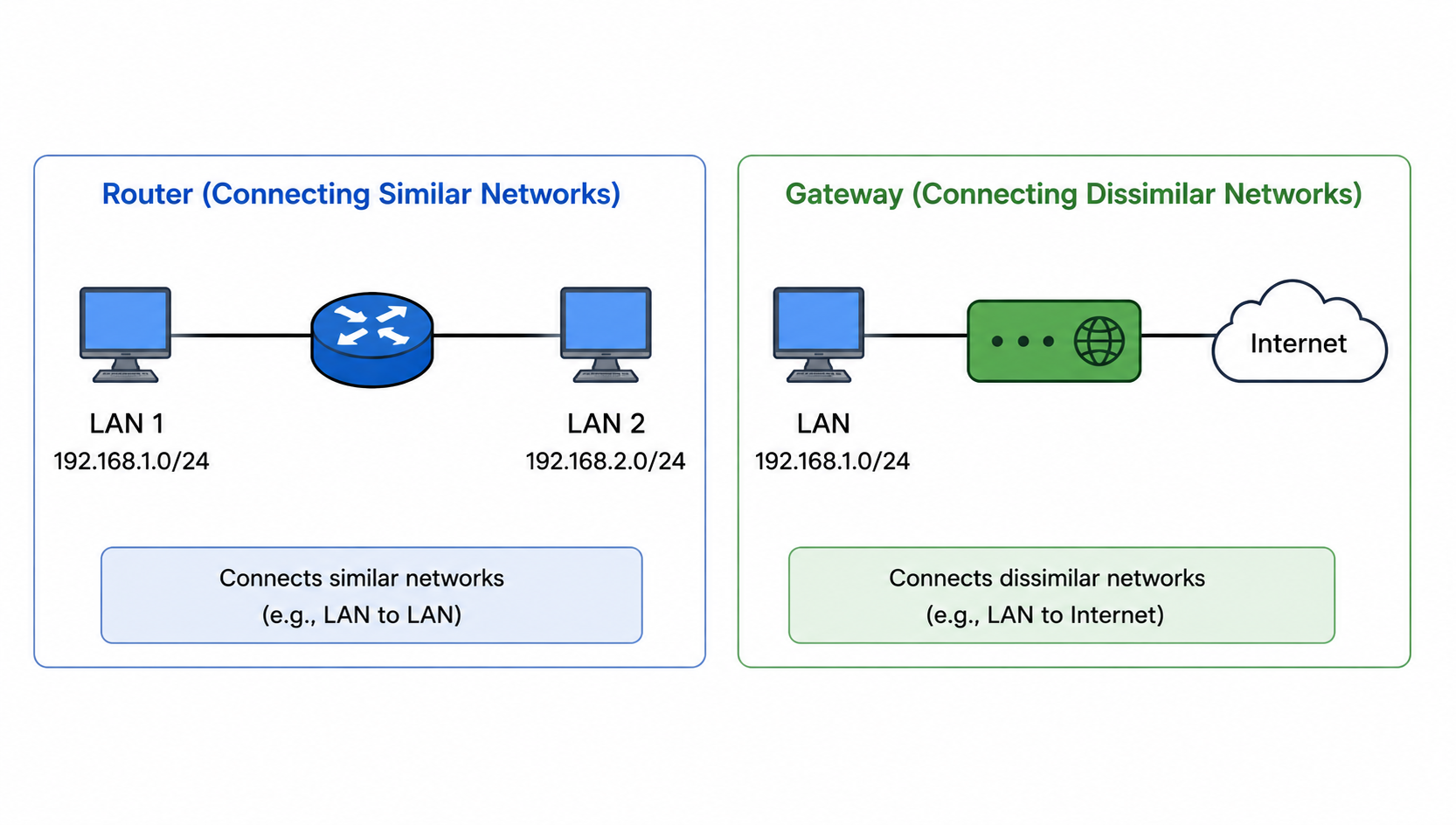
What is the purpose of a router, and how does it differ from a gateway?
Router:
Gateway:
Key Differences:
| Feature | Router | Gateway |
|---|---|---|
| Protocol | Same protocol | Different protocols |
| OSI Layer | Layer 3 | Multiple layers |
| Function | Routes packets | Translates protocols |
| Complexity | Simpler | More complex |
Example:
How do the commands ipconfig and ifconfig differ?
ipconfig vs ifconfig — Key Differences:
ipconfig (Internet Protocol Configuration):
- `ipconfig` — displays basic IP configuration.
- `ipconfig /all` — shows detailed network info including MAC address.
- `ipconfig /release` — releases current DHCP IP address.
- `ipconfig /renew` — renews DHCP IP address.
- `ipconfig /flushdns` — clears DNS cache.
ifconfig (Interface Configuration):
- `ifconfig` — displays all active network interfaces.
- `ifconfig eth0` — shows configuration for a specific interface.
- `ifconfig eth0 up/down` — enables or disables an interface.
Common Features:
Modern Note:
What is a firewall, and what does it do?
A firewall is a network security system designed to monitor and control incoming and outgoing network traffic based on predefined security rules.
Primary Function:
How a Firewall Works:
- Source/Destination IP address
- Port numbers
- Protocols (TCP, UDP)
- Application type (NGFW)
Types of Firewalls:
Packet Filtering:
Stateful Inspection:
Application Layer (Proxy) Firewall:
Next-Generation Firewall (NGFW):
Benefits:
What do the terms unicasting, anycasting, multicasting, and broadcasting mean?
These terms describe different methods of transmitting data from a source to one or more destinations in a network.
Unicasting:
Anycasting:
Multicasting:
Broadcasting:
What do confidentiality, integrity, and availability (CIA) represent in security?
The CIA Triad represents the three core principles of information security.
Confidentiality:
Integrity:
Availability:
Why CIA Matters:
What is IP spoofing?
IP Spoofing is a hacking technique where attackers disguise their IP addresses to gain unauthorized access to systems or launch attacks while hiding their true identity.
How It Works:
History:
Common Uses of IP Spoofing:
DoS/DDoS Attacks:
Man-in-the-Middle Attacks:
Session Hijacking:
Prevention:
What do threat, vulnerability, and risk mean in cybersecurity?
These three terms form the foundation of cybersecurity risk assessment.
Threat:
Vulnerability:
Risk:
Relationship:
Example:
How does an Intrusion Prevention System (IPS) differ from a firewall?
Intrusion Prevention System (IPS):
Firewall:
Key Differences:
| Feature | IPS | Firewall |
|---|---|---|
| Function | Detects and prevents threats | Controls access based on rules |
| Traffic Analysis | Deep content inspection | Header-based inspection |
| Response | Active blocking | Rule-based allow/deny |
| Threat Detection | Yes | No |
| Position | Inline with traffic | Network perimeter |
Modern Note:
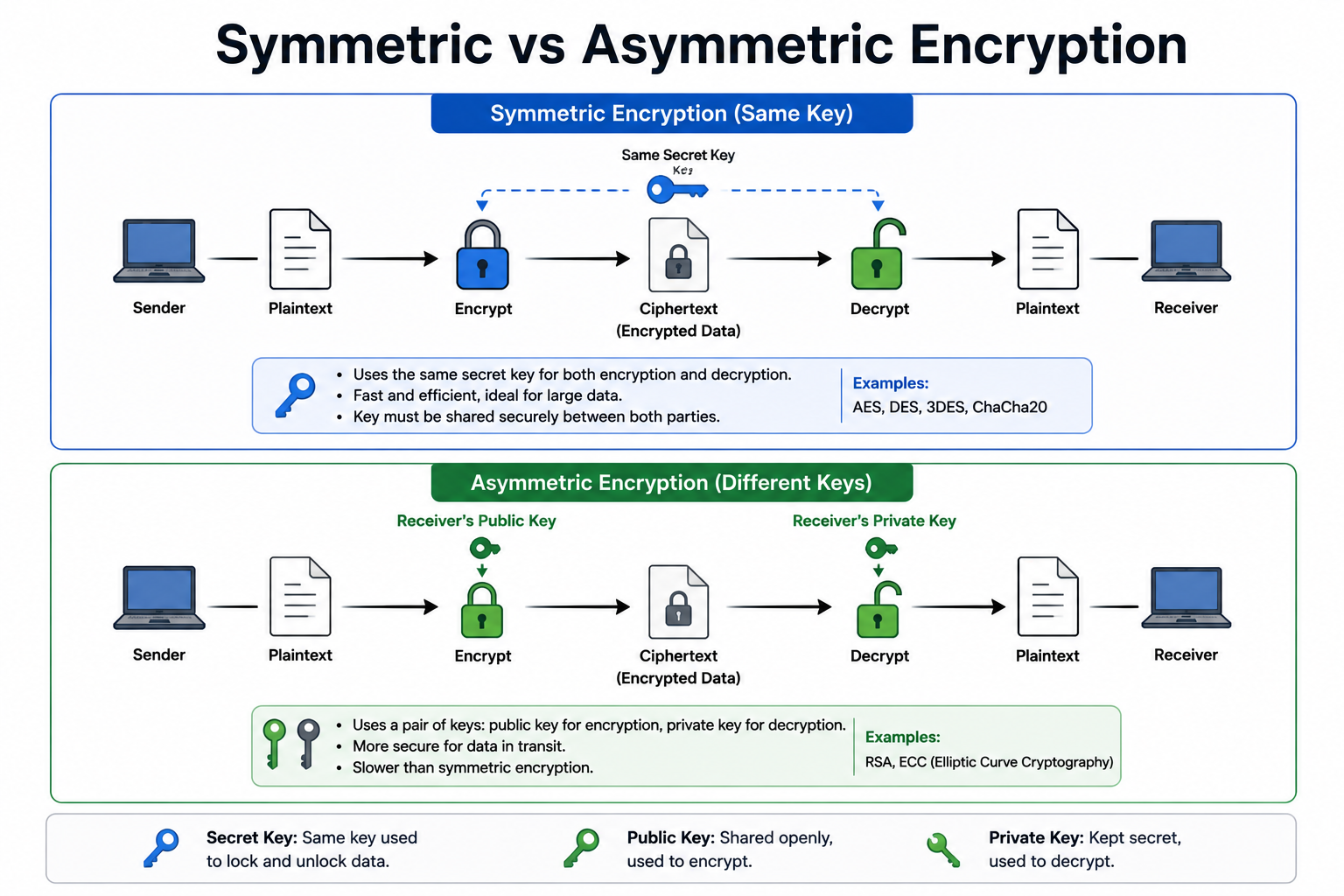
What is the difference between symmetric and asymmetric encryption?
Symmetric Encryption:
Asymmetric Encryption:
How They Work Together:
What is a zone-based firewall?
A Zone-Based Firewall is an advanced stateful firewall that organizes network interfaces into security zones and controls traffic between them based on policies.
Key Characteristics:
How it Works:
Cisco Implementation:
- CBAC (Context-Based Access Control) — older method.
- Zone-Based Firewall (ZBF) — newer, simplified approach.
Common Zones:
Advantage:
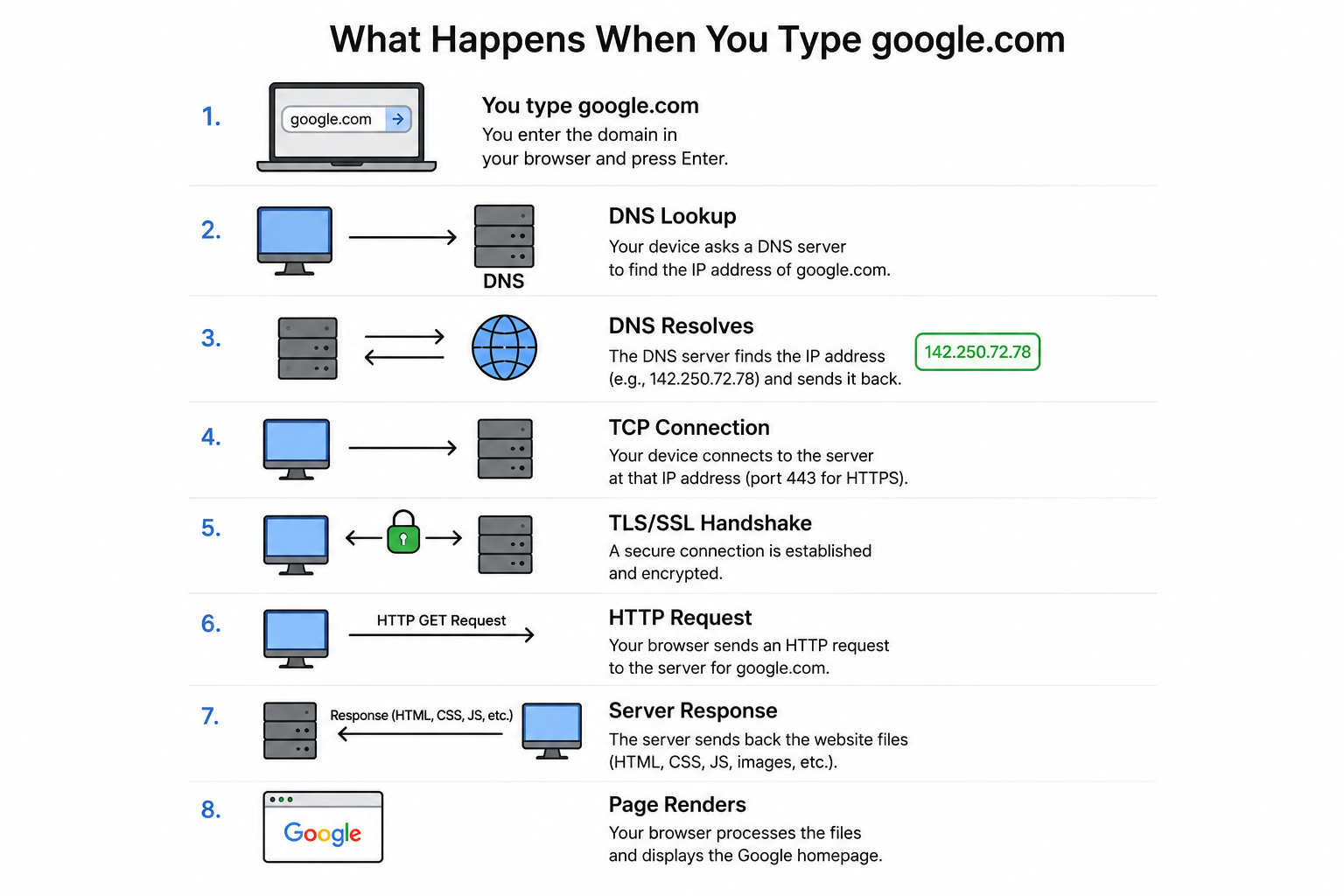
What happens technically when you type google.com into a web browser?
When you enter `google.com` in a browser, the following steps occur:
1. Cache Check:
2. DNS Resolution:
3. TCP Connection:
4. HTTP Request:
5. Server Response:
6. Connection Management:
7. Caching:
8. Rendering: