← Back to Interview Questions

Operating Systems Interview Questions

• Images marked with ★ are AI-generated.

1

Why is an operating system important?

GoogleAmazonMicrosoftTCSInfosys
Solution

The operating system is a crucial and indispensable component of a computer without which the system is practically unusable.

Key Roles:

Interface/Bridge:

Acts as a mediator facilitating interaction between the software installed on the OS and the users.
Manages communication with hardware and maintains coordination between hardware and the CPU.

Service Provider:

Offers services to users and provides a platform where programs can run effectively.
Handles all the common tasks that applications require to function properly.

Resource Manager:

Manages memory, processes, and all hardware and software components.
Ensures the computer operates correctly and prevents user programs from disrupting system functioning.

Without an OS:

Users would need to write machine-level code to interact with hardware directly.
No common platform for applications to run on.
No memory management or process scheduling.
2

What is the primary function of an operating system? What types of operating systems exist?

AmazonMicrosoftGoogleTCSWipro
Solution

Primary Function:

The fundamental objective of an operating system is to run user programs and to simplify user interaction with computers while facilitating application execution. It is specifically designed to enhance system performance by managing all computational activities, overseeing memory management, process control, and the operation of all hardware and software components.

Types of Operating Systems:

Batched OS:

Executes batches of jobs without user interaction.
Examples: Payroll Systems, Transaction Processing.

Multi-Programmed OS:

Allows multiple programs to reside in memory simultaneously.
Examples: Windows OS, UNIX OS.

Time-Sharing OS:

Allows multiple users to use the system simultaneously by sharing CPU time.
Example: Multics.

Distributed OS:

Manages a group of independent computers and makes them appear as a single system.
Example: LOCUS.

Real-Time OS (RTOS):

Processes data within strict time constraints.
Examples: PSOS, VRTX.
3

Can you explain the main role of an operating system?

GoogleAmazonMicrosoftTCSCognizant
Solution

An operating system serves as a mediator between the computer user and the hardware.

Main Roles:

User Interface:

Provides a convenient and efficient environment for users to run programs.
Offers either a GUI (Graphical User Interface) or CLI (Command Line Interface) for user interaction.

Hardware Management:

Manages all hardware components including CPU, memory, storage, and I/O devices.
Ensures the computer operates correctly.

Process Management:

Controls the execution of programs, handling creation, scheduling, and termination of processes.

Memory Management:

Allocates and deallocates memory to processes as needed.
Prevents processes from interfering with each other's memory.

Security and Protection:

Prevents user programs from disrupting the system's proper functioning.
Controls access to system resources.

File System Management:

Organizes and manages data storage on disks.
Provides a structured way to store, retrieve, and manage files.
4

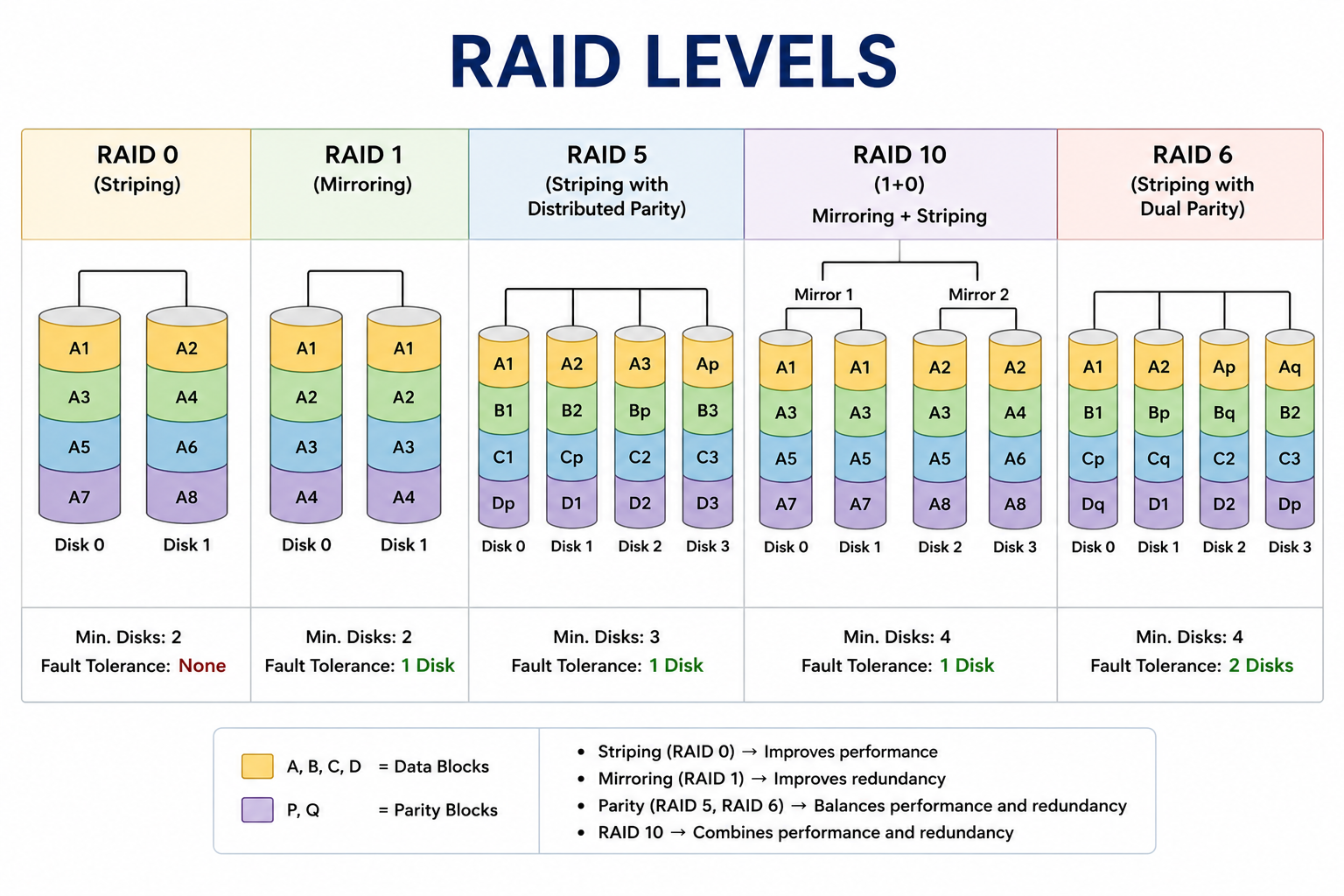
What does RAID mean in the context of operating systems? What are the different RAID levels?

AmazonGoogleMicrosoftTCSInfosys
Solution

RAID (Redundant Array of Independent Disks) is a technology that stores data across multiple hard disks, acting as a data storage virtualization method. It balances data protection, system performance, and storage capacity.

Main Aim:

Enhance overall performance and reliability of data storage.
Increase storage capacity.
Ensure data redundancy to minimize data loss.

RAID Levels:

RAID 0 — Striping:

Non-redundant striping to boost performance.
No fault tolerance — failure of one disk loses all data.

RAID 1 — Mirroring:

Mirroring and duplexing, providing fault tolerance through disk mirroring.
Data is duplicated on two disks.

RAID 2 — Error-Correcting Codes:

Uses Hamming code for fault tolerance.
Rarely used in practice.

RAID 3 — Bit-Interleaved Parity:

Uses a dedicated parity drive for error correction.

RAID 4 — Block-Interleaved Parity:

Stores parity on a single dedicated drive.

RAID 5 — Distributed Parity:

Distributed block-interleaved parity offering improved performance and fault tolerance.
Most commonly used RAID level.

RAID 6 — Double Parity:

P+Q redundancy tolerating up to two simultaneous drive failures.
What does RAID mean in the context of operating systems? What are the different RAID levels? image 1
Figure 4: ★ RAID Levels
5

What is meant by GUI?

MicrosoftGoogleAmazonTCSWipro
Solution

GUI (Graphical User Interface) is a type of interface that enables users to interact with the operating system through graphical elements such as icons, buttons, windows, and menus.

Key Characteristics:

Developed to be more user-friendly, simpler, and easier to understand compared to command-line interfaces (CLI).
Main aim is to enhance efficiency and usability.
Instead of memorizing text commands, users can execute tasks by simply clicking buttons or icons.

Components of a GUI:

Windows: Rectangular areas displaying application content.
Icons: Small graphical representations of files, folders, or applications.
Menus: Lists of options or commands.
Buttons: Clickable elements triggering actions.
Toolbars: Collections of buttons for common tasks.

Examples:

Microsoft Windows — most widely used desktop GUI.
macOS — Apple's desktop operating system GUI.
Apple iOS / Android — mobile operating system GUIs.

GUI vs CLI:

GUI is easier for non-technical users but uses more system resources.
CLI is faster for experienced users and uses fewer resources.
6

What is a pipe in operating systems, and when is it used?

GoogleAmazonMicrosoftTCSInfosys
Solution

A pipe is a connection mechanism between two or more related processes, used for inter-process communication (IPC) via message passing.

How it Works:

Allows one process to send data (output) directly to another process as input.
Acts as a unidirectional data channel between processes.
The output of one process becomes the input of the next.

Types of Pipes:

Anonymous (Unnamed) Pipes:

Used for communication between parent and child processes.
Temporary — exist only as long as the processes are running.
Example: `ls | grep .txt` in Linux (output of ls is piped to grep).

Named Pipes (FIFOs):

Can be used between unrelated processes.
Persist in the file system and can be accessed by name.
More flexible than anonymous pipes.

When Pipes Are Used:

Shell scripting — chaining commands together.
IPC — passing data between related processes.
Data streaming — processing data in a pipeline fashion.

Characteristics:

Typically used for one-way communication.
Simple and efficient for passing data between processes.
Limited to communication between processes on the same machine.
7

What types of operations can be performed on a semaphore?

AmazonGoogleMicrosoftTCSWipro
Solution

There are two fundamental atomic operations that can be performed on semaphores:

Wait() — also called P() or Down():

Decrements the semaphore value.
If the value becomes negative, the process is blocked and added to the waiting queue.
Used when a process wants to acquire a resource or enter a critical section.
Originally called Proberen (to test) in Dutch.

Signal() — also called V() or Up():

Increments the semaphore value.
If there are processes waiting, one is unblocked and moved to the ready queue.
Used when a process releases a resource or exits a critical section.
Originally called Verhogen (to increment) in Dutch.

Key Properties:

Both operations are atomic — they execute completely without interruption.
Atomicity prevents race conditions during semaphore operations.

Example:

```

Wait(semaphore S):

S.value = S.value - 1

if S.value < 0: block this process

Signal(semaphore S):

S.value = S.value + 1

if S.value <= 0: unblock a waiting process

```

8

What is a bootstrap program in an operating system?

MicrosoftGoogleAmazonTCSInfosys
Solution

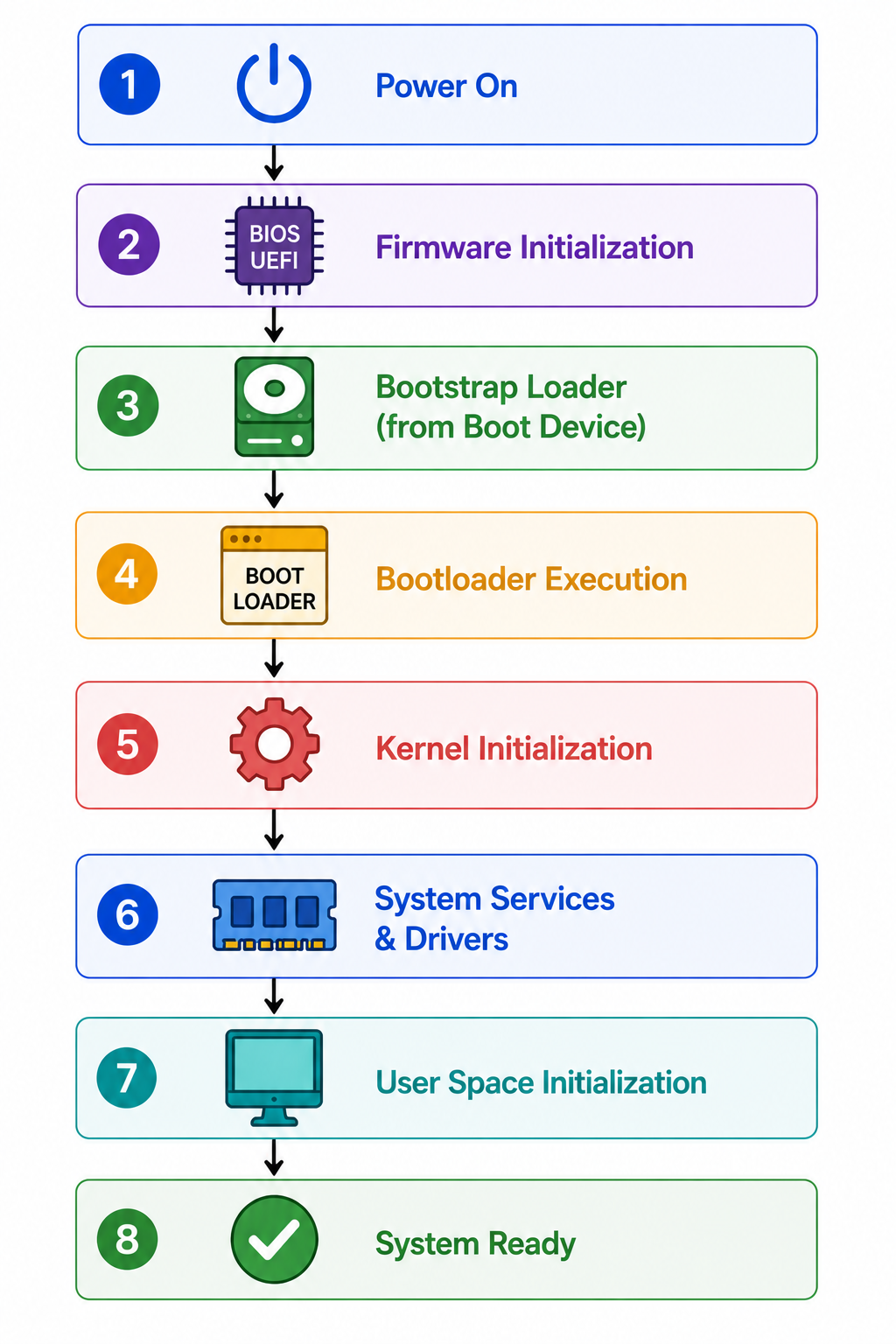
A bootstrap program is the initial program that runs during system startup. It is the first code executed whenever the computer powers on.

Key Functions:

The operating system is loaded through this bootstrapping process, commonly known as booting.
The OS relies on the bootstrap program to function correctly.
It is stored in a fixed disk location called boot blocks (or ROM/BIOS/UEFI in modern systems).

Bootstrap Process:

1. Computer is powered on.

2. CPU executes the bootstrap program from ROM/BIOS/UEFI.

3. Bootstrap performs hardware diagnostics (POST — Power-On Self Test).

4. Bootstrap locates the OS kernel on the storage device.

5. Kernel is loaded into main memory.

6. Kernel begins execution and initializes the system.

Where It Is Stored:

Stored in ROM (Read-Only Memory) or EEPROM — non-volatile memory that persists when power is off.
In modern systems, stored in BIOS or UEFI firmware.

Key Point:

Without the bootstrap program, the OS cannot load and the computer cannot start.
The term "booting" comes from the phrase "pulling oneself up by the bootstraps".
What is a bootstrap program in an operating system? image 1
9

Can you describe the concept of demand paging?

GoogleAmazonMicrosoftTCSCognizant
Solution

Demand paging is a technique where pages are loaded into memory only when they are needed. It is widely used in virtual memory systems.

How Demand Paging Works:

1. A page is referenced during execution.

2. System attempts to access the page.

3. If the page is already in memory → normal processing continues.

4. If the page is not in memory → a page-fault trap is triggered.

5. System checks if the reference is valid — if invalid, the process terminates.

6. If valid, the required page is brought from secondary storage (disk) into main memory.

7. The interrupted instruction restarts after the page has been loaded.

Key Concept — Lazy Loading:

Pages are loaded on demand rather than all at once at program startup.
Reduces initial load time and memory usage.

Benefits:

Efficient memory use — only needed pages occupy RAM.
Faster startup — programs begin executing before fully loaded.
Supports running programs larger than physical memory.

Page Fault:

Occurs when a referenced page is not in memory.
Triggers the OS to load the page from secondary storage.
Too many page faults cause thrashing — degraded performance.
10

What does RTOS stand for?

MicrosoftQualcommAmazonTCSInfosys
Solution

RTOS stands for Real-Time Operating System.

A Real-Time Operating System is designed for applications requiring data processing within strict time constraints. It excels at executing tasks that must complete within a short, fixed time.

Key Characteristics:

Uses minimal memory and resources.
Handles execution, monitoring, and control effectively.
Guarantees responses within a specified timing constraint (deadline).

Types of RTOS:

Hard Real-Time:

Missing a deadline is considered a complete system failure.
Used in safety-critical systems like aircraft control, pacemakers.

Firm Real-Time:

Missing occasional deadlines is acceptable, but degrades quality.
Example: Multimedia streaming systems.

Soft Real-Time:

Deadlines are desirable but not critical — system continues functioning.
Example: Online transaction processing.

Common Use Cases:

Air traffic control systems
Anti-lock braking systems (ABS)
Heart pacemakers
Industrial robots
Military systems

Examples of RTOS: PSOS, VRTX, VxWorks, FreeRTOS, QNX.

11

What is a process, and what is a process table?

GoogleAmazonMicrosoftTCSInfosys
Solution

Process:

A process is an executing instance of a program such as a web browser or command prompt. It is a program in active execution managed by the operating system.

Key Characteristics:

A process has its own memory space, resources, and execution context.
The OS allocates CPU time and resources like memory and disks to each process.
Processes are independent — they do not share memory by default.

Process Table:

The OS maintains a process table — a data structure listing all active processes alongside their:

Resource usage (memory, files, I/O devices)
Current state (running, waiting, ready, terminated)
Process ID (PID)
Program counter and registers
Priority and scheduling information

Purpose of Process Table:

Keeps track of all processes efficiently.
Enables the OS to switch between processes (context switching).
Allows the OS to manage and allocate resources fairly among processes.

Example:

When you open a browser and a text editor simultaneously, both are separate processes tracked in the process table.
12

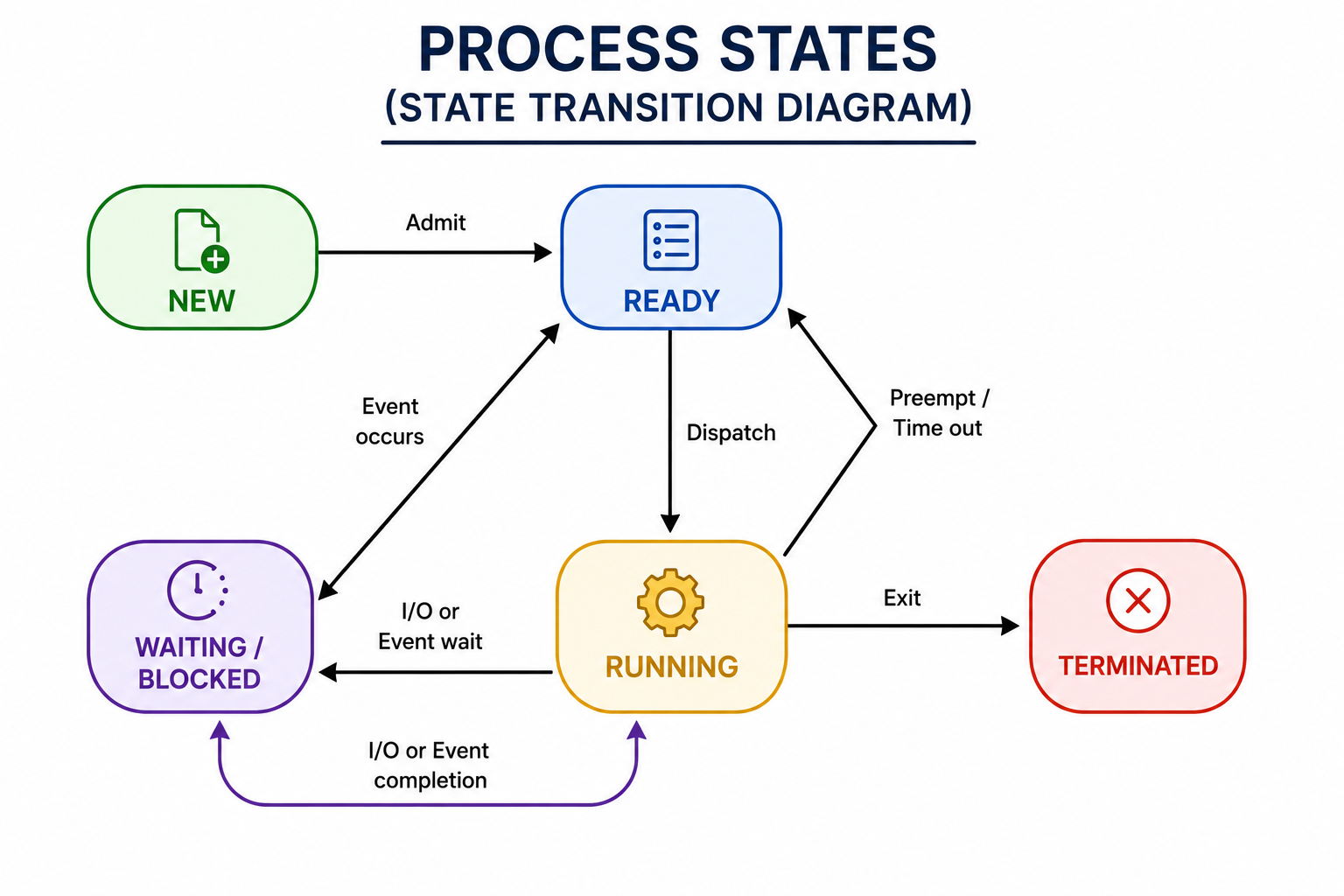
Define a process. What are the various states a process can be in?

AmazonGoogleMicrosoftTCSWipro
Solution

Process Definition:

A process is a program in execution managed by the OS. When loaded into memory, it consists of four sections: stack, heap, text, and data.

Processes are categorized into:

Operating System Processes — system-level processes managing OS functions.
User Processes — applications initiated by the user.

Process States:

New:

The process is being created.
Resources are being allocated.

Running:

The CPU is executing the process instructions.
Only one process runs per CPU core at a time.

Waiting (Blocked):

The process is waiting for an event to occur.
Example: Waiting for I/O completion, user input, or a timer.

Ready:

The process has all resources but is awaiting CPU allocation.
Sits in the ready queue waiting for the scheduler.

Terminate (Exit):

The process has finished execution.
Resources are being released and deallocated.

State Transitions:

New → Ready → Running → Waiting → Ready → Running → Terminate
Define a process. What are the various states a process can be in? image 1
Figure 12: ★ Process States
13

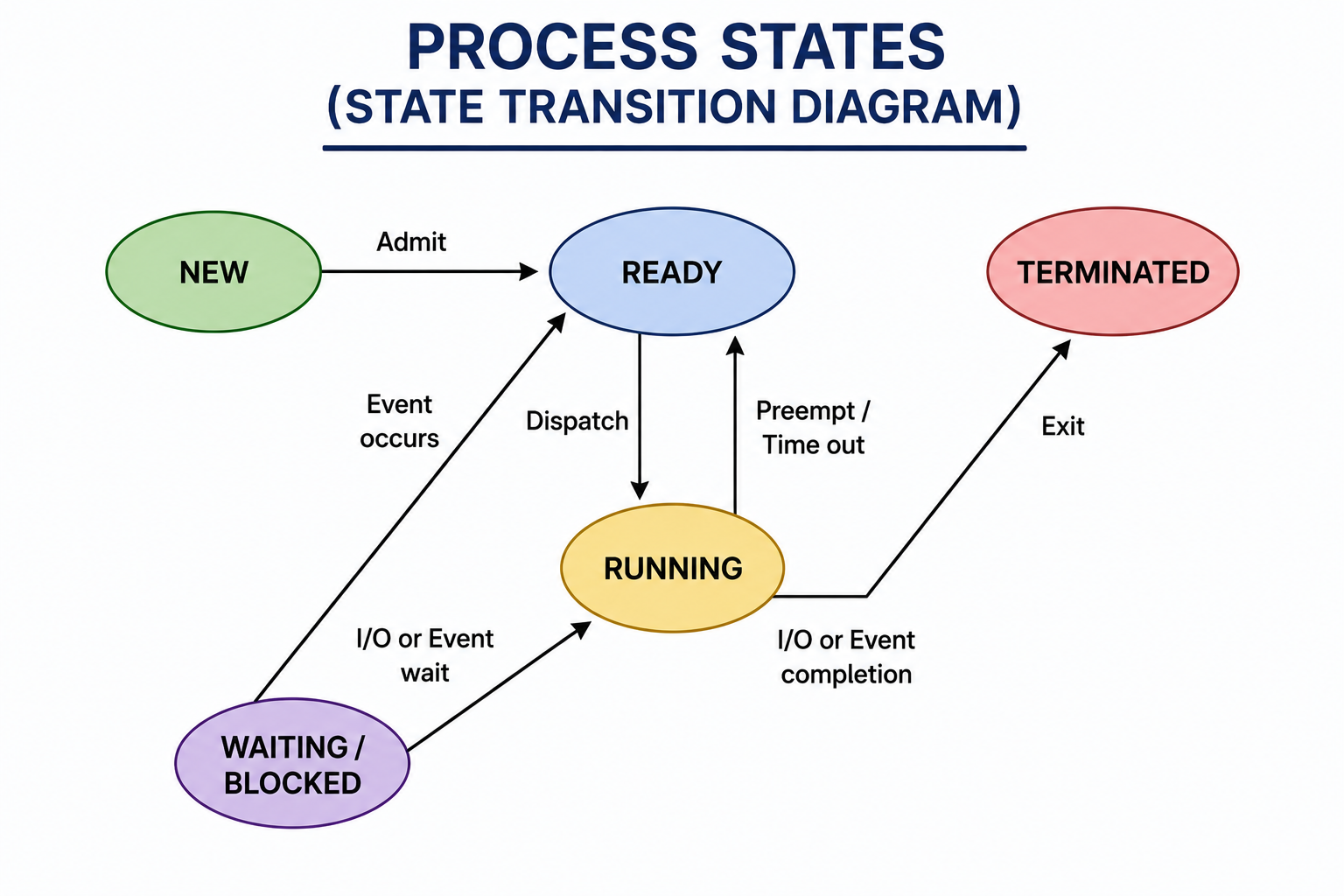
What are the different states of a process?

GoogleAmazonMicrosoftTCSCognizant
Solution

Processes exist in three primary states at any given time, with additional transitional states:

Running:

The process has all required resources and currently has CPU access.
Only one process runs at a time per processor core.
The process is actively executing instructions.

Ready:

The process has all required resources but is waiting for CPU allocation.
Multiple processes can be in the ready state simultaneously.
Managed in a ready queue — scheduler picks from here.

Waiting (Blocked):

The process is waiting for an external event to complete.
Examples: Waiting for user input, disk I/O, network response, or timer.
Cannot use the CPU even if it becomes available.
Managed in a waiting queue.

Additional States:

New:

Process is being created and initialized.

Terminated:

Process has completed execution and is being cleaned up.

Queue Management:

Waiting and ready states are typically managed in separate queues.
The scheduler moves processes between states based on availability of CPU and resources.
What are the different states of a process? image 1
Figure 13: ★ Process States
14

What is a thread?

GoogleAmazonMicrosoftMetaTCS
Solution

A thread is a single sequence of execution within a process. Threads are lightweight processes that enhance parallelism.

Key Characteristics:

A thread is the smallest unit of CPU utilization.
Multiple threads can exist within a single process.
Threads within the same process share resources — memory, files, and code.
Each thread has its own program counter, stack, and registers.

Real-World Examples:

A browser's multiple tabs may run as different threads.
MS Word uses multiple threads simultaneously — one for formatting, another for handling keyboard input, another for auto-saving.
A web server uses multiple threads to handle multiple client requests concurrently.

Benefits of Threads:

Parallelism — multiple tasks execute simultaneously.
Faster context switching — lighter than process switching.
Resource sharing — threads share process memory efficiently.
Better CPU utilization — while one thread waits for I/O, others continue.

Types of Threads:

User-Level Threads — managed by user-space libraries.
Kernel-Level Threads — managed directly by the OS kernel.
15

How is a thread defined in an operating system?

AmazonGoogleMicrosoftTCSInfosys
Solution

A thread is an execution path comprising a program counter, thread ID, stack, and registers inside a process.

Formal Definition:

The smallest CPU utilization unit, enabling efficient communication and improved use of multiprocessor architectures.
Reduces context switching time and improves application performance through parallelism.

What Threads Share (within the same process):

Address space
Heap memory
Static data
Code segment
File descriptors
Global variables
Child processes
Signals

What Threads Have Individually:

Program counter — tracks current instruction.
Registers — current working variables.
Stack — local variables and function call history.
Thread state — running, ready, waiting.

Advantages of Threads:

Responsiveness — application remains active even if one thread is blocked.
Resource sharing — threads share process memory, reducing overhead.
Economy — cheaper to create and context-switch than processes.
Scalability — can run in parallel on multiprocessor systems.

Thread ID:

Each thread has a unique Thread ID (TID) within its process for identification.
16

What are the different sections within a process?

MicrosoftGoogleAmazonTCSWipro
Solution

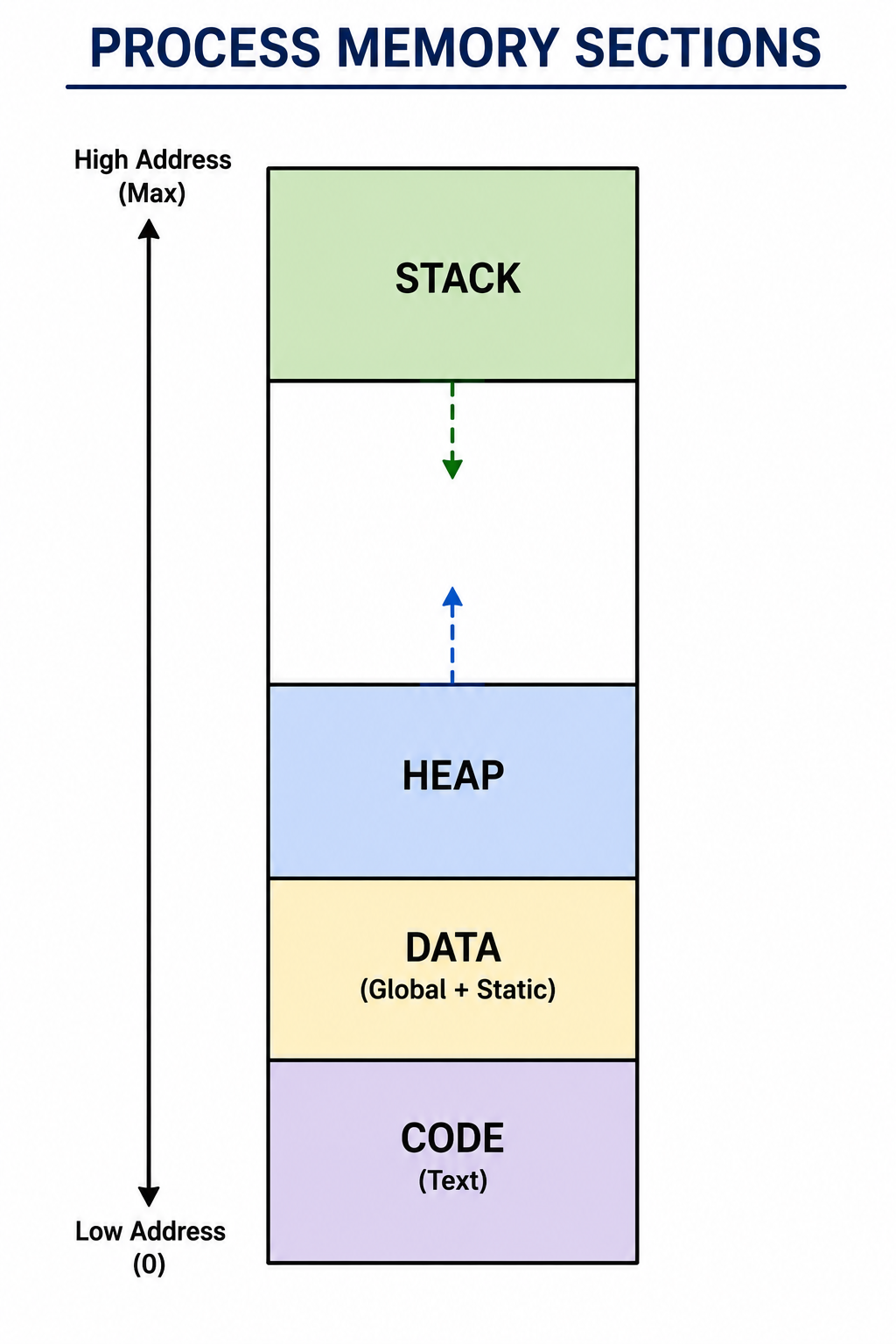
A process is composed of four main sections when loaded into memory:

Stack:

Holds local variables and return addresses for function calls.
Grows and shrinks dynamically as functions are called and return.
Managed using LIFO (Last In First Out) structure.
Each thread within a process has its own stack.

Heap:

Used for dynamic memory allocation at runtime.
Memory allocated using `malloc()`, `new`, etc. is stored here.
Grows upward in memory.
Must be manually managed (freed) in languages like C/C++.
Automatically managed by garbage collectors in Java/Python.

Data Section:

Contains global and static variables.
Divided into:

- Initialized data — variables with initial values.

- Uninitialized data (BSS) — variables without initial values.

Code / Text Section:

Contains the compiled program code (machine instructions).
Usually read-only to prevent accidental modification.
Shared among multiple instances of the same program.

Memory Layout (top to bottom):

Stack → Heap → Data → Code
What are the different sections within a process? image 1
Figure 16: ★ Process Memory Layout
17

How do processes and threads differ?

GoogleAmazonMicrosoftMetaTCS
Solution

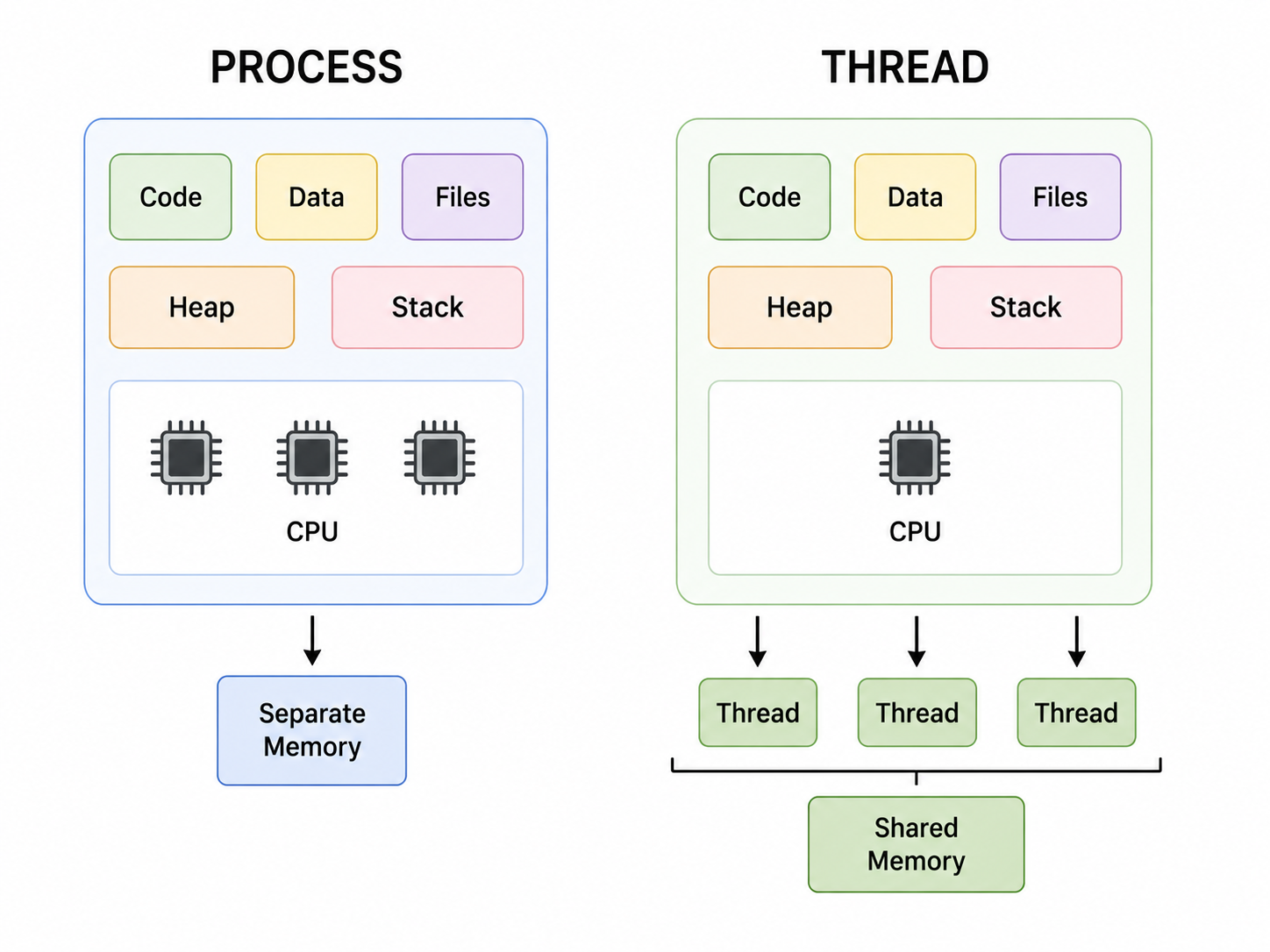
Process vs Thread — Key Differences:

Execution Unit:

Process: Independent program execution managed by OS.
Thread: Smallest CPU scheduling unit within a process.

Memory Usage:

Process: Has its own address space (code, data, stack, heap).
Thread: Shares code, data, heap with other threads; has own stack, registers, and program counter.

Communication:

Process: Uses Inter-Process Communication (IPC) — pipes, sockets, shared memory — which is slower.
Thread: Uses shared memory within the process — faster communication.

Context Switch:

Process: Heavy — saves and restores complete process state including memory maps.
Thread: Lightweight — switches only thread-specific data (stack, registers, PC).

Creation Overhead:

Process: More expensive to create — requires new memory space and resources.
Thread: Cheaper to create — shares existing process resources.

Isolation:

Process: Fully isolated — crash in one process doesn't affect others.
Thread: Not isolated — a crash in one thread can affect the entire process.

Example:

Opening a new browser window = new process.
Opening a new tab in the same browser = new thread.
How do processes and threads differ? image 1
Figure 17: ★ Process vs Thread
18

What advantages does multithreaded programming offer?

GoogleAmazonMicrosoftMetaTCS
Solution

Multithreaded programming offers several significant advantages:

Enhanced Responsiveness:

Applications remain responsive to users even when part of the program is blocked or performing lengthy operations.
Example: A UI thread stays responsive while a background thread loads data.

Resource Sharing:

Threads share memory and resources of the parent process by default.
More efficient than inter-process communication — no need for shared memory setup.

Economy:

Cheaper to create and context-switch threads than processes.
Threads share process resources, reducing memory overhead.
More cost-effective for achieving concurrency.

Multiprocessor Utilization:

Facilitates the use of multiprocessor and multi-core architectures.
Threads can run in true parallel on multiple CPU cores.
Dramatically improves performance for CPU-intensive applications.

Improved Performance:

Tasks can be split into parallel sub-tasks reducing total execution time.
Example: A video encoder uses multiple threads for different frames simultaneously.

Scalability:

Applications can scale across multiple processors without redesign.
Server applications handle multiple client requests concurrently using thread pools.
19

What does FCFS stand for?

AmazonMicrosoftTCSInfosysWipro
Solution

FCFS stands for First Come First Serve.

It is one of the simplest CPU scheduling algorithms that executes processes in the exact order they arrive in the ready queue.

Key Characteristics:

The earliest arriving process runs first.
Non-preemptive — once a process starts, it runs until completion or I/O.
Simple and usually implemented using a FIFO (First In First Out) queue.

How it Works:

1. Processes enter the ready queue in arrival order.

2. The CPU picks the first process in the queue.

3. That process runs to completion.

4. The next process in the queue is then selected.

Advantages:

Simple to implement — just a queue.
Fair in terms of arrival order.
No starvation for processes that arrive early.

Disadvantages:

Can lead to starvation if the first process has a very long burst time.
Convoy Effect — short processes wait behind a long process, reducing CPU efficiency.
Poor average waiting time when process burst times vary significantly.

Example:

If P1 (10ms), P2 (2ms), P3 (3ms) arrive in order, P2 and P3 wait for P1 to finish despite being shorter.
20

What is reentrancy?

GoogleMicrosoftAmazonTCSCognizant
Solution

Reentrancy refers to the property of a function that allows it to be used simultaneously by multiple clients sharing a single program copy.

It relates mainly to OS code and does not directly deal with concurrency or thread safety.

Key Features of a Reentrant Function:

No Self-Modification:

The program code does not modify itself during execution.
The code section remains read-only and unchanged.

Separate Local Data:

Local data for each client process is stored separately.
Each invocation has its own local variables — typically on the stack.
Does not use shared writable global or static variables.

Why Reentrancy Matters:

Critical for operating system code that may be called by multiple processes simultaneously.
Ensures correct behavior when multiple processes invoke the same function.
Particularly important for interrupt handlers and system calls.

Reentrant vs Thread-Safe:

A reentrant function is safe to call from multiple execution contexts.
Thread-safe functions may use locks to protect shared state.
All reentrant functions are thread-safe but not vice versa.

Example:

A `printf()` implementation that uses only local variables and stack is reentrant.
21

What is a scheduling algorithm? Can you name different types?

GoogleAmazonMicrosoftTCSInfosys
Solution

A scheduling algorithm optimizes CPU utilization and minimizes waiting time by deciding which process gets resource allocation and when. It ensures fairness and reduces resource starvation among competing tasks.

Purpose:

Maximize CPU utilization.
Maximize throughput (processes completed per unit time).
Minimize waiting time, turnaround time, and response time.
Ensure fairness among all processes.

Types of Scheduling Algorithms:

First-Come First-Served (FCFS):

Executes processes in arrival order — simple FIFO queue.

Shortest Job First (SJF):

Selects the process with the smallest burst time — minimizes average waiting time.

Priority Scheduling:

CPU allocated to the process with the highest priority.

Shortest Remaining Time (SRT):

Preemptive version of SJF — switches to shorter job if it arrives.

Round Robin (RR):

Each process gets a fixed time quantum in rotation — fair for all.

Multilevel Queue Scheduling:

Multiple queues with different priorities for different process types.

Multilevel Feedback Queue:

Processes can move between queues based on behavior and priority adjustments.
22

What is the Round Robin (RR) scheduling algorithm?

AmazonGoogleMicrosoftTCSWipro
Solution

Round Robin (RR) scheduling assigns each process a fixed time slot called a quantum and cycles through all jobs fairly, giving each an equal share of CPU time.

How it Works:

1. All processes are placed in a circular ready queue.

2. The CPU executes each process for a fixed time quantum (e.g., 10ms).

3. If the process finishes within the quantum → it leaves the queue.

4. If it doesn't finish → it is interrupted and placed at the end of the queue.

5. The next process in the queue gets the CPU.

Key Features:

Cyclic scheduling — prevents starvation as every process gets CPU time.
Variant of FCFS — same arrival-order principle but with time limits.
Also called Time Slicing Scheduling.
No prioritization — all processes are treated equally.

Quantum Size Impact:

Too small quantum → excessive context switching overhead.
Too large quantum → degenerates into FCFS.
Optimal quantum — typically 10-100ms.

Advantages:

Fair — no process waits indefinitely.
Good for time-sharing systems.
Simple to implement.

Disadvantage:

Higher average turnaround time compared to SJF.
23

Briefly explain the First-Come, First-Served (FCFS) scheduling.

AmazonMicrosoftTCSInfosysCognizant
Solution

FCFS (First Come First Served) scheduling allocates CPU to jobs in their arrival order.

Key Characteristics:

Non-preemptive — a process keeps the CPU until it finishes or performs I/O.
Implemented using a simple FIFO queue.
The first process to arrive is the first to be executed.

How It Works:

1. Processes enter the ready queue in order of arrival.

2. CPU picks the first process in the queue.

3. Process runs to completion without interruption.

4. Next process in queue is then selected.

Example:

| Process | Arrival | Burst Time | Wait Time |

|---|---|---|---|

| P1 | 0ms | 10ms | 0ms |

| P2 | 1ms | 2ms | 9ms |

| P3 | 2ms | 3ms | 10ms |

Advantages:

Very simple to implement.
Easy to understand.

Disadvantages:

Convoy Effect — longer processes cause shorter ones to wait.
Poor average waiting time when burst times vary significantly.
Not suitable for interactive or time-sharing systems.
24

What is the main goal of multiprogramming?

GoogleAmazonMicrosoftTCSWipro
Solution

Multiprogramming allows multiple programs to run on a single processor by managing CPU and memory usage efficiently.

Main Goal:

Keep the CPU busy at all times by ensuring some process is always running.
Improve CPU utilization through coordinated execution of multiple jobs.
Maximize system throughput — number of jobs completed per unit time.

How It Works:

Multiple programs are loaded into memory simultaneously.
When one process is waiting for I/O or an event, the CPU switches to another ready process.
The CPU is never idle as long as there is a ready process.

Benefits:

Higher CPU utilization — no idle time waiting for I/O.
Increased throughput — more jobs completed per unit time.
Better resource utilization — memory and CPU used efficiently.
Reduced response time — users get faster results.

Example:

Process A is performing disk I/O (CPU idle for A).
OS switches CPU to Process B while A waits.
When A's I/O completes, it re-enters the ready queue.

Difference from Multitasking:

Multiprogramming focuses on maximizing CPU utilization.
Multitasking focuses on providing fast response to multiple interactive users.
25

What defines a time-sharing system?

MicrosoftGoogleAmazonTCSInfosys
Solution

A time-sharing system enables multiple users to access and share a system's resources simultaneously from different locations.

Key Definition:

The CPU time is divided into slots (time slices) allocated to various processes in rotation.
Allows multitasking and remote user access from multiple terminals.

How It Works:

1. Multiple users connect to the system simultaneously.

2. The OS divides CPU time into small time slots (typically milliseconds).

3. Each user/process gets a time slot in turn.

4. Switching is so fast that each user feels they have dedicated access.

Key Characteristics:

Response time is typically under 1-2 seconds for interactive tasks.
Supports concurrent multi-user access.
Enables remote access from different locations.
Enhances resource sharing across many users.

Benefits:

Cost-effective — many users share one system.
Interactive — users get quick responses.
Efficient — CPU rarely sits idle.

Example:

Multics — one of the first time-sharing OS.
UNIX — classic time-sharing OS.
Modern cloud computing — effectively a large-scale time-sharing system.
26

What is preemptive multitasking?

GoogleAmazonMicrosoftTCSCognizant
Solution

Preemptive multitasking is a scheduling method where the OS can interrupt and pause a currently running process to allocate CPU time to another process.

Key Concept:

The OS forcibly takes control of the CPU from a running process.
The interrupted process is moved back to the ready queue.
A higher-priority or time-expired process gets the CPU.

How It Works:

1. Process A is running on the CPU.

2. A timer interrupt fires (time quantum expires) OR a higher-priority process becomes ready.

3. OS saves the state of Process A (context switch).

4. OS assigns CPU to Process B.

5. Process A resumes later when selected again.

Why It's Used:

Enhances system responsiveness — high-priority tasks get CPU quickly.
Prevents any single process from dominating CPU usage indefinitely.
Ensures fairness among all processes.

Contrast with Cooperative Multitasking:

Preemptive: OS decides when to switch — more reliable.
Cooperative: Processes voluntarily yield CPU — less reliable (a buggy process can freeze the system).

Modern Usage:

Widely implemented in contemporary operating systems like Windows, Linux, macOS.
Essential for real-time and interactive systems.
27

What are the various scheduling algorithms?

GoogleAmazonMicrosoftTCSInfosys
Solution

The main CPU scheduling algorithms used in operating systems are:

First Come First Serve (FCFS):

Executes processes in arrival order.
Non-preemptive, simple FIFO queue.

Shortest Job First (SJF):

Selects the process with the smallest burst time.
Minimizes average waiting time but requires knowing burst time in advance.

Shortest Remaining Time First (SRTF):

Preemptive version of SJF.
If a new process arrives with a shorter remaining time, it preempts the current process.

Priority Scheduling:

CPU allocated to the highest priority process.
Can be preemptive or non-preemptive.
Risk of starvation for low-priority processes — solved by aging.

Round Robin (RR):

Each process gets a fixed time quantum in rotation.
Fair and prevents starvation — good for time-sharing systems.

Multilevel Queue Scheduling:

Multiple separate queues for different process types (system, interactive, batch).
Each queue has its own scheduling algorithm.

Multilevel Feedback Queue Scheduling:

Processes can move between queues based on CPU burst behavior.
Most flexible and complex — used in most modern OS.
28

What is virtual memory?

GoogleAmazonMicrosoftTCSWipro
Solution

Virtual memory is a memory management technique that offers an idealized abstraction of the storage resources available on a machine.

Core Concept:

Creates the illusion of a very large memory for users.
Allows the system to compensate for physical memory shortages by temporarily moving data from RAM to disk storage (swap space).

How It Works:

The OS divides memory into pages (fixed-size blocks).
Not all pages need to be in RAM simultaneously.
Pages not currently needed are stored on disk (swap space).
When needed, they are swapped back into RAM (page fault handling).

Benefits:

Run larger programs than physical RAM allows.
Multiple programs can run simultaneously even with limited RAM.
Programs don't need to know about physical memory locations.
Provides memory isolation between processes for security.

Key Concepts:

Page Table: Maps virtual addresses to physical addresses.
Page Fault: Occurs when a requested page is not in RAM.
Thrashing: Excessive page faulting that degrades performance.

Example:

A computer with 4GB RAM can run a program requiring 8GB using virtual memory, with inactive portions stored on disk.
29

Could you explain virtual memory in detail?

AmazonGoogleMicrosoftTCSInfosys
Solution

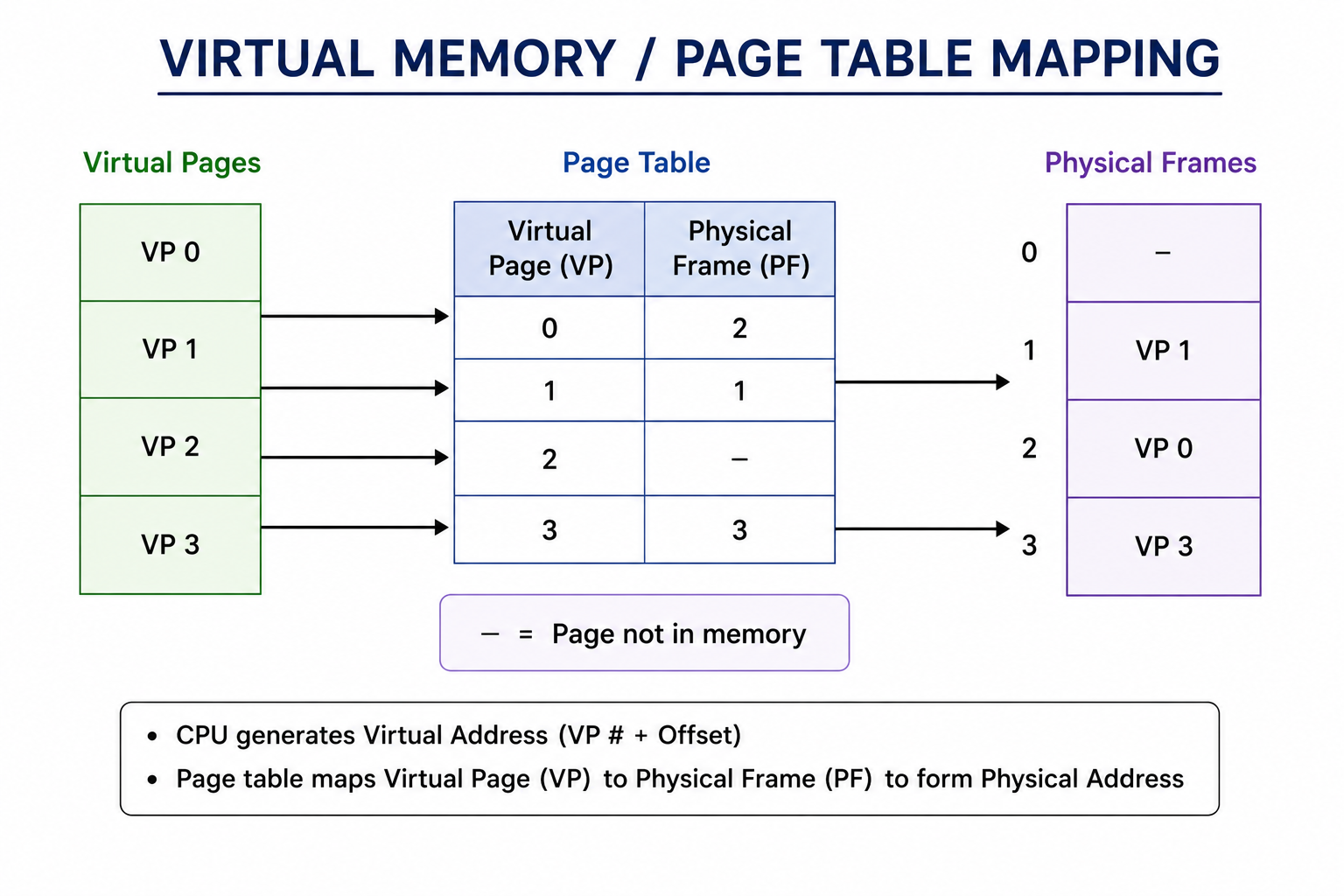
Virtual memory is a memory management approach that provides an "idealized abstraction of the storage resources actually available on a machine", thereby "creating the illusion for users of a very large memory."

Detailed Explanation:

Address Spaces:

Each process gets its own virtual address space — independent of physical memory.
Virtual addresses are mapped to physical addresses by the Memory Management Unit (MMU).

Page Table:

The OS maintains a page table for each process.
Maps virtual page numbers to physical frame numbers.
Includes a valid/invalid bit indicating if the page is in RAM.

Page Fault Handling:

1. Process accesses a virtual address.

2. MMU checks the page table.

3. If page is not in RAMpage fault interrupt.

4. OS finds the page on disk (swap space).

5. OS loads the page into a free frame in RAM.

6. Page table is updated.

7. Instruction restarts.

Demand Paging:

Pages loaded only when needed — lazy loading approach.

Page Replacement Algorithms:

FIFO — replace oldest page.
LRU (Least Recently Used) — replace least recently accessed page.
Optimal — replace page not needed for longest time.

Thrashing:

When the system spends more time swapping than executing — severe performance degradation.
Could you explain virtual memory in detail? image 1
Figure 29: ★ Virtual Memory Management
30

How do paging and segmentation differ?

GoogleAmazonMicrosoftTCSCognizant
Solution

Paging vs Segmentation — Key Differences:

Memory Division:

Paging: Divides memory into fixed-size blocks called pages.
Segmentation: Divides memory into variable-sized segments based on logical program structure.

Programmer Visibility:

Paging: Invisible to the programmer — handled entirely by the OS.
Segmentation: Visible to the programmer — segments correspond to logical program units (code, stack, data).

Fragmentation:

Paging: Eliminates external fragmentation — all frames are the same size.
Segmentation: May suffer from external fragmentation — variable sizes leave gaps.

Primary Purpose:

Paging: Primarily used for memory management — efficient use of physical memory.
Segmentation: Mainly supports logical program structure — code, data, stack as separate segments.

Address Structure:

Paging: Address = page number + offset.
Segmentation: Address = segment number + offset.

Size:

Paging: Fixed page size (typically 4KB).
Segmentation: Variable segment size determined by program logic.

Modern Systems:

Most modern OS use a combination of both — segmented paging.
31

What is the fundamental function of paging?

AmazonGoogleMicrosoftTCSWipro
Solution

The fundamental function of paging is to divide a process into pages and physical memory into frames, then map pages to frames to enable non-contiguous storage of processes in memory.

Core Mechanism:

Pages:

The logical memory of a process is divided into fixed-size blocks called pages.
Typical page size: 4KB (can vary).

Frames:

Physical memory (RAM) is divided into fixed-size blocks called frames.
Frame size equals page size.

Page Table:

The OS maintains a page table mapping each page to its corresponding frame.
Enables the CPU to translate logical addresses to physical addresses.

Key Benefits:

Eliminates External Fragmentation:

Since all frames are the same size, any free frame can be used for any page.
No gaps between allocated memory blocks.

Non-Contiguous Storage:

A process doesn't need contiguous physical memory.
Pages can be spread across different frames anywhere in RAM.

Simplifies Memory Allocation:

OS just needs to find any free frame — no need for contiguous blocks.

Enables Virtual Memory:

Pages not needed can be swapped to disk and brought back as needed.

Internal Fragmentation:

The last page may not be fully used — causing internal fragmentation (wasted space within a page).
32

What does fragmentation mean?

GoogleAmazonMicrosoftTCSInfosys
Solution

Fragmentation describes the inefficient use of storage space, which decreases capacity or system performance. It happens when memory is broken into scattered, unusable pieces.

Types of Fragmentation:

Internal Fragmentation:

Occurs when allocated memory is larger than requested.
The extra space within the allocated block is wasted.
Common in paging — the last page may not be fully used.
Example: A process needs 18KB but is allocated 20KB (one 4KB page) — 2KB wasted internally.

External Fragmentation:

Occurs when there is enough total free memory but it is not contiguous.
Free memory is scattered in small blocks that cannot satisfy a large request.
Common in segmentation and dynamic memory allocation.
Example: 10KB free but split as 2KB + 3KB + 5KB — cannot allocate a single 8KB block.

Solutions:

For Internal Fragmentation:

Use smaller page/block sizes.
Use best-fit allocation strategies.

For External Fragmentation:

Compaction — move processes to consolidate free space.
Paging — eliminates external fragmentation entirely.
Garbage collection — in managed languages.
33

What are overlays?

MicrosoftGoogleAmazonTCSWipro
Solution

Overlays are a programming method that allows a process to be larger than its allocated memory.

Core Concept:

The program is split into segments (overlays).
Only the necessary segments are loaded into memory as needed.
When a new segment is needed, it replaces a segment no longer required.
Optimizes memory usage for large programs on limited memory systems.

How Overlays Work:

1. Program is divided into logical sections that don't need to be in memory simultaneously.

2. A root segment (always in memory) manages which overlays to load.

3. When a function in an unloaded overlay is called, the overlay is loaded from disk.

4. It overwrites a previously loaded overlay that is no longer needed.

Historical Context:

Used extensively when physical memory was very limited (early computing era).
Programmers manually divided programs into overlays.
Now largely replaced by virtual memory which handles this automatically.

Difference from Virtual Memory:

Overlays: Programmer manually manages which segments load when.
Virtual Memory: OS automatically manages memory — transparent to programmer.

Example:

A large game might have separate overlays for different levels — only the current level's code is loaded into memory.
34

How does swapping improve memory management?

GoogleAmazonMicrosoftTCSInfosys
Solution

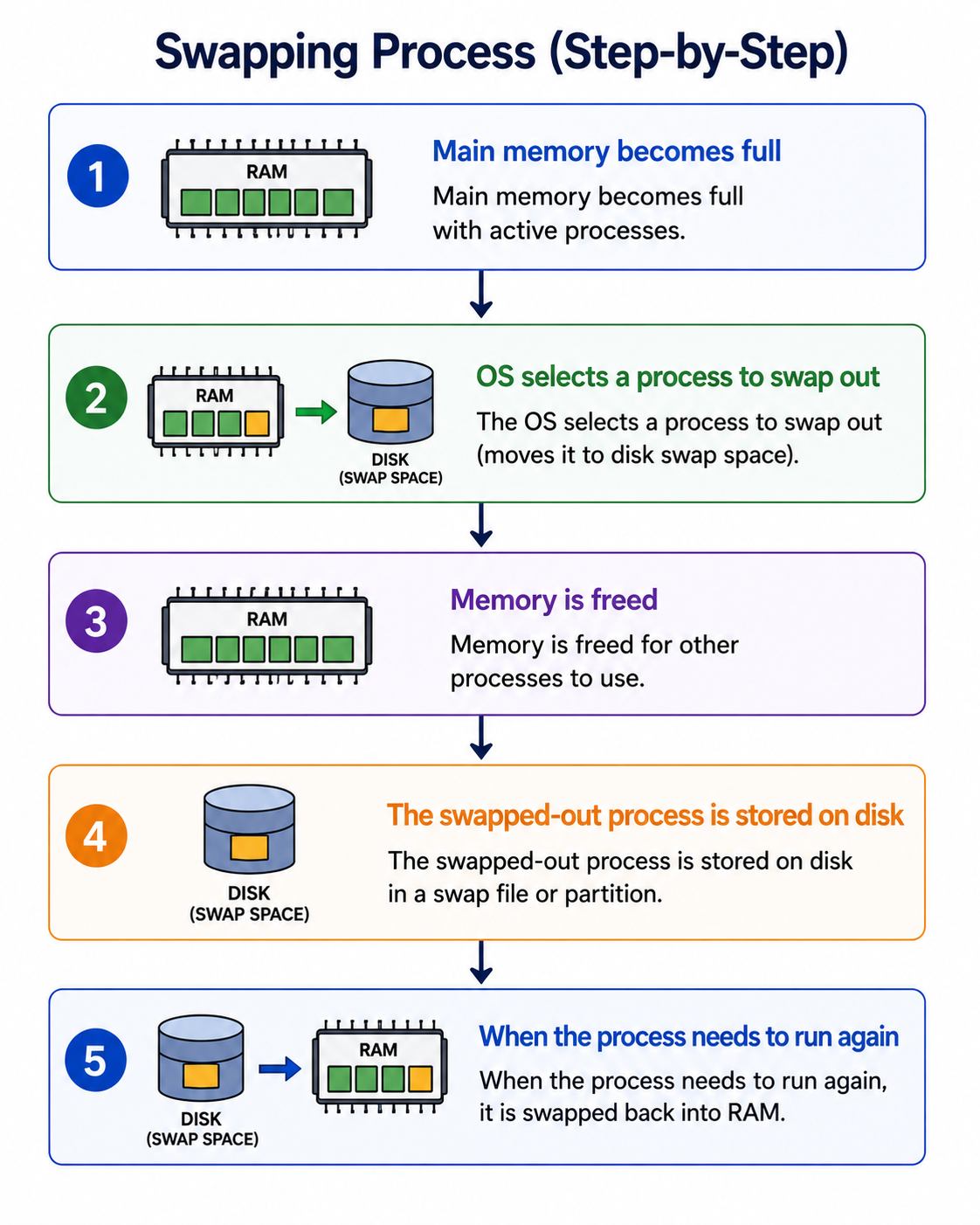
Swapping is a memory management technique where a process is temporarily moved from main memory (RAM) to secondary storage (disk) and later brought back for execution.

How Swapping Works:

1. Main memory becomes full with active processes.

2. OS selects a process to swap out (moves it to disk swap space).

3. Memory is freed for other processes to use.

4. The swapped-out process is stored on disk in a swap file or partition.

5. When the process needs to run again, it is swapped back into RAM.

How It Improves Memory Management:

Increases Multiprogramming Level:

More processes can be active simultaneously even with limited RAM.
Enables running more programs than physical memory can hold.

Better Memory Utilization:

Inactive or blocked processes are moved to disk, freeing RAM for active ones.
CPU is kept busy with ready processes.

Supports Virtual Memory:

Swapping is a key component of virtual memory systems.
Enables the illusion of larger memory than physically available.

Limitations:

Slow — disk I/O is much slower than RAM access.
Swap thrashing — excessive swapping degrades performance severely.
Modern systems use demand paging (page-level swapping) instead of whole-process swapping.
How does swapping improve memory management? image 1
Figure 34: ★ Swapping in Memory Management
35

What is the primary difference between logical and physical address space?

GoogleAmazonMicrosoftTCSCognizant
Solution

Logical vs Physical Address Space — Key Differences:

Logical Address (Virtual Address):

Generated by the CPU during program execution.
Also called a virtual address.
Visible to the user/program — programs use logical addresses.
May differ from the physical address — it's an abstraction.
The set of all logical addresses is the logical address space.

Physical Address:

The actual memory address in RAM hardware.
Also called the real address.
Not visible to the user — managed by the OS and MMU.
Represents the actual location in RAM.
The set of all physical addresses is the physical address space.

How They Relate:

The Memory Management Unit (MMU) translates logical addresses to physical addresses at runtime.
This translation is done using the page table.

Why the Distinction Matters:

Allows process isolation — each process has its own logical address space.
Enables virtual memory — logical addresses can exceed physical memory.
Provides security — processes cannot directly access each other's physical memory.

Example:

A program using address `0x1000` (logical) might actually be stored at `0x5000` (physical) in RAM — the MMU handles the translation transparently.
36

What is demand paging, and how does it operate?

GoogleAmazonMicrosoftTCSInfosys
Solution

Demand paging is a virtual memory technique where pages are loaded into memory only when required during execution — not all at once when the program starts.

How Demand Paging Operates:

1. Page is referenced during program execution.

2. System checks if the page is in memory:

- Yes (Page Hit) → execution continues normally.

- No (Page Miss) → a page fault occurs.

3. OS verifies if the reference is valid:

- Invalid → process is terminated (segmentation fault).

- Valid → page needs to be loaded.

4. OS finds the page on secondary storage (disk).

5. OS loads the page into a free frame in RAM.

6. Page table is updated to reflect new location.

7. Instruction that caused the fault restarts.

Key Concept — Lazy Loading:

Pages are loaded on demand — not pre-loaded.
Reduces initial load time significantly.

Benefits:

Efficient memory use — only needed pages are in RAM.
Faster program startup — no need to load everything first.
Enables running programs larger than physical memory.

Page Fault Rate:

Low page fault rate = good performance.
High page fault rate = thrashing — system spends more time paging than executing.
37

What is a semaphore in an operating system, and why is it used?

GoogleAmazonMicrosoftTCSWipro
Solution

A semaphore is a synchronization mechanism used to control access to shared resources by multiple processes concurrently.

Definition:

An integer variable accessed through two atomic operations: Wait() and Signal().
Used to address critical section problems and prevent race conditions.

Types of Semaphores:

Binary Semaphore (Mutex):

Value is either 0 or 1.
Works like a lock — 0 means locked, 1 means unlocked.
Used for mutual exclusion — only one process in critical section at a time.

Counting Semaphore:

Value ranges over an unrestricted domain.
Used to control access to a resource with multiple instances.
Example: Managing a pool of 5 database connections.

Why Semaphores Are Used:

Mutual Exclusion:

Ensures only one process accesses a critical section at a time.

Process Synchronization:

Coordinates execution order between cooperating processes.

Prevents Race Conditions:

Stops multiple processes from simultaneously modifying shared data.

Resource Management:

Controls access to limited resources like printers, buffers, or connections.

Example:

A semaphore with value 3 allows up to 3 processes to access a shared resource concurrently.
38

What benefits do semaphores provide?

AmazonGoogleMicrosoftTCSInfosys
Solution

Semaphores provide several significant advantages in operating systems:

Platform Independence:

Semaphores are platform-independent — they work across different operating systems and architectures.
Code using semaphores is more portable.

Simple Implementation:

Simple to implement using just two atomic operations (Wait and Signal).
No complex hardware support required beyond atomic operations.

Easier Correctness Verification:

Easier to verify correctness compared to other synchronization mechanisms.
Well-defined semantics make formal verification possible.

Multiple Critical Section Management:

Multiple critical sections can be managed using different semaphores.
Each resource can have its own semaphore for fine-grained control.

Simultaneous Resource Acquisition:

Semaphores can acquire multiple resources simultaneously using counting semaphores.
Useful for managing resource pools like database connection pools.

No Busy Waiting (Blocking Semaphores):

No CPU cycles wasted on busy waiting.
Blocked processes are placed in a waiting queue instead of spinning.
CPU is free to execute other processes while a process waits.

Flexibility:

Can be used for both mutual exclusion (binary) and resource counting (counting).
Supports producer-consumer, reader-writer, and dining philosophers problems.
39

What conditions must be met for a deadlock to occur in a system?

GoogleAmazonMicrosoftTCSWipro
Solution

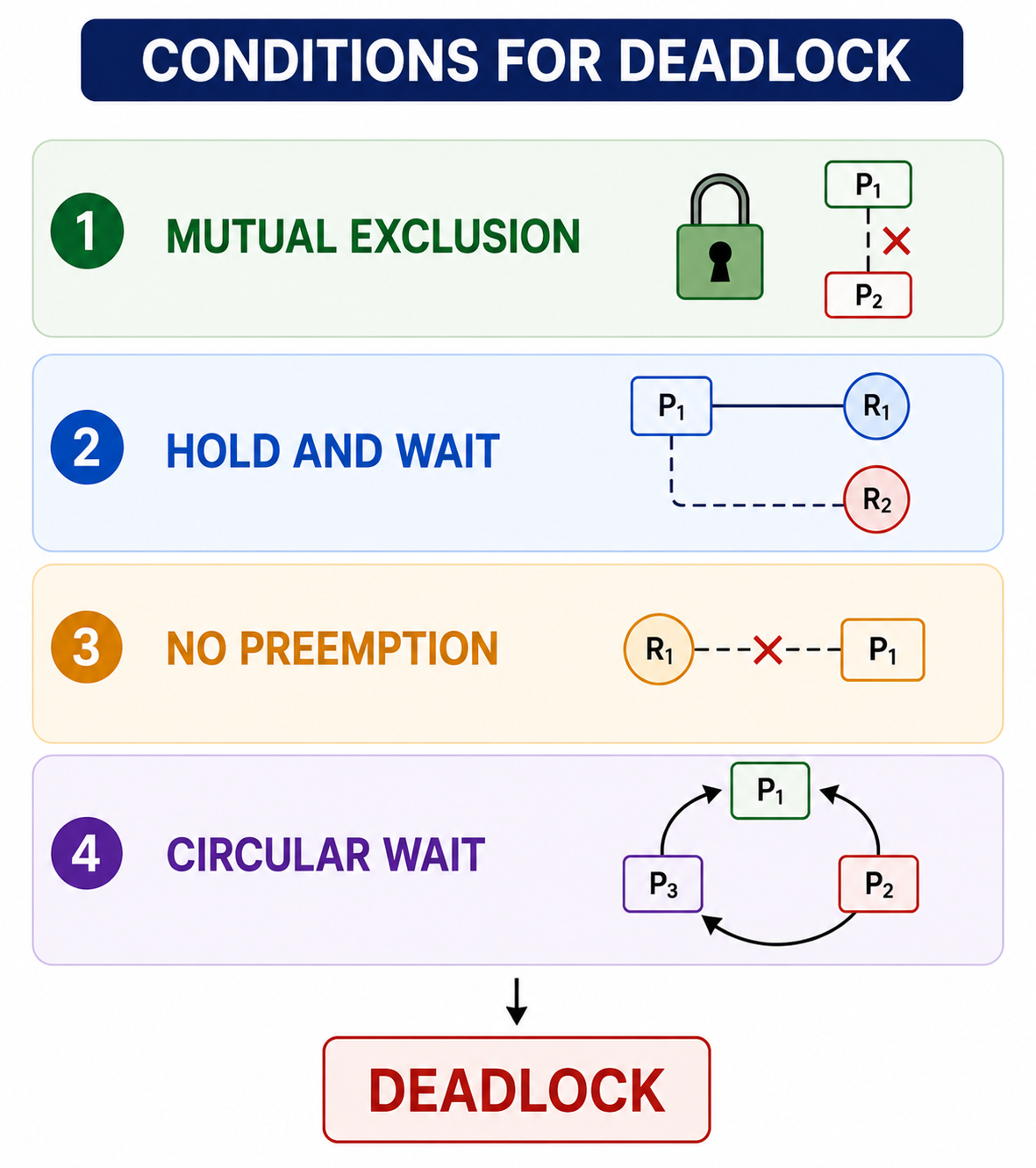
For a deadlock to occur, all four of the following conditions must hold simultaneously (Coffman's conditions):

1. Mutual Exclusion:

A resource cannot be shared — only one process can use it at a time.
If another process requests the resource, it must wait until it is released.
Example: A printer can only print one job at a time.

2. Hold and Wait:

A process is holding at least one resource and is waiting to acquire additional resources currently held by other processes.
The process does not release its held resources while waiting.

3. No Preemption:

Resources cannot be forcibly taken from a process holding them.
Resources can only be voluntarily released by the holding process after it completes its task.

4. Circular Wait:

A set of processes forms a cycle where each process is waiting for a resource held by the next process in the cycle.
Example: P1 waits for resource held by P2, P2 waits for resource held by P3, P3 waits for resource held by P1.

Prevention:

Eliminating any one of these four conditions prevents deadlock.
The Banker's Algorithm is used for deadlock avoidance.
Resource Allocation Graphs help detect deadlocks.
What conditions must be met for a deadlock to occur in a system? image 1
Figure 39: ★ Deadlock Conditions
40

What is a deadlock in operating systems, and what are its necessary conditions?

GoogleAmazonMicrosoftTCSInfosys
Solution

Deadlock is a scenario where a set of processes are blocked as each holds resources and waits for resources held by others. Multiple processes try to execute simultaneously but end up waiting for each other indefinitely due to dependencies.

Analogy:

Similar to a "handshake problem" — two people each waiting for the other to extend their hand first.
Like two trains on a single track heading toward each other — neither can proceed.

Common in multiprocessing systems where multiple processes compete for shared resources.

Necessary Deadlock Conditions (all four must hold):

Mutual Exclusion:

At least one resource is held in non-sharable mode.
Only one process can use the resource at a time.

Hold and Wait:

A process holds one resource and waits for another held by another process.

No Preemption:

Resources cannot be forcibly taken from processes.
Must be voluntarily released.

Circular Wait (Resource Wait):

A circular chain of processes exists, each waiting for a resource held by the next.

Deadlock Handling Strategies:

Prevention — eliminate one of the four conditions.
Avoidance — use Banker's Algorithm to stay in safe state.
Detection — detect and recover from deadlocks.
Ignorance — some OS simply ignore deadlocks (Ostrich Algorithm).
41

Can you define deadlock?

AmazonGoogleMicrosoftTCSCognizant
Solution

Deadlock occurs when two or more processes are waiting indefinitely for each other to finish, and none of them ever does.

Simple Definition:

A situation where processes are stuck forever — each waiting for a resource that another process holds.

Classic Analogy:

Like two trains heading toward each other on a single track — once they meet, neither can proceed.
Or two people in a narrow hallway, each waiting for the other to move aside.

In Operating Systems:

Process A holds Resource 1 and needs Resource 2.
Process B holds Resource 2 and needs Resource 1.
Neither can proceed — both are blocked forever.

Key Characteristics:

No process makes progress.
System appears to hang or freeze.
Cannot be resolved without external intervention (killing a process or releasing a resource).

Example:

```

Process A: lock(R1) → wait for R2

Process B: lock(R2) → wait for R1

→ DEADLOCK: Both waiting forever

```

Resolution Methods:

Kill one process to break the cycle.
Preempt a resource from one process.
Rollback a process to a previous safe state.
Restart the system (last resort).
42

What is Peterson's solution or approach?

GoogleAmazonMicrosoftTCSWipro
Solution

Peterson's solution is a concurrency algorithm used to synchronize two processes, ensuring mutual exclusion for a shared resource or critical section.

How It Works:

Uses two variables to manage access:

Boolean flag array (size 2):

`flag[0]` and `flag[1]` — indicates if each process wants to enter the critical section.
`flag[i] = true` means process i wants to enter.

Integer variable "turn":

Indicates whose turn it is to enter the critical section.
If `turn = i`, process i can enter if it wants to.

Algorithm for Process i:

```

flag[i] = true; // I want to enter

turn = j; // Give turn to other process

while (flag[j] && turn == j); // Wait if other wants and it's their turn

// CRITICAL SECTION

flag[i] = false; // I'm done

```

Properties Satisfied:

Mutual Exclusion — only one process in critical section at a time.
Progress — if no process is in critical section, one will eventually enter.
Bounded Waiting — a process won't wait forever.

Limitations:

Works only for two processes.
May not work correctly on modern hardware with instruction reordering.
Memory barriers/fences needed on modern architectures.
43

What are the disadvantages of using semaphores?

AmazonGoogleMicrosoftTCSInfosys
Solution

While semaphores are useful synchronization tools, they have several notable drawbacks:

Priority Inversion:

Priority inversion is a significant limitation.
A high-priority process may be blocked waiting for a semaphore held by a low-priority process.
The low-priority process may itself be preempted by medium-priority processes, indefinitely delaying the high-priority one.

Usage by Convention Only:

Semaphore usage is by convention, not enforced by the compiler or OS.
Programmers must manually call Wait() before entering and Signal() after exiting critical sections.
Easy to make mistakes if conventions are not followed.

Tracking Overhead:

Programmers must carefully track all Wait() and Signal() calls.
In complex programs with many semaphores, this becomes difficult to manage.
Missing a Signal() call causes permanent blocking.

Deadlock Risk:

Improper use may cause indefinite blocking (deadlock).
If a process forgets to call Signal() or calls Wait() twice without a corresponding Signal(), deadlock occurs.

Difficult to Debug:

Semaphore-related bugs like deadlocks and race conditions are notoriously hard to reproduce and debug.

No Built-in Ownership:

Unlike mutexes, semaphores have no concept of ownership — any process can call Signal() regardless of who called Wait().
44

What is the kernel, and what are its main functions?

GoogleAmazonMicrosoftTCSWipro
Solution

The kernel is the core component of an operating system responsible for managing and controlling all system and hardware operations.

Key Characteristics:

Loads first during system startup and remains in main memory throughout operation.
Acts as a bridge between user applications and hardware.
Operates in kernel mode — has full access to all hardware resources.

Main Functions:

Resource Management:

Manages CPU, memory, files, processes, and other system resources.
Allocates and deallocates resources among competing processes.

Hardware-Software Interaction:

Facilitates interaction between hardware components and software applications.
Provides system calls as the interface for applications to request hardware services.

Memory Management:

Manages RAM to ensure all running processes can work effectively.
Handles virtual memory, paging, and memory protection.

Process Management:

Controls primary OS tasks — process creation, scheduling, termination.
Manages context switching between processes.

Device Management:

Manages peripheral devices through device drivers.
Handles I/O operations and interrupt processing.

CPU Scheduling:

Schedules CPU work to optimize user task execution.
Decides which process runs next based on scheduling algorithms.
45

What different types of kernels exist?

GoogleMicrosoftAmazonTCSInfosys
Solution

The main types of kernels used in operating systems are:

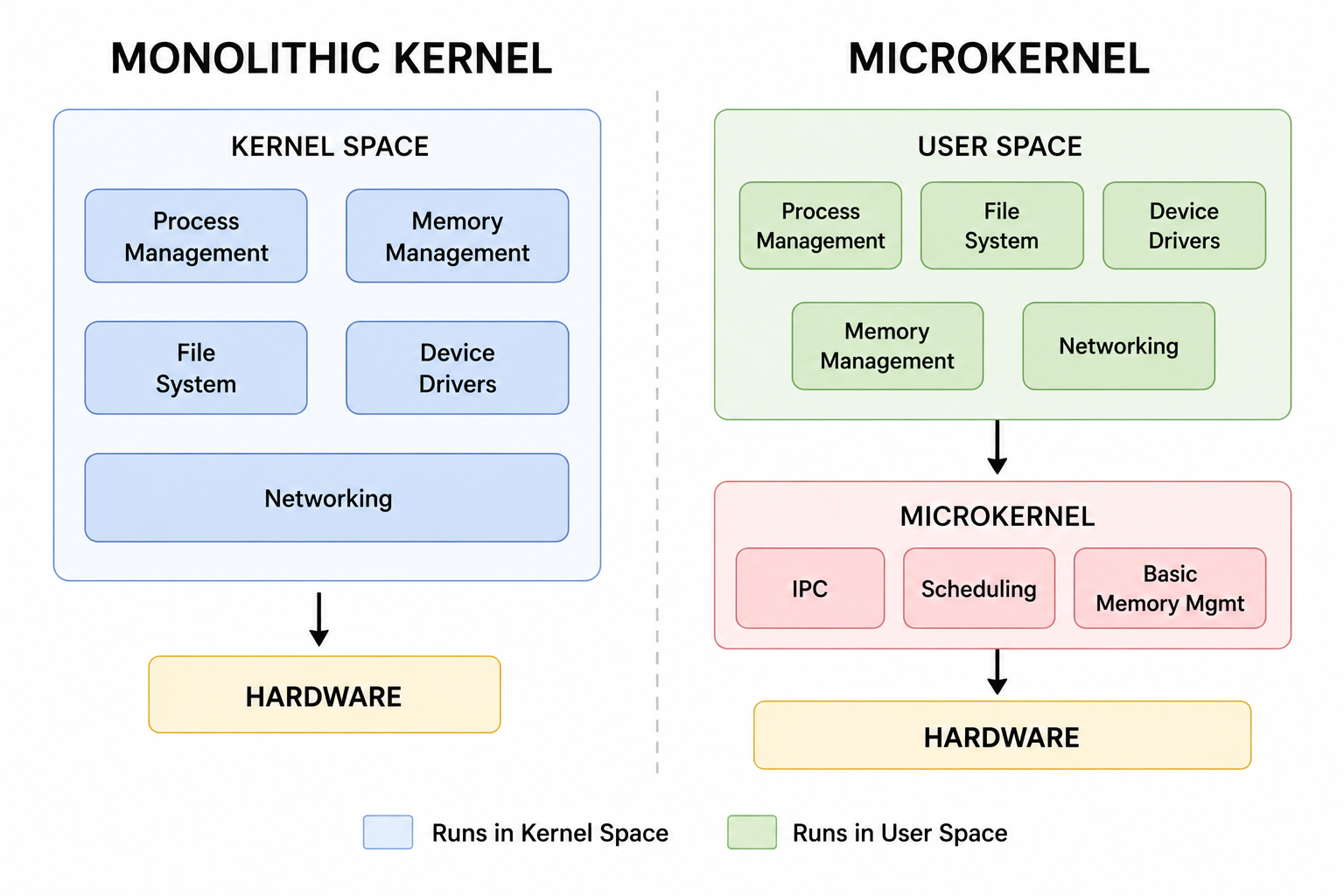
Monolithic Kernel:

All OS services run in kernel space as a single large program.
High performance due to direct communication between services.
Examples: Linux, UNIX, MS-DOS.

Microkernel:

Only essential services (IPC, basic memory management, scheduling) run in kernel space.
Other services (file systems, device drivers) run in user space.
More modular, secure, and maintainable.
Examples: MINIX, QNX, L4.

Hybrid Kernel:

Combines aspects of monolithic and microkernel designs.
Core services in kernel space, others optionally in user space.
Balances performance and modularity.
Examples: Windows NT, macOS (XNU kernel).

Exokernel:

Extremely minimal — provides only hardware resource protection.
Gives applications direct access to hardware resources.
Maximum performance but complex application development.
Mostly used in research systems.

Nano Kernel:

Even smaller than a microkernel.
Provides only the most basic hardware abstraction.
Used in highly specialized embedded systems.

Modern Trend:

Most commercial OS use hybrid kernels balancing performance and security.
46

How do microkernels differ from monolithic kernels?

GoogleMicrosoftAmazonTCSCognizant
Solution

Monolithic Kernel vs Microkernel — Key Differences:

Size:

Monolithic Kernel: Large kernel size — all OS services in kernel space.
Microkernel: Small kernel size — only essential services in kernel space.

Service Location:

Monolithic: All services (file system, device drivers, networking) run in kernel space.
Microkernel: Only IPC, basic scheduling, and memory management in kernel space; rest in user space.

Performance:

Monolithic: Higher performance — services communicate directly without IPC overhead.
Microkernel: Slightly slower — services communicate via message passing (IPC overhead).

Security:

Monolithic: Less secure — a bug in any service can crash the entire kernel.
Microkernel: More secure — services are isolated; a crash in one doesn't affect others.

Maintainability:

Monolithic: Difficult to maintain — tightly coupled code.
Microkernel: Easier to maintain — modular design with clear interfaces.

Examples:

Monolithic: Linux, UNIX.
Microkernel: MINIX, QNX.

Modern Note:

Linux (monolithic) is more widely used due to performance.
QNX (microkernel) is used in safety-critical systems (cars, medical devices).
How do microkernels differ from monolithic kernels? image 1
Figure 46: ★ Monolithic vs Microkernel
47

What is context switching?

GoogleAmazonMicrosoftTCSWipro
Solution

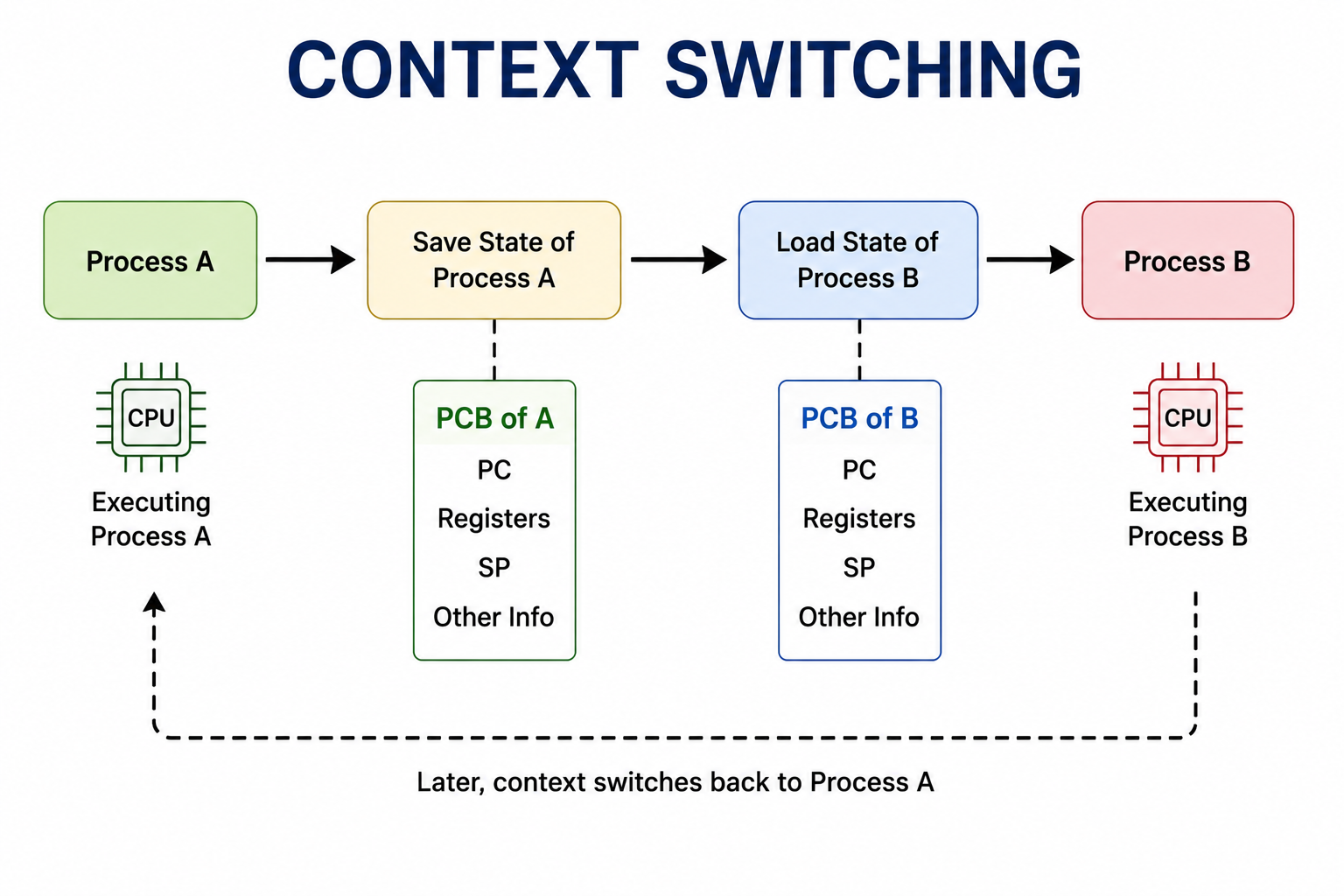
Context switching is the procedure of saving the state of one process and loading the state of another, allowing the CPU to switch between processes.

What Gets Saved/Restored (Process Context):

Program Counter (PC) — next instruction to execute.
CPU Registers — current working values.
Process State — running, ready, waiting.
Memory management information — page tables.
I/O status — open files and I/O requests.

How Context Switching Works:

1. Interrupt or system call triggers a context switch.

2. OS saves the current process's context into its PCB (Process Control Block).

3. OS selects the next process to run (via scheduling algorithm).

4. OS loads the saved context of the selected process from its PCB.

5. CPU resumes execution of the new process.

Key Characteristics:

Cost-effective and time-efficient mechanism for sharing a single processor.
Enables OS to switch processes between running and ready states.
Allows managing several processes without extra resources.

Overhead:

Context switching itself takes time — no useful work is done during the switch.
Frequent context switches can reduce overall system performance.
Modern CPUs have hardware support to speed up context switching.
What is context switching? image 1
Figure 47: ★ Context Switching
48

What is Belady's Anomaly?

GoogleAmazonMicrosoftTCSInfosys
Solution

Belady's Anomaly is an occurrence where increasing the number of frames (page slots) in memory causes an increase in page faults instead of the expected decrease.

Background:

In operating systems, processes are divided into fixed-sized pages loaded into memory frames.
Normally, more frames = more pages in memory = fewer page faults.
Belady's Anomaly is the counterintuitive exception to this rule.

When It Occurs:

Specifically happens with the FIFO (First In First Out) page replacement algorithm.
Also called FIFO Anomaly.

Example:

With 3 frames and reference string `1,2,3,4,1,2,5,1,2,3,4,5`: 9 page faults.
With 4 frames and same reference string: 10 page faults — MORE page faults with more memory!

Why It Happens:

FIFO replaces the oldest page, which may still be frequently needed.
Adding more frames changes the replacement pattern in a way that causes more misses.

Algorithms That Don't Suffer from Belady's Anomaly:

LRU (Least Recently Used) — does not exhibit Belady's Anomaly.
Optimal Algorithm — does not exhibit Belady's Anomaly.
These are called stack algorithms — guaranteed no anomaly with more frames.
49

What is spooling in operating systems?

MicrosoftAmazonGoogleTCSWipro
Solution

Spooling (Simultaneous Peripheral Operations OnLine) is the process of placing data from various I/O jobs into a buffer — a special area in memory or disk accessible to I/O devices.

Core Concept:

Mediates between fast computer applications and slower peripheral devices.
Allows overlap of I/O and CPU operations for efficiency.
The CPU writes data to the spool (buffer) and continues working while the peripheral device processes data at its own speed.

How Spooling Works:

1. Application generates output (e.g., print job).

2. Output is written to the spool buffer on disk — not directly to printer.

3. CPU is immediately free to continue other tasks.

4. Spooler daemon manages sending data from buffer to the slow device.

5. Printer processes data at its own pace from the spool.

Common Examples:

Print Spooling:

Multiple print jobs are queued in a spool.
Printer processes them one by one.
Users don't wait for the printer — they submit and continue working.

Email Spooling:

Outgoing emails are spooled and sent when the mail server is available.

Benefits:

CPU efficiency — not blocked waiting for slow devices.
Multi-user support — multiple users can submit jobs simultaneously.
Job management — jobs can be prioritized or cancelled in the queue.
50

What do starvation and aging mean in the context of operating systems?

GoogleAmazonMicrosoftTCSInfosys
Solution

Starvation and Aging are related concepts in CPU scheduling dealing with process fairness.

Starvation:

Occurs when a process waits indefinitely for resources because they are continuously allocated to other processes.
The starving process never gets CPU time despite being ready.

When Starvation Occurs:

In priority scheduling — low-priority processes may never execute if high-priority processes keep arriving.
In SJF scheduling — long processes may never run if short processes keep arriving.

Example:

A low-priority background process waits for CPU while high-priority interactive processes continuously preempt it.
Result: The background process makes no progress and eventually may be terminated by the OS.

Aging:

A technique used to prevent starvation by gradually increasing the priority of waiting requests over time.
Ensures that each request eventually attains the highest priority and gets executed.

How Aging Works:

Every time unit a process waits, its priority is incremented.
Eventually the process's priority becomes high enough to get CPU time.
Guarantees every process eventually executes — no indefinite waiting.

Example:

A process starts with priority 5 (low).
After waiting 10 time units, priority becomes 6.
After waiting 20 time units, priority becomes 7.
Eventually reaches highest priority and gets scheduled.